web
You’re offline. This is a read only version of the page.
close
Skip to main content

Notifications

Announcements

No record found.

Community site session details

Community site session details

Session Id :
Customer experience | Sales, Customer Insights,...
Suggested Answer

JS OnChange Web Resource doesn't run unless saved

(0) ShareShare
ReportReport
Posted on by 20

Hello!

On the Quotes form, whenever I change the address (bill to or ship to) using the Look Up Address button, I want to pull a custom field from the address table ( email ) and populate it on the Quotes form. It is an OnChange event, however it only runs after changing and saving the address. Why does this happen and what are some possible fixes?
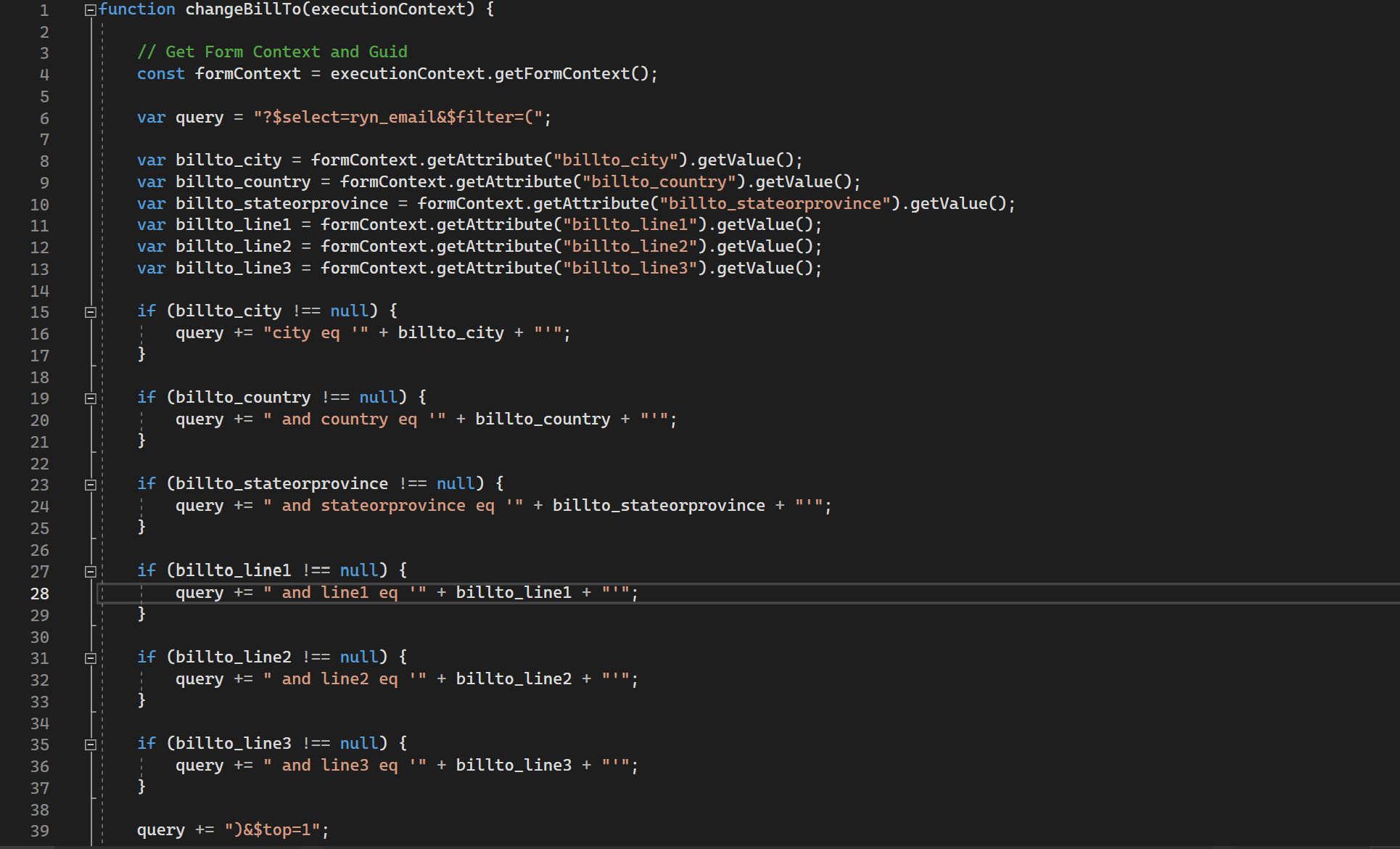
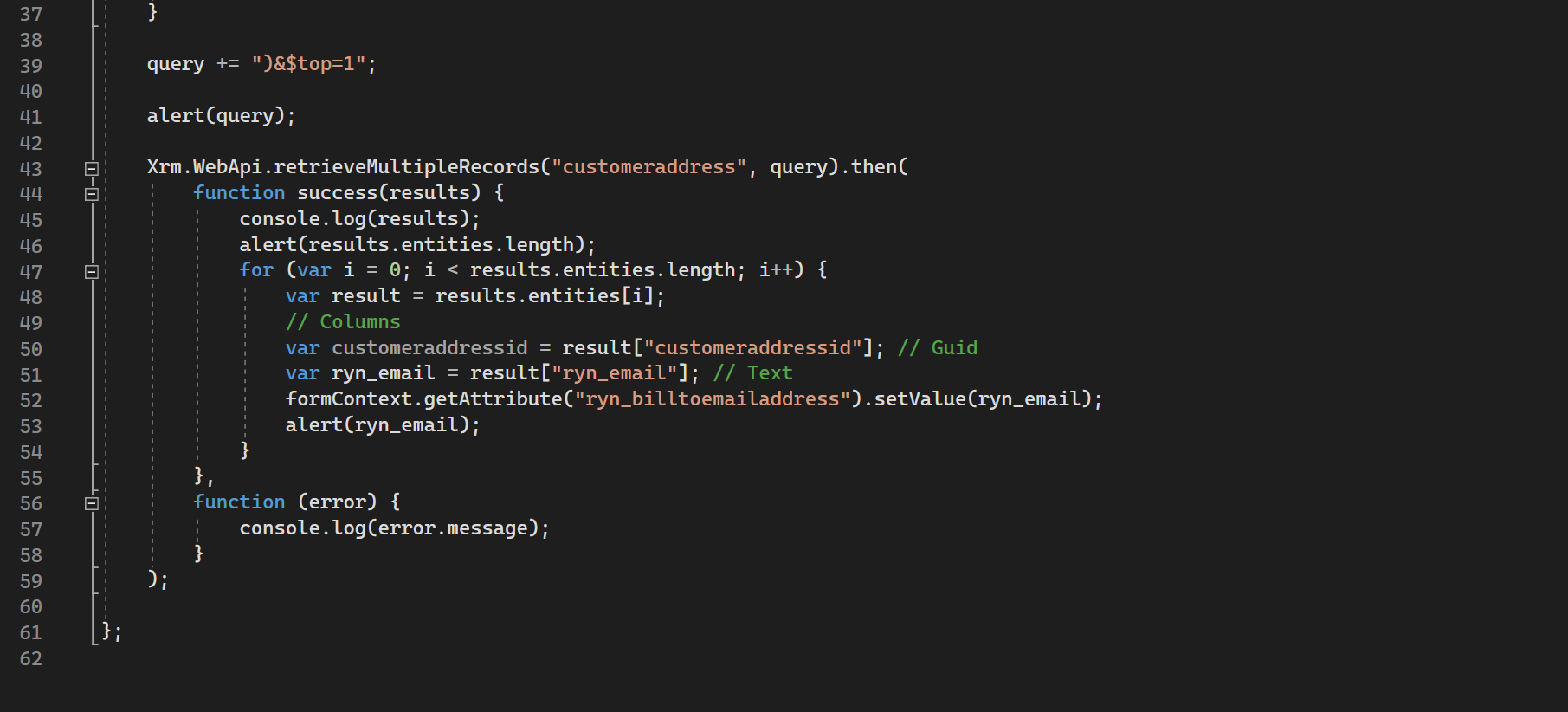
pastedimage1680115915806v1.png

pastedimage1680115951400v2.png

P.S. I'm aware I could've retrieved the table row using Xrm.WebApi.retrieveRecord("customer address", <address guid>, <select fields>)... However, apparently there is a bug where the billto_addressid and shipto_addressid don't get populated on the Quotes form. Any suggestions on that note would be greatly appreciated too!

I have the same question (0)
  • Suggested answer
    Abdul Wahab Profile Picture
    12,119 Moderator on at

    Hi Rashid2002,

    Do you not think it is due to the asynchronous nature of XRM.WebApi.retrieveMultiipleReccords.? How about if you used the function with the awaits keyword?
    How about the behavior at the time of debugging?

  • Rashid2002 Profile Picture
    20 on at

    Correct me if I'm wrong but if it was due to the asynchronous nature of the Xrm.WebApi shouldn't the alert on line 41 work?

    Also, I used the awaits keyword and it still runs onSave rather than onChange. Here is the reference I used. 

    pastedimage1680126013391v1.png

    pastedimage1680126038213v2.png

  • XM-22040801-0 Profile Picture
    11 on at

    Hello,

    Yes, the alert at line 41 will no be executed if an error occurs in Xrm.WebApi.

        You can use try { } catch {} in async function to handle errors.&type=information
        

    You can use promise based function (async) in OnSave but you must enabled Async OnSave in your app settings. See https://learn.microsoft.com/en-us/power-apps/developer/model-driven-apps/clientapi/reference/events/form-onsave

    Be careful, async OnSave have a 10 sec timeout.

Under review

Thank you for your reply! To ensure a great experience for everyone, your content is awaiting approval by our Community Managers. Please check back later.

Helpful resources

Quick Links

Responsible AI policies

As AI tools become more common, we’re introducing a Responsible AI Use…

Neeraj Kumar – Community Spotlight

We are honored to recognize Neeraj Kumar as our Community Spotlight honoree for…

Leaderboard > Customer experience | Sales, Customer Insights, CRM

#1
Tom_Gioielli Profile Picture

Tom_Gioielli 171 Super User 2025 Season 2

#2
#ManoVerse Profile Picture

#ManoVerse 83

#3
Jimmy Passeti Profile Picture

Jimmy Passeti 50 Most Valuable Professional

Last 30 days Overall leaderboard

Product updates

Dynamics 365 release plans
