web
You’re offline. This is a read only version of the page.
close
Skip to main content

Notifications

Announcements

No record found.

Community site session details

Community site session details

Session Id :
Customer experience | Sales, Customer Insights,...
Answered

Defining goals for Accounts or Contacts

(0) ShareShare
ReportReport
Posted on by 280

Hi community friends,

How do you usually work when setting up goals for specific accounts/contacts in CRM? For me, the goal entity is more setting up goals for "salespeople or teams".

I thought about creating custom fields which rolls ups different data.

Have you came across this scenario, and how do you usually solve when customers want to KPI information of specific Accounts or Cotnacts with data/charts?

I have the same question (0)
  • LuHao Profile Picture
    40,892 on at

    Hi CEklx,

    Could you give a specific example?

    For example, which data do you want to roll up from the account?

  • CEklx Profile Picture
    280 on at

    On the Account form, i would like to show for e.g

    No. of appointments

    Sales Data

    Quotes this year

    Sales goals related to the Account for e.g we have a goal to do 100 000 in revenue for the Customer this month, how can we show it on the account form, to see a visual track, inprogress vs actuals and the target of this month (100 000) all related on the Account entity for e.g.

  • Verified answer
    LuHao Profile Picture
    40,892 on at

    Hi CEklx,

    1. No. of appointments

    We will craete a rollup field.

    Go to Customizations > Account > Fields, new.

    pastedimage1591066256646v1.png

    Select Whole Number and Rollup. Click Edit.

    pastedimage1591066382676v2.png

    Set the logic as follow, you could add some filter for Opportunities. Finally add this rollup field on the Account form.

    pastedimage1591066476616v3.png

    2. Sales Data

    We will craete a rollup field.

    Go to Customizations > Account > Fields, new.
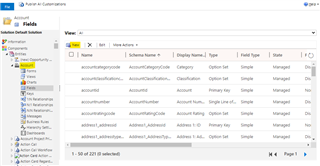
    pastedimage1591066595494v4.png

    Select Currency and Rollup. Click Edit.

    pastedimage1591066757334v5.png

    Set the logic as follow, you could add some filter for Opportunities. Finally add this rollup field on the Account form.

    pastedimage1591066809216v6.png

    3. Quotes this year

    We will add a sub-grid.

    Go to Customizations > Account > Forms, edit the main form.

    pastedimage1591066912939v7.png

    Click Sub-Grid under INSERT tab of command bar.

    pastedimage1591067001589v8.png

    Select Only Related Records and Quotes (Potential Customer), then click New.

    pastedimage1591067129317v9.png

    For the new view, add columns and edit filter criteria to configure this view.

    pastedimage1591067195559v10.png

    pastedimage1591067358533v11.png

    After saving the view, select this view in the sub-grid.

    pastedimage1591067426932v12.png

    3. Sales goals related to the Account

    Unfortunately, because the Account entity and the Goal entity do not have a 1:N or N:N relationship, Goal cannot be displayed on the Account form.

    To achieve this, we have to create a lookup field of the for Goal, and then manually select the corresponding Account for Goals.

    pastedimage1591067905948v13.png    pastedimage1591067943628v14.png

    pastedimage1591068233700v15.png

    Then insert a Goals sub-grid on the Account form.

    pastedimage1591077870061v16.png

    The effect is as follows.

    pastedimage1591078263495v17.png

Under review

Thank you for your reply! To ensure a great experience for everyone, your content is awaiting approval by our Community Managers. Please check back later.

Helpful resources

Quick Links

Responsible AI policies

As AI tools become more common, we’re introducing a Responsible AI Use…

Neeraj Kumar – Community Spotlight

We are honored to recognize Neeraj Kumar as our Community Spotlight honoree for…

Leaderboard > Customer experience | Sales, Customer Insights, CRM

#1
Tom_Gioielli Profile Picture

Tom_Gioielli 70 Super User 2025 Season 2

#2
Gerardo Rentería García Profile Picture

Gerardo Rentería Ga... 33 Most Valuable Professional

#3
Daniyal Khaleel Profile Picture

Daniyal Khaleel 32 Most Valuable Professional

Last 30 days Overall leaderboard

Product updates

Dynamics 365 release plans
