web
You’re offline. This is a read only version of the page.
close
Skip to main content

Announcements

News and Announcements icon
Community site session details

Community site session details

Session Id :
Small and medium business | Business Central, N...
Suggested Answer

export and import company

(0) ShareShare
ReportReport
Posted on by 194

Hello,

We have an installation of Business Central 2020 Wave 1 with Cumulative update 17 on premises.

We are trying to export a company from the live database and import it in a test database.

To export a file containing the company we use the Export Data to a file functionality:
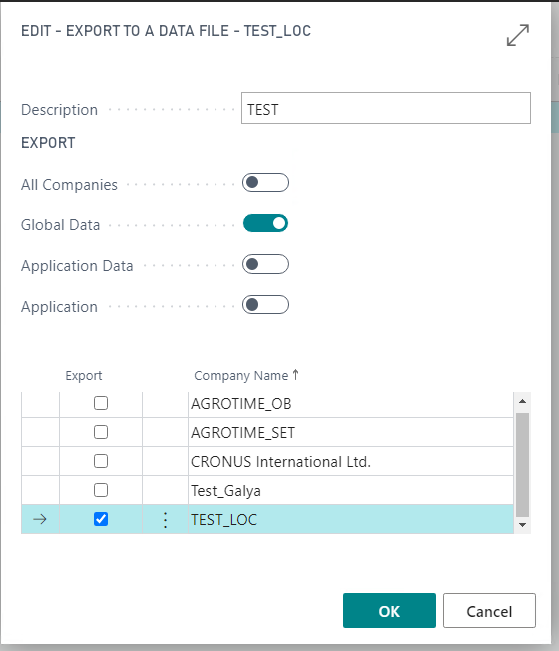
pastedimage1611041942434v1.png

We get a message that data was exported successfully and a file TEST with a size of 52909 KB is created.

Then we try to import this file from Import from a data file by pressing the assist edit button and selecting the file:
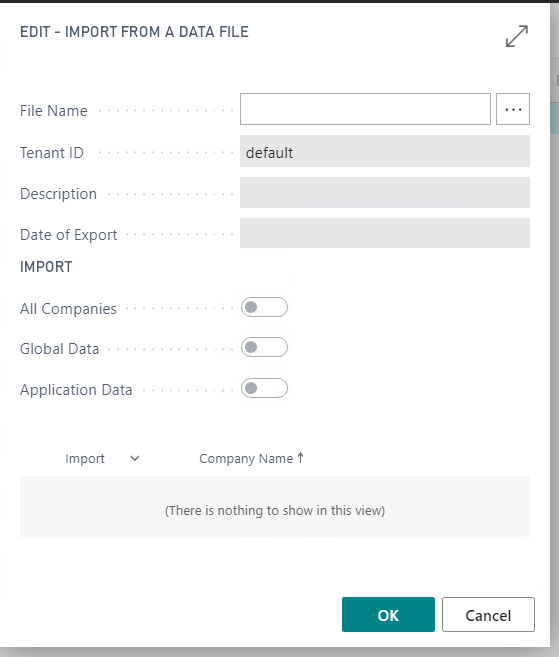
pastedimage1611042155297v2.png

Then we get the following error:

"The file could not be uploaded because it was too large. The maximum file size that can be uploaded is 350 MB."

Why occurs this error when the file size is only 53 MB?

How to export and import a company successfully?

I have the same question (0)
  • Suggested answer
    JAngle Profile Picture
    159 on at

    For the type of reason you have identified it’s not in regular usage as a feature. If you have the skills in house I would look at doing a sql database restore of live instead. Will save time trying to figure out a good pathway with the import company feature. If this is to just test with the data then copy company is also good. Stops users having to logon to a different service tier.

  • Suggested answer
    Marco Mels Profile Picture
    Microsoft Employee on at

    Hello,

    This may help.

    community.dynamics.com/.../the-file-could-not-be-uploaded-because-it-was-too-large

    The file that was created is not the actual file upload size, so you may have to do this a few times to get it done. We suggest to do this during non business hours as it can make your BC unavailable for a few hours. There may be other ways to reach the same goal like Josh suggested.

    Thanks.

Under review

Thank you for your reply! To ensure a great experience for everyone, your content is awaiting approval by our Community Managers. Please check back later.

Helpful resources

Quick Links

Season of Sharing Community Challenge Launch!

Jump in, show your community spirit, and win prizes!

Women in Power Builds Momentum

Expanding mentorship, skilling, and AI innovation

Congratulations to the May Top 10 Community Leaders

These are the community rock stars!

Leaderboard > Small and medium business | Business Central, NAV, RMS

#1
OussamaSabbouh Profile Picture

OussamaSabbouh 2,344 Super User 2026 Season 1

#2
YUN ZHU Profile Picture

YUN ZHU 1,742 Super User 2026 Season 1

#3
AndrewThomas81 Profile Picture

AndrewThomas81 1,231

Last 30 days Overall leaderboard

Featured topics

Microsoft Training Manuals

Product updates

Dynamics 365 release plans



