web
You’re offline. This is a read only version of the page.
close
Skip to main content

Notifications

Announcements

No record found.

Community site session details

Community site session details

Session Id :
Microsoft Dynamics AX (Archived)

SSIS & AIF Document Services

(0) ShareShare
ReportReport
Posted on by 2

Hi,

Has anyone been successful in consuming an AIF document service from within a Script Component in SQL Server Integration Services?

I've switched the script project to .Net 3.5 and added the service reference, but it seems to give me the following errors when generating the proxy classes:
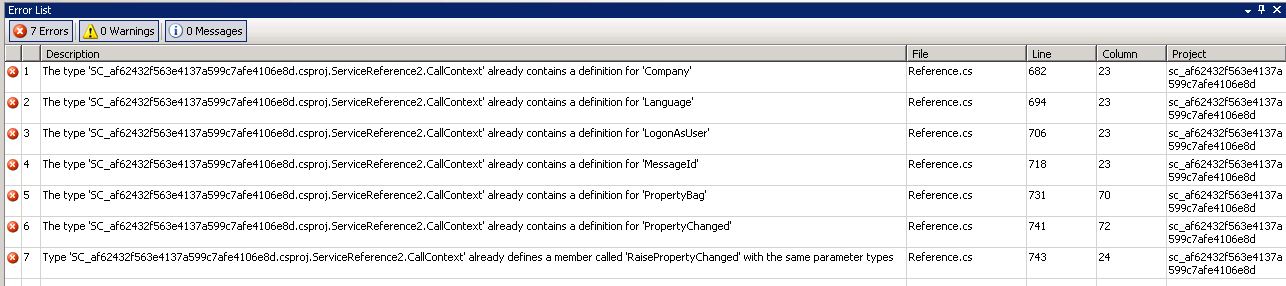
I'm not sure if this is anything to do with .net 4/3,5 compatibility?

Anyone have any experience in this area?

Thanks in advance,

Nick

*This post is locked for comments

I have the same question (0)
  • NR-11010513-0 Profile Picture
    2 on at

    Error 1 The type 'SC_af62432f563e4137a599c7afe4106e8d.csproj.ServiceReference2.CallContext' already contains a definition for 'Company' C:\Users\User1\AppData\Local\Temp\2\SSIS\c904e952b148439899fc634468e1202a\service references\ServiceReference2\Reference.cs 682 23 sc_af62432f563e4137a599c7afe4106e8d

    Error 2 The type 'SC_af62432f563e4137a599c7afe4106e8d.csproj.ServiceReference2.CallContext' already contains a definition for 'Language' C:\Users\User1\AppData\Local\Temp\2\SSIS\c904e952b148439899fc634468e1202a\service references\ServiceReference2\Reference.cs 694 23 sc_af62432f563e4137a599c7afe4106e8d

    Error 3 The type 'SC_af62432f563e4137a599c7afe4106e8d.csproj.ServiceReference2.CallContext' already contains a definition for 'LogonAsUser' C:\Users\User1\AppData\Local\Temp\2\SSIS\c904e952b148439899fc634468e1202a\service references\ServiceReference2\Reference.cs 706 23 sc_af62432f563e4137a599c7afe4106e8d

    Error 4 The type 'SC_af62432f563e4137a599c7afe4106e8d.csproj.ServiceReference2.CallContext' already contains a definition for 'MessageId' C:\Users\User1\AppData\Local\Temp\2\SSIS\c904e952b148439899fc634468e1202a\service references\ServiceReference2\Reference.cs 718 23 sc_af62432f563e4137a599c7afe4106e8d

    Error 5 The type 'SC_af62432f563e4137a599c7afe4106e8d.csproj.ServiceReference2.CallContext' already contains a definition for 'PropertyBag' C:\Users\User1\AppData\Local\Temp\2\SSIS\c904e952b148439899fc634468e1202a\service references\ServiceReference2\Reference.cs 731 70 sc_af62432f563e4137a599c7afe4106e8d

    Error 6 The type 'SC_af62432f563e4137a599c7afe4106e8d.csproj.ServiceReference2.CallContext' already contains a definition for 'PropertyChanged' C:\Users\User1\AppData\Local\Temp\2\SSIS\c904e952b148439899fc634468e1202a\service references\ServiceReference2\Reference.cs 741 72 sc_af62432f563e4137a599c7afe4106e8d

    Error 7 Type 'SC_af62432f563e4137a599c7afe4106e8d.csproj.ServiceReference2.CallContext' already defines a member called 'RaisePropertyChanged' with the same parameter types C:\Users\User1\AppData\Local\Temp\2\SSIS\c904e952b148439899fc634468e1202a\service references\ServiceReference2\Reference.cs 743 24 sc_af62432f563e4137a599c7afe4106e8d

  • Carolina Banda Profile Picture
    35 on at

    Hello,

    I'm having the exact same problem and I'm wondering if you were able to find a solution for it?

    Thank you,

    CB

  • NR-11010513-0 Profile Picture
    2 on at

    Hi Carolina,

    Yes, I was able to solve the problem.

    If you edit the References file which contains the proxy objects generated by adding the service reference, you will see that two CallContext objects are generated. You should be able to delete the first CallContext partial class which will resolve your build errors.

    Alternatively, if you add a service reference to a project in VisualStudio 2010, you can copy the entire References code to the references code in your SSIS package (updating the namespaces accordingly).

    Not sure if either of these methods are recommended, but they seem to solve the problem.

    Cheers,

    Nick

  • Carolina Banda Profile Picture
    35 on at

    Hi Nick,

    Thank you very much! I will do that for now, we shouldnt have to change what was generated with the tool though... but its a good workaround... seems like a problem somewhere in AX.

    After deleting the first CallContext I get "Error found when validating record" but its probably just data issue.

    Again thank you very much and have a great day!

    Carolina

Under review

Thank you for your reply! To ensure a great experience for everyone, your content is awaiting approval by our Community Managers. Please check back later.

Helpful resources

Quick Links

Responsible AI policies

As AI tools become more common, we’re introducing a Responsible AI Use…

Neeraj Kumar – Community Spotlight

We are honored to recognize Neeraj Kumar as our Community Spotlight honoree for…

Leaderboard > 🔒一 Microsoft Dynamics AX (Archived)

#1
Priya_K Profile Picture

Priya_K 4

#1
Martin Dráb Profile Picture

Martin Dráb 4 Most Valuable Professional

#3
Ali Zaidi Profile Picture

Ali Zaidi 2

Last 30 days Overall leaderboard

Featured topics

Product updates

Dynamics 365 release plans
