web
You’re offline. This is a read only version of the page.
close
Skip to main content

Notifications

Announcements

No record found.

Community site session details

Community site session details

Session Id :
Microsoft Dynamics AX (Archived)

Standard statistics report can't print with error "No such host is known"

(0) ShareShare
ReportReport
Posted on by

Hi, I am work on dynamics AX 2012. I have 3 statistics report cannot print with error "No such host is known"

Path 1: Account Payable> Reports> Statistics> Vendor> Purchases in the past periods

Path 2: Account Payable> Reports> Statistics> Vendor> Top vendors by YTD purchase

Path 3: Account Payable> Reports> Status> Total accounts payable in the past periods chart
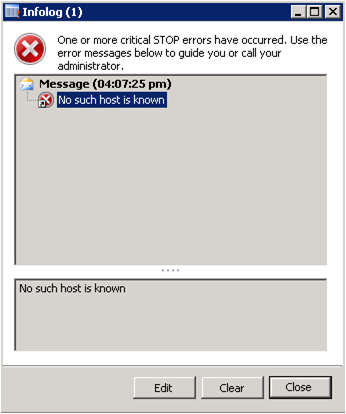
Open preview from VS get the error:

Error 2 Error connecting to DynamicsAXOLAP : A connection cannot be made. Ensure that the server is running.. LedgerTotalAcctsPayablePastXPeriod.FullPage [Preview] 0 0

Open IE from report server get the error:

An error has occurred during report processing. (rsProcessingAborted) Query execution failed for dataset 'Company'. (rsErrorExecutingCommand) A connection cannot be made. Ensure that the server is running. No such host is known

I already redeploy all report, full gen CIL, service SSAS ald started, report server connection correct, all other report can print except this 3 reports.

No error record in event viewer.

Any idea?

Thanks in advance.

Regards

*This post is locked for comments

I have the same question (0)
  • Umesh Pandit Profile Picture
    9,315 User Group Leader on at

    Hi S,

    Please validate the SSRS server setting, have you used Power shell to deploy the reports? Have you tried with other browsers.

  • Community Member Profile Picture
    on at

    Hi Umesh Pandit,

    This is the report in Dynamic AX 2012, I already tried Power shell run with administrator and deploy all report. still can't work. My other report all can work with the server setting.

    Thank you for your reply.

  • Community Member Profile Picture
    on at

    Have you resolve problem? I am facing same error

  • Ludwig Reinhard Profile Picture
    Microsoft Employee on at

    Hi Vijay, those reports refer to data stored in the AX cubes. Have you deployed and processed them? Ludwig

  • Umesh Pandit Profile Picture
    9,315 User Group Leader on at
  • Community Member Profile Picture
    on at

    Hi.. Ludwig,

    Thanks for your reply, I have deployed and processed via powershell and also checked to do reinstall and redeployed reports, but getting same problem.

    Please Note:- I am getting this error only in Retails Reports rest AX Standard reports working fine

  • Community Member Profile Picture
    on at

    Hi...Umesh

    Thanks for your Reply,  I am getting this error only in Retails Reports rest AX Standard reports working fine

Under review

Thank you for your reply! To ensure a great experience for everyone, your content is awaiting approval by our Community Managers. Please check back later.

Helpful resources

Quick Links

Responsible AI policies

As AI tools become more common, we’re introducing a Responsible AI Use…

Neeraj Kumar – Community Spotlight

We are honored to recognize Neeraj Kumar as our Community Spotlight honoree for…

Leaderboard > 🔒一 Microsoft Dynamics AX (Archived)

#1
Martin Dráb Profile Picture

Martin Dráb 4 Most Valuable Professional

#1
Priya_K Profile Picture

Priya_K 4

#3
MyDynamicsNAV Profile Picture

MyDynamicsNAV 2

Last 30 days Overall leaderboard

Featured topics

Product updates

Dynamics 365 release plans



