web
You’re offline. This is a read only version of the page.
close
Skip to main content

Notifications

Announcements

No record found.

Community site session details

Community site session details

Session Id :
Customer experience | Sales, Customer Insights,...
Answered

How to organize solutions

(0) ShareShare
ReportReport
Posted on by

Hi all,

I would like to have your inputs on how to organize my solutions on Power Apps

I am mainly using Dynamics 365 and currently segmenting my solutions by, let's say, business needs

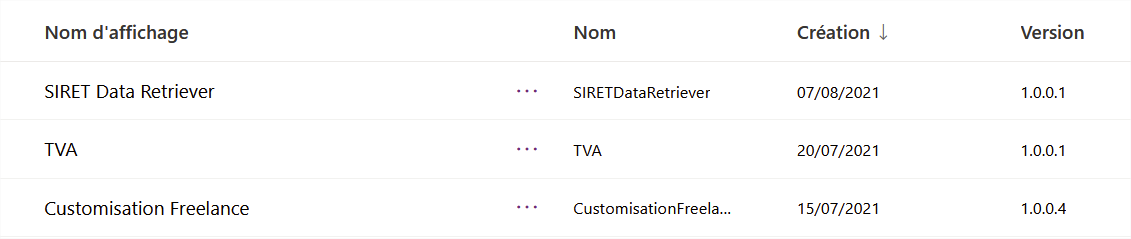
For instance below you see 3 solutions where I have

- A solution (SIRET Legal Data Retriever) to retrieve automatically legal and financial data and enrich the Account entity
pastedimage1631017732900v1.png

- Below (TVA) eases the computation of french taxes

- and the first one is the customisation for my Freelance activity

But it is not ALM friendly.

I can't export from DEV to UAT to PRD because I have Account forms in each of the solutions

What are your inputs ? How should I do ? Can I do better now ? How can I do better in the future ?

Thanks in advance,

Fred
https://www.frederickgrobost.com

I have the same question (0)
  • Community Member Profile Picture
    on at

    Hi,

    Can you tell me what app you are using?

  • Community Member Profile Picture
    on at

    I use mainly Sales.

  • Verified answer
    ThomasN Profile Picture
    3,190 on at

    Fred, Thanks for reaching out.

    Are you using Managed or Unmanaged solutions when promoting to other environments? If Managed you want to create as few solutions as possible. I find it helpful to create a BASE solution that has all my configurations and another solution DEVELOPMENT that has my plugins and custom code. I make all configuration changes in BASE and then make any custom code/web resources/plugin changes in DEVELOPMENT.

    If using unmanaged I find it helpful to create smaller solutions specific to whatever changes you are pushing. I still typically separate configurations and development.

    I have a blog on choosing Managed vs. Unmanaged and some references at the end to MSFT ALM best practices. I hope this helps.

    dynamicconsultantsgroup.com/.../

    -Tom

Under review

Thank you for your reply! To ensure a great experience for everyone, your content is awaiting approval by our Community Managers. Please check back later.

Helpful resources

Quick Links

Responsible AI policies

As AI tools become more common, we’re introducing a Responsible AI Use…

Neeraj Kumar – Community Spotlight

We are honored to recognize Neeraj Kumar as our Community Spotlight honoree for…

Leaderboard > Customer experience | Sales, Customer Insights, CRM

#1
Tom_Gioielli Profile Picture

Tom_Gioielli 137 Super User 2025 Season 2

#2
#ManoVerse Profile Picture

#ManoVerse 57

#3
Jimmy Passeti Profile Picture

Jimmy Passeti 50 Most Valuable Professional

Last 30 days Overall leaderboard

Product updates

Dynamics 365 release plans



