web
You’re offline. This is a read only version of the page.
close
Skip to main content

Notifications

Announcements

No record found.

Community site session details

Community site session details

Session Id :
Microsoft Dynamics AX (Archived)

Check query range before generate report

(0) ShareShare
ReportReport
Posted on by

Hi, i'm student and I currently work on AX 2012

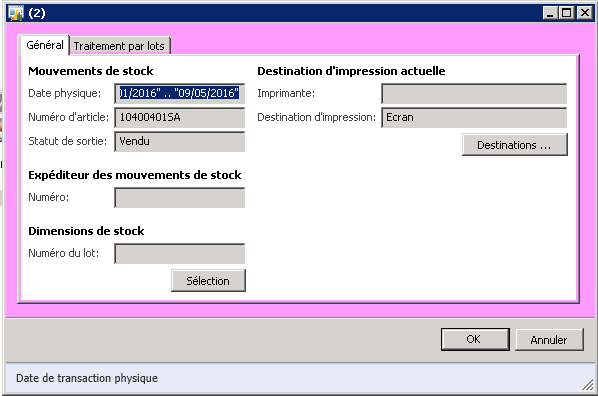
I work on a SSRS report with a query to set parameters and a Data Provider
screensh.png

I need to check some query ranges.

If the parameters(ranges) are blank/null, i don't generate the report and i send an error.

How can i do it ? Should i create a controller to collect parameters and raise message ?

Sorry for my English and thank you

*This post is locked for comments

I have the same question (0)
  • krishna.rao@dax Profile Picture
    3,006 on at

    in the Visual studio.

    in the design . under parameters node

    In each parameter - Allow blank property make False.

    When there is no value then it prompts an error message.

  • Suggested answer
    Anoop Tripathi Profile Picture
    790 on at

    Add the mandatory parameter in Contract class put validate and that should be enough.

    You may need to look into contract class in more details.

  • Anoop Tripathi Profile Picture
    790 on at

    I do not understand why would you prefer to do this in the Visual Studio side rather than Ax?? Can you tell me

  • Community Member Profile Picture
    on at

    Thank you Krisha

    The problem is that my parameters are query ranges, so they are not each in visual studio parameters

    screensh2.png

  • Anoop Tripathi Profile Picture
    790 on at

    You must have specified your query as an attribute you will need to capture this object and check if the ranges have some values or not.

    Ideally in such a scenario the range is made to be populated from the user interface by a contract class and then passed on to the query. This way it saves processing time as if the user does not enter a value nothing is processed and an error message is displayed there itself.

    Any particular reason you are trying to do it in this manner ?

  • Community Member Profile Picture
    on at

    The analyst choose the way with a query (and range) because with this solution, users can set new ranges. So it's more flexible.

    screensh3.png

    [quote user="Anoop Tripathi"]

    Ideally in such a scenario the range is made to be populated from the user interface by a contract class and then passed on to the query. This way it saves processing time as if the user does not enter a value nothing is processed and an error message is displayed there itself.

    [/quote]
     
    With this solution we lose the flexible aspect 


  • Verified answer
    Hajish Profile Picture
    460 on at

    Please refer the below code to check specific field in a query range

    int cnt, i;

    QueryBuildRange range;

    str filter = "";

    ;

    //CustInvoiceJour is datasource table


    cnt = queryRun.query().dataSourceTable(tablenum(CustInvoiceJour)).rangeCount();

    for (i=1 ; i<=cnt; i++)

    {

    range = queryRun.query().dataSourceTable(tablenum(CustInvoiceJour)).range(i);

    if(range.fieldName() == "InvoiceDate") // table field is checking

    filter = range.value();


  • Anoop Tripathi Profile Picture
    790 on at

    That is not correct. The only thing adding a range does is that it specifically show that particular field in the input form window, even if you remove the range and click on the " Select" button it will again open the same window for query ranges. The only difference is that it would not contain any pre added range fields.

    Also when you add the range using the contract class you can clearly show that a range is mandatory and be in better control. The purpose of contract class is to handle parameters for the report.

  • Community Member Profile Picture
    on at

    [quote user="Anoop Tripathi"]

    That is not correct. The only thing adding a range does is that it specifically show that particular field in the input form window, even if you remove the range and click on the " Select" button it will again open the same window for query ranges. The only difference is that it would not contain any pre added range fields.

    Also when you add the range using the contract class you can clearly show that a range is mandatory and be in better control. The purpose of contract class is to handle parameters for the report.

    [/quote]

    Yes, i'm agree with you.  Maybe I did not make myself clear enough when I explained the flexible aspect.  I just wanted to say that users can use more and new ranges with a query. And if i use contract class, my parameters will be "static" in the sense that users can't create new ranges to filter the result report. Let me know if i'm wrong

    Thank you Hajish R I  your answer help me a lot.

    This is my code if it can help someone or if you have suggestions to help me improve

    //in my controller class
    protected container preRunValidate()
    {
        container ret;
        QueryRun                queryRun;
        int cnt,i;
        Query                   query = this.getFirstQuery();
        QueryBuildRange range;
        str filter = "";
        boolean pDate = false;
        ret = super();
    
        
        queryRun = new QueryRun(query);
        cnt = queryRun.query().dataSourceTable(tablenum(InventTrans)).rangeCount();
        for (i=1 ; i<=cnt; i++)
        {
            range = queryRun.query().dataSourceTable(tablenum(InventTrans)).range(i);
            if(range.fieldName() == "DatePhysical")
            {
                filter = range.value();
                if(filter != "")
                {
                    pDate = true;
                }
            }
            
            
        }
        
        if(!pDate)
        {
            ret = [SrsReportPreRunState::Error, "No valid input found for the DatePhysical Range"];
        }
        
        return ret;
    }


  • Suggested answer
    Hajish Profile Picture
    460 on at

    i hope inside if statement you can use "break;". :)

    like below

               if(filter != "")

               {

                   pDate = true;

                  break;

               }

Under review

Thank you for your reply! To ensure a great experience for everyone, your content is awaiting approval by our Community Managers. Please check back later.

Helpful resources

Quick Links

Responsible AI policies

As AI tools become more common, we’re introducing a Responsible AI Use…

Neeraj Kumar – Community Spotlight

We are honored to recognize Neeraj Kumar as our Community Spotlight honoree for…

Leaderboard > 🔒一 Microsoft Dynamics AX (Archived)

#1
Priya_K Profile Picture

Priya_K 4

#1
Martin Dráb Profile Picture

Martin Dráb 4 Most Valuable Professional

#3
Ali Zaidi Profile Picture

Ali Zaidi 2

Last 30 days Overall leaderboard

Featured topics

Product updates

Dynamics 365 release plans



