web
You’re offline. This is a read only version of the page.
close
Skip to main content

Notifications

Announcements

No record found.

Community site session details

Community site session details

Session Id :
Customer experience | Sales, Customer Insights,...
Suggested Answer

Help to create a new D365 Sales Professional instance

(0) ShareShare
ReportReport
Posted on by 245

Hi all,

As a CRM consultant with a few years' experience, I know my way around the product. However, I've never had to set up an instance from scratch. I've got a freshly created log in with a D365 Sales Professional licence which is also set up as a global admin. I've gone into the Admin Center of D365 and I can see the CDS instance that's set up but I obvoiusly need a D365 Customer Engagement Sales Professional instance setting up.

I've selected the 'New' option and I've also toggled the option to create a database, however, when I go onto the next screen, I get the warning message "You do not have the required Dynamics 365 licenses to create databases with Dynamics apps".
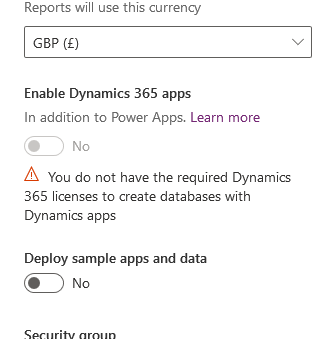
pastedimage1584371963643v1.png

I've tried creating the instance without the database but, when I've done that, I've not been able to install the Sales Professional solution as the admin center says it needs a valid Customer Engagement instance to be installed on.

Any help would be appreciated.

Thanks,

I have the same question (0)
  • Suggested answer
    Yiming  Profile Picture
    on at

    Hi,

    Only the subscriptions in your tenant enable the Sales Apps, can you create a database with Dynamics apps. The license check for Dynamics 365 apps does not depend on user license assignments. It depends on tenant level subscriptions. 


    For example, if one tenant has the following subscriptions:

    Dynamics 365 Team Members / PowerApps per user plan / Project Plan 3 / Office 365 ProPlus


    Which provide these SKUs:

    DYN365_TEAM_MEMBERS / POWERAPPS_PER_USER / PROJECTPROFESSIONAL / OFFICESUBSCRIPTION


    These SKUs do not enable any of the Dynamics 365 apps.


    If you have any concerns about subscriptions whether they are granted access to Sales App, suggest raise a ticket to Microsoft Support and support engineer will check details of the subscriptions for your tenant. Thanks!

    Hope above helps!

  • Ana Pereira Profile Picture
    on at

    Hello Jon,

    In order to create an instance with sales pro solution please use the following Powershell Script

    1. Install-Module -Name Microsoft.PowerApps.Administration.PowerShell
    2. New-AdminPowerAppEnvironment -DisplayName "MyTestEnvironment" -EnvironmentSku Production -LocationName europe -CurrencyName EUR -LanguageName 1033 -Templates @("D365_SalesPro") -ProvisionDatabase

    pastedimage1584797755219v1.png

    • you might need to check the LocationName Get-AdminPowerAppEnvironmentLocations or Currency name 
    • you might also have to check the PowerShell execution policies 

    https://docs.microsoft.com/en-us/powershell/module/microsoft.powershell.core/about/about_execution_policies?view=powershell-7

    other option is to raise a support ticket with MS,

    I hope it helped 

    Thanks

    Teresa

  • Suggested answer
    JonEvans Profile Picture
    245 on at

    Thanks for your replies everyone but it turns out that Microsoft have changed how you set up one of these instances. We had the correct licence types, etc but were just going through the wrong process. One of our technical guys managed to have a look at it and I'm eager to find out what he did.

Under review

Thank you for your reply! To ensure a great experience for everyone, your content is awaiting approval by our Community Managers. Please check back later.

Helpful resources

Quick Links

Responsible AI policies

As AI tools become more common, we’re introducing a Responsible AI Use…

Neeraj Kumar – Community Spotlight

We are honored to recognize Neeraj Kumar as our Community Spotlight honoree for…

Leaderboard > Customer experience | Sales, Customer Insights, CRM

#1
Pallavi Phade Profile Picture

Pallavi Phade 98

#2
Tom_Gioielli Profile Picture

Tom_Gioielli 60 Super User 2025 Season 2

#3
Gerardo Rentería García Profile Picture

Gerardo Rentería Ga... 43 Most Valuable Professional

Last 30 days Overall leaderboard

Product updates

Dynamics 365 release plans



