web
You’re offline. This is a read only version of the page.
close
Skip to main content

Notifications

Announcements

No record found.

Community site session details

Community site session details

Session Id :
Service | Customer Service, Contact Center, Fie...
Suggested Answer

How to Preview the attachment without download

(1) ShareShare
ReportReport
Posted on by 20

Hi there!

Can anyone suggest I find out a way how can I make Preview the attachments without downloading them?

I have this issue. Here in Timeline I have Notes and the attachments
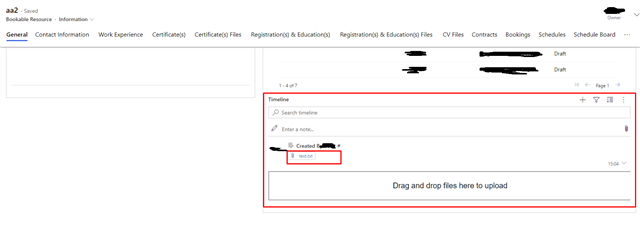
Untitled.png_2D00_640x480.png_2D00_640x480.png

I just need to be able to preview the attached files in a new window, and for all kinds of documents (pdf, excel, word, txt and etc) or just make a preview without PCF.

While researching I saw this post and it was helpful, I just don't know from where do I need to start.

mahadeomatre.blogspot.com/.../view-or-download-attachments-for.html

Hope to get a reply as soon as possible and thanks in advance!


Regards
Grisha

I have the same question (0)
  • Suggested answer
    Community Member Profile Picture
    on at

    Hi Grisha,

    The content of this link is divided into two main sections:

    (1)Create one web resource and add it to one entity form.

    Create web resources in Dynamics 365 Customer Engagement (on-premises) | Microsoft Docs

    (2)Create one button to the form.

    This is the download page for Ribbon Workbench:

    http://www.develop1.net/public/rwb/ribbonworkbench.aspx

  • Be Elshayep Profile Picture
    86 on at

    Have you found a way yet to view word or excel or non-pdf or text files?

  • Suggested answer
    dgdf Profile Picture
    15 on at

    No way to easily show a preview without using a PCF component.

    Only way to obtain a similar result is generate a web resource on Dynamics that dinamically points to the public URL of the file.

    For example, you can add in your web resource a picklist loaded with the list of the attachments related and in the selection event, pass the  url of the file in an iframe added below.

    Probably, some type of unsupported files will be downloaded automatically by the browser. Unfortunatly, it will depends by the client...

  • vdblohowiak Profile Picture
    on at

    I have a PCF component. I get all notes with attachments via an OData query on the annotation (note) entity that looks something like this:

    ?$select=filename,mimetype,createdon,annotationid,documentbody&$filter=(_objectid_value eq ${context.page.entityId}) and (startswith(mimetype, 'image%2f') or startswith(mimetype, 'video%2f'))

    I can render it in an HTML <img/> tag with the src like this:

    src={`data:${attachment.mimetype};base64,${attachment.documentbody}`}

    Unfortunately, this still has to download all attachments (since I am returning documentbody in my query) in order to render the PCF. With 5+ images or videos, this can start to take a very long time. Do you know how to get the public URL of the file? I don't know where that is or if it even exists.

Under review

Thank you for your reply! To ensure a great experience for everyone, your content is awaiting approval by our Community Managers. Please check back later.

Helpful resources

Quick Links

Responsible AI policies

As AI tools become more common, we’re introducing a Responsible AI Use…

Neeraj Kumar – Community Spotlight

We are honored to recognize Neeraj Kumar as our Community Spotlight honoree for…

Leaderboard > Service | Customer Service, Contact Center, Field Service, Guides

#1
Tom_Gioielli Profile Picture

Tom_Gioielli 57 Super User 2025 Season 2

#2
Daniyal Khaleel Profile Picture

Daniyal Khaleel 34 Most Valuable Professional

#3
Scott Jackson UK Profile Picture

Scott Jackson UK 22

Last 30 days Overall leaderboard

Featured topics

Product updates

Dynamics 365 release plans
