web
You’re offline. This is a read only version of the page.
close
Skip to main content

Notifications

Announcements

No record found.

Community site session details

Community site session details

Session Id :
Finance | Project Operations, Human Resources, ...
Answered

New Menu Item Leads to SSRS Report with No Data

(0) ShareShare
ReportReport
Posted on by

Hi, 

I needed to create a new action menu item for a report. It has to be exactly like the Pro forma confirmation menu item however it needs to print a new report. 
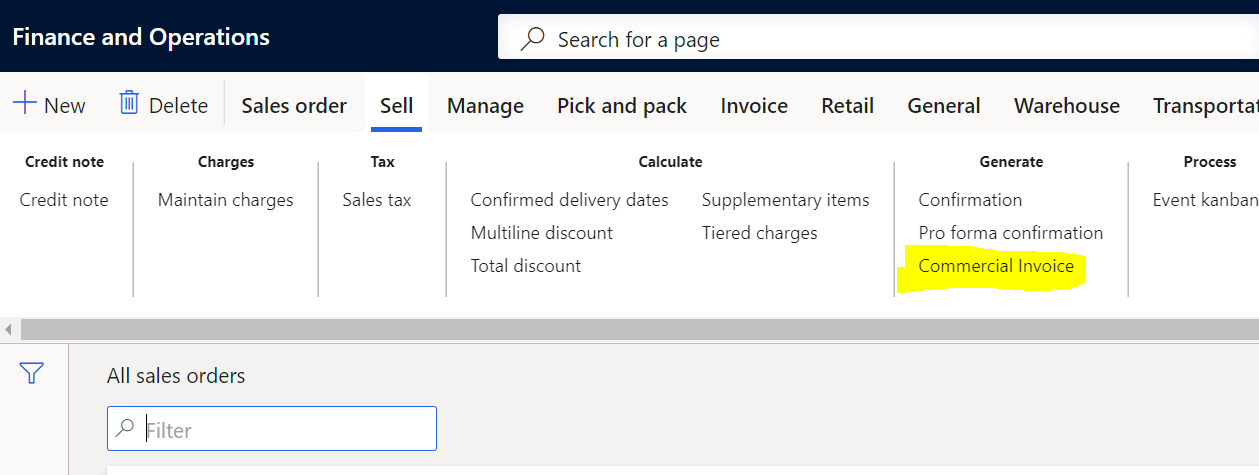
5265.comm.PNG

To do this, I extended the FormLetterJournalPrint class to be able to handle the new version of the SalesConfirmJournalPrint class I made.

1881.form.PNG

Here it points to the CustConfirmJour table where I extended it to be able to handle a new method where it points to the ouput menu item I created.

commmer.PNG

In the picture below you can see I call the new menu item below which then calls the extended controller class SalesConfirmController
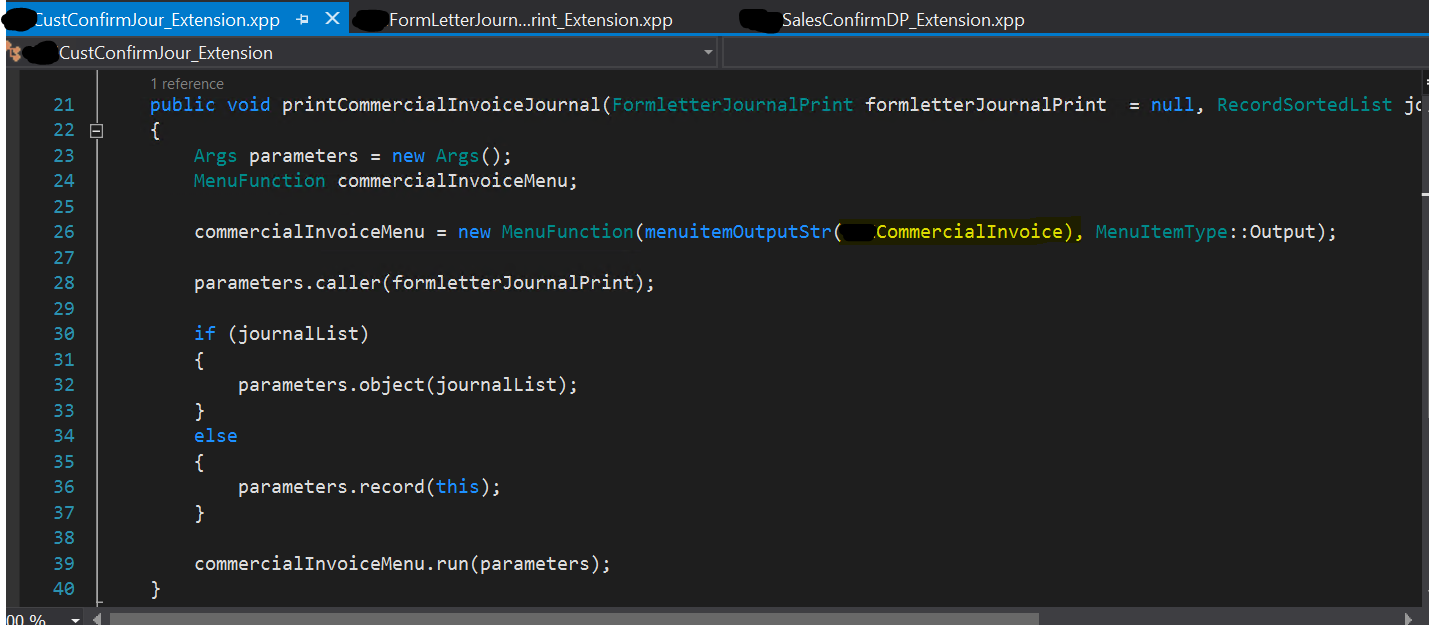
menu.PNG

In the extended SalesConfirmController I have 2 reports, I want it to be able to choose based on if they selected the Commercial Invoice menu that I had made earlier. This is the main and below it will be the ouputReport method I also modified to help show the selected report.

5123.main.PNG

output.PNG

The problem is that when it goes through the "else" in the main where it picks "SalesInvoiceReport", it will show all the data since it is from the original "salesConfirmation" output menu. However when it goes through the CommercialSalesInvoiceReport and it uses the new menu I made the report ends up with empty data.

7288.data.PNG

Does anyone have any ideas why the report for the customized SalesInvoiceReport will show all the data but for the customized CommercialInvoiceReport with the new menu item will give me empty data?

Best Regards,

Paulina

I have the same question (0)
  • Gunjan Bhattachayya Profile Picture
    35,423 on at

    Hi Paulina,

    In the new report, are you sing the same DP class as in the original report? Did you try debugging the DP class to check if data is getting inserted into the temp tables?

  • Community Member Profile Picture
    on at

    Hi Gunjan,

    Thank you for your response. Yes I debugged the DP class, it does insert the new data into the temp tables. This is why it is weird it shows in the SalesInvoiceReport but not in the CommercialInvoiceReport when they are both customized reports.

  • Gunjan Bhattachayya Profile Picture
    35,423 on at

    Can you do build of your customized model and do an IISRESET?

    Please try running the report again and check if the report works after these steps.

  • Community Member Profile Picture
    on at

    It still gives me an empty report. The only time it provides me a report with actual data is when I use the original SalesConfirmation menu item, otherwise when I use my new CommercialInvoice menu item the data always shows up empty. For the CommercialInvoice menu item I duplicated the original SalesConfirmation menu item. Part of me was wondering if there would be something in the back end related to the original SalesConfirmation menu item that I missed when creating the new CommercialInvoice menu item. It is as if the temp table will pass it's data to the SalesConfirmation menu item but the temp table will not pass it's data to the new CommercialInvoice menu item.

  • Gunjan Bhattachayya Profile Picture
    35,423 on at

    Hi Paulina,

    One thing I didn't notice before, in the if condition, you should use this code rather than using the label.

    if(_args.menuItemName() == menuItemOutputStr())
    {
        
    }

    As per your screenshots, you have created one report with two designs - CommercialSalesInvoiceReport and SalesInvoiceReport. Correct? In that case they share the same dataset. Does the SalesInvoiceReport  design display correct data?

  • Community Member Profile Picture
    on at

    Sure, I will adjust the code to use the code line you posted instead :)

    This is correct, I have created 1 report with 2 separate designs: CommercialSalesInvoiceReport and SalesInvoiceReport.

    They do share the same dataset.

    If I use the original SalesConfirmation menu item for SalesInvoiceReport or for CommercialSalesInvoiceReport the design will display correctly with the appropriate data.

    However if I use the new menu item for SalesInvoiceReport or for CommercialSalesInvoiceReport the designs of both will show empty data.

  • Verified answer
    Gunjan Bhattachayya Profile Picture
    35,423 on at

    Hi Paulina,

    Rather than creating an extension of SalesConfirmController class, why don't you try creating a new Controller class for this report and check if that works? Please change the menu item object property to this new controller class and check if you are able to get any data in the report.

  • Community Member Profile Picture
    on at

    Hi Gunjan,

    So I created a brand new controller class from scratch CommercialInvoiceController. I still used the methods from SalesConfirmController class but did modifications. I noticed, when I printed using the new menu item, it would print out SalesConfirmReport with all the appropriate data. I believe this is because in Print Management it is set to that report even though in the CommercialInvoiceController class I am asking it to take the CommercialInvoiceReport design. I believe I have narrowed it down to the issue being in the initFormLetterReport method of the SalesConfirmController class.

    8765.invoice.PNG

    My guess is the formLetterReport = FormLetterReport::construct(PrintMgmtDocumentType::SalesOrderConfirmation) is blocking the new CommercialInvoiceReport design that was made as well as it's data and forcing the SalesConfirmationReport to display instead.

  • Gunjan Bhattachayya Profile Picture
    35,423 on at

    Hi Paulina,

    For now, please try commenting the code for print management in the method "initFormLetterReport". Please include this code only before the super() call and check if that helps.

    formLetterReport.parmUsePrintMgmtDestinations(false);

  • Community Member Profile Picture
    on at

    Hi Gunjan,

    I tried as you said below,

    guy_5F00_LI.jpg

    but everytime it still shows SalesConfirmationReport witih data instead of CommercialInvoiceReport even though I set it to take the report in the "main".

    gen.PNG

    I know in the print management section under Form setup of Accounts Receivable it is set to take the SalesConfirmationReport. I feel like I am missing something in the controller class for it to always decide to take SalesConfirmationReport when I am asking it to take CommercialInvoiceReport.

Under review

Thank you for your reply! To ensure a great experience for everyone, your content is awaiting approval by our Community Managers. Please check back later.

Helpful resources

Quick Links

Responsible AI policies

As AI tools become more common, we’re introducing a Responsible AI Use…

Neeraj Kumar – Community Spotlight

We are honored to recognize Neeraj Kumar as our Community Spotlight honoree for…

Leaderboard > Finance | Project Operations, Human Resources, AX, GP, SL

#1
Martin Dráb Profile Picture

Martin Dráb 565 Most Valuable Professional

#2
André Arnaud de Calavon Profile Picture

André Arnaud de Cal... 450 Super User 2025 Season 2

#3
Sohaib Cheema Profile Picture

Sohaib Cheema 250 User Group Leader

Last 30 days Overall leaderboard

Product updates

Dynamics 365 release plans
