web
You’re offline. This is a read only version of the page.
close
Skip to main content

Notifications

Announcements

Community site session details

Community site session details

Session Id :
Microsoft Dynamics AX (Archived)

Inventory Management / Transfer Orders

(0) ShareShare
ReportReport
Posted on by

Hello AX Experts,


I have na issue In ‘Company/Inventory Management/Periodic/Transfer Orders’ about reversal of accounting.

Fiscal Stablishment Dimension: FROM CFC009 - TO CFC001


First Step:

We posted the ‘Ship transfer order’ and the Ledger account voucher was correct with the correct dimensions (Main account + Fiscal Stablishment (CFC009), like print below. Here everithing is all right.

8468.Screenshot_5F00_1.png


Second Step:

Before receive the transfer order we decided to cancel the fiscal document, in Posting > Cancel Fiscal Document like below.
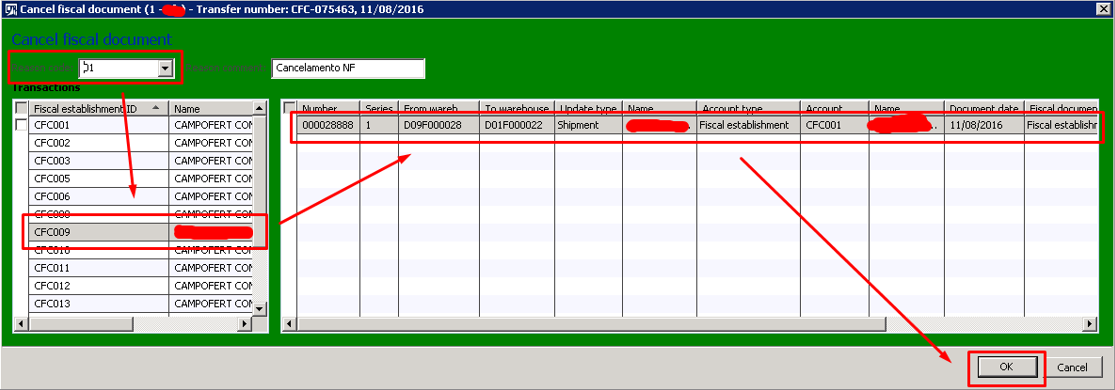
0535.Screenshot_5F00_2.png

Third Step: (problem)

After Cancel, whe checked the ledger account voucher and the Fiscal Stablishment was incorrect (with the TO not FROM), like below
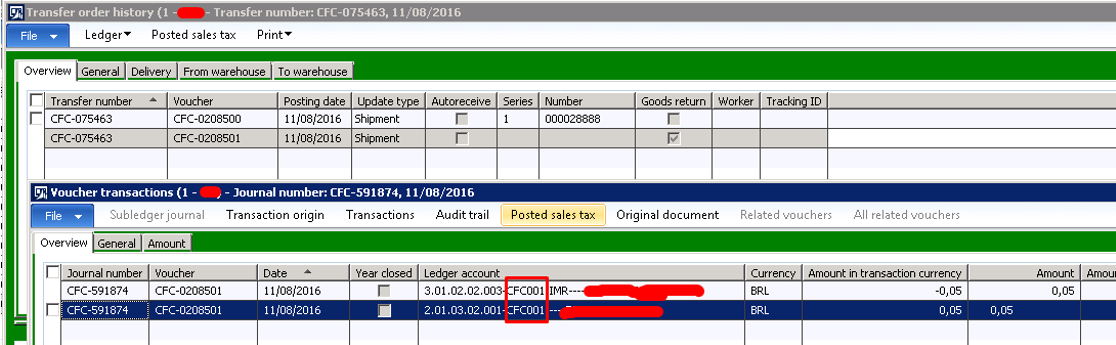
0844.Screenshot_5F00_3.png


In reversion we undertand that the fiscal stablishment must be the same of origin, not the ‘to warehouse’.

Could anyone please help us suggesting a parameter?

Thanks in Advanced.


*This post is locked for comments

I have the same question (0)
  • Suggested answer
    Ludwig Reinhard Profile Picture
    Microsoft Employee on at

    Hello Pablo,

    If I remember it correctly then you run your system with Brazilian localizations, right?

    I have a quick look at available hotfixes for cancelling BRA fiscal documents on LifeCycleServices and found several.

    The issue you report might possibly be related to one of those bugs that got fixed.

    Can you check that on LCS and verify whether one of the Hotfixes available solves your issue?

    Please see for example: fix.lcs.dynamics.com/.../Results;v=16_15_7_5_4_3_1&i=2_1_3_4&ct=1_3_5_4_2_6&ft=1_2_3&cu=&pi=&pm=&pc=&x=0&y=0

    Hope this helps,

    Ludwig

  • Community Member Profile Picture
    on at

    Hello Ludwig,

    Thanks for your quick response.

    Realy in Brazilian localization. We open a ticket at Microsoft and we´ll update this questions as soon.

    Best regards.

  • Verified answer
    Community Member Profile Picture
    on at

    Hello All,

    Installed KB3161035, did works fine.

    Best Regards.

Under review

Thank you for your reply! To ensure a great experience for everyone, your content is awaiting approval by our Community Managers. Please check back later.

Helpful resources

News and Announcements

Season of Giving Solutions is Here!

Quick Links

Responsible AI policies

As AI tools become more common, we’re introducing a Responsible AI Use…

Neeraj Kumar – Community Spotlight

We are honored to recognize Neeraj Kumar as our Community Spotlight honoree for…

Leaderboard > 🔒一 Microsoft Dynamics AX (Archived)

#1
Martin Dráb Profile Picture

Martin Dráb 4 Most Valuable Professional

#2
TAHER Mehdi Profile Picture

TAHER Mehdi 3

#3
Nakul Profile Picture

Nakul 2

Last 30 days Overall leaderboard

Featured topics

Product updates

Dynamics 365 release plans
