web
You’re offline. This is a read only version of the page.
close
Skip to main content

Notifications

Announcements

No record found.

Community site session details

Community site session details

Session Id :
Microsoft Dynamics AX (Archived)

Problem with rendering ssrs report

(0) ShareShare
ReportReport
Posted on by

Hello! 

We are using Dynamics Ax 2009 in our company and SSRS 2012 services for reporting.

After installation windows update on server with Axapta, we faced with problem of rendering ssrs report:

in any report in filter form when user tryes to choose any value in dropdownlist 

user gets an error, as I understand in javascript.
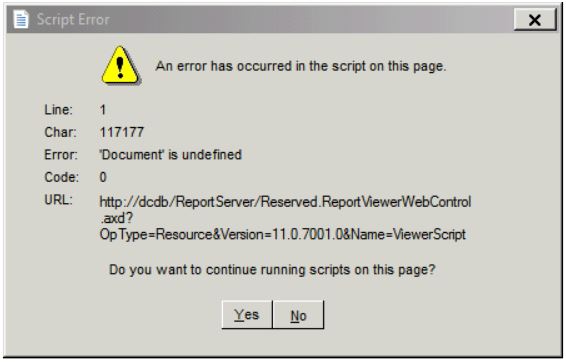
SSRS_5F00_Report.JPG

How can I fix that problem?

And we haven't this error in IE 11 and Google Chrome.

Thank you for your help!

*This post is locked for comments

I have the same question (0)
  • Martin Dráb Profile Picture
    237,880 Most Valuable Professional on at

    So does it occur when rendering a report of when selecting parameters?

    What was the update?

    Is it the same of pure SSRS reports? If so, the problem isn't related to AX and you should rather ask in an SSRS forum.

  • Community Member Profile Picture
    on at

    >>So does it occur when rendering a report of when selecting parameters?

    when selecting parameters

    >>What was the update?

    It was list of windows updates

    >>Is it the same of pure SSRS reports? If so, the problem isn't related to AX and you should rather ask in an SSRS forum.

    In web-browsers there is no problems, only in Ax.

    Could it be related with version of web-browser?

  • Martin Dráb Profile Picture
    237,880 Most Valuable Professional on at

    Okay, if it's not a about rendering, we should fix the title ("Problem with rendering ssrs report").

    To understand which update caused this (if any), you can test it in another environment and apply hotfixes one by one. Also, if you have extended support for AX 2009, you can create a support request.

  • Community Member Profile Picture
    on at

    So I checked SSRS report in Internet Explorer on machine with AX 2009, and it is working correctly. What browser or components uses AX 2009 for showing SSRS reports?

  • Verified answer
    Community Member Profile Picture
    on at

    The problem was fixed by that way:

    - Open the reportviewer.aspx file located in \Microsoft SQL Server\MSRS11.MSSQLSERVER\Reporting Services\ReportServer\Pages in notepad.

    - Change the meta tag from <meta http-equiv="X-UA-Compatible" content="IE=5"> to <meta http-equiv="X-UA-Compatible" content="IE=Edge">

Under review

Thank you for your reply! To ensure a great experience for everyone, your content is awaiting approval by our Community Managers. Please check back later.

Helpful resources

Quick Links

Responsible AI policies

As AI tools become more common, we’re introducing a Responsible AI Use…

Neeraj Kumar – Community Spotlight

We are honored to recognize Neeraj Kumar as our Community Spotlight honoree for…

Leaderboard > 🔒一 Microsoft Dynamics AX (Archived)

#1
Martin Dráb Profile Picture

Martin Dráb 4 Most Valuable Professional

#1
Priya_K Profile Picture

Priya_K 4

#3
MyDynamicsNAV Profile Picture

MyDynamicsNAV 2

Last 30 days Overall leaderboard

Featured topics

Product updates

Dynamics 365 release plans
Liquid error: parsing "/globalsearch/?q=star+health+insurance++24+months+waiting+period+health+issue++name+" - Nested quantifier +.



