web
You’re offline. This is a read only version of the page.
close
Skip to main content

Notifications

Announcements

No record found.

Community site session details

Community site session details

Session Id :
Microsoft Dynamics 365 | Integration, Dataverse...
Answered

"Sort by" options / field

(0) ShareShare
ReportReport
Posted on by 411

Hello everyone,

Is it possible to add the "Sort by" field to some specific views who doesnt have this option please ?

pastedimage1609707415523v2.png

Best regards.

I have the same question (0)
  • Verified answer
    mobeenmohsin Profile Picture
    on at

    Hi Archer,

    Please find the information using below document:

    https://docs.microsoft.com/en-us/dynamics365/customerengagement/on-premises/customize/configure-sorting 

    Thank you.

    Best Regards,

    Mobeen Mohsin

  • Archetype Profile Picture
    411 on at

    Hello, Thanks for your answer.

    I think i misspoke, I wanted to add the "group by" feature to some views who doesnt has it.

    Exemple : Orders entity view below

    pastedimage1609748622204v1.png

    and Approval entity view has it : 

    pastedimage1609748715110v2.png

    Best regards.

  • Verified answer
    Wahaj Rashid Profile Picture
    11,321 on at

    Hi,

    You need to enable Editable Grid control for the Order Entity.

    Here are the steps to enable Editable Grid control:

    • Go to Advanced Settings -> Customizations -> Customize this System.
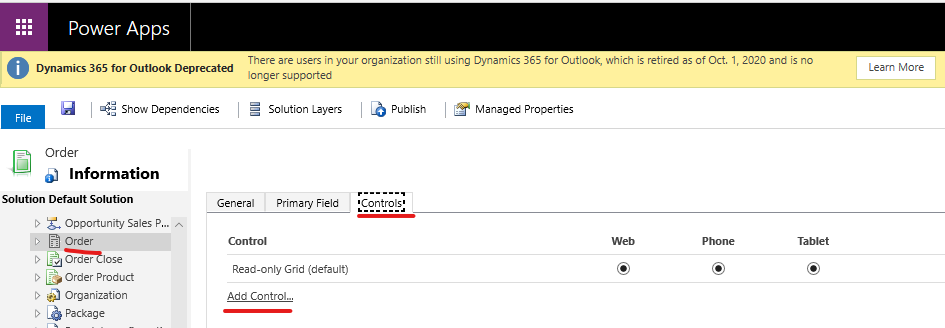
    • Expand the Entities -> Order.
    • On the Controls tab, click on Add Control.
    • pastedimage1609752206955v1.png
    • Select Editable Grid from the list and click on Add.

    pastedimage1609752333338v3.png

    • Click on the radio button under Web for Editable Grid Control to enable it and click Save on the ribbon.

    pastedimage1609752472543v4.png

    • Publish the changes.

    Refresh your browser, you could see Group By is added in the Order Views.

    pastedimage1609752546635v5.png

    Let me know if you need further clarification.

    Best,

    Wahaj

    (if it helps, please mark this answer as verified)

  • Archetype Profile Picture
    411 on at

    Thanks you very much ;)

  • Verified answer
    Wahaj Rashid Profile Picture
    11,321 on at

    Glad it helped :)

Under review

Thank you for your reply! To ensure a great experience for everyone, your content is awaiting approval by our Community Managers. Please check back later.

Helpful resources

Quick Links

Responsible AI policies

As AI tools become more common, we’re introducing a Responsible AI Use…

Neeraj Kumar – Community Spotlight

We are honored to recognize Neeraj Kumar as our Community Spotlight honoree for…

Leaderboard > Microsoft Dynamics 365 | Integration, Dataverse, and general topics

#1
Siv Sagar Profile Picture

Siv Sagar 93 Super User 2025 Season 2

#2
#ManoVerse Profile Picture

#ManoVerse 76

#3
Martin Dráb Profile Picture

Martin Dráb 64 Most Valuable Professional

Last 30 days Overall leaderboard

Product updates

Dynamics 365 release plans



