web
You’re offline. This is a read only version of the page.
close
Skip to main content

Notifications

Announcements

No record found.

Community site session details

Community site session details

Session Id :
Customer experience | Sales, Customer Insights,...
Answered

Throw message to user after plugin is successfully completed

(0) ShareShare
ReportReport
Posted on by 165

Hello,

I've made a plugin which is triggered by an action (and a custom button) on the opportunity form. What it does: 
It creates orders and entitlements depending on the number of the opportunity products.
What I need is to throw a message to the user, when the plugin has finished its job, like this: 
"{Entitlements.count} entitlements and {Orders.count} orders have successfully been created"

I have already read that the only way to do this is by throwing an exception, which is not a good idea.
Are there any other options?

Thank you in advance.

I have the same question (0)
  • Verified answer
    Pawar Pravin  Profile Picture
    5,237 on at

    Hi ,

    You are correct, throwing exception is not good way to show message to the user. Regardless of exception you can show alert on success of custom action execution.

    Please refer below url for more details:

    pravinpawarweb.wordpress.com/.../

    pravinpawarweb.wordpress.com/.../

  • irenegr Profile Picture
    165 on at

    Hello,

    Thank you for the response. I've read the blogs you posted, really useful information. I need some guidance though:

    Right now I have an action with no parameters at all. This action is triggered by a custom button. Also this action triggers the plugin (action is used as a step). In the alert window, I need to show to the users 2 numbers (number of orders created and number of entitlements created). So, should I add 2 output parameters to the action that will be updated from the plugin?

  • Suggested answer
    Pawar Pravin  Profile Picture
    5,237 on at

    Yes, you need to add output parameters so that you can check output value in JS to trigger alert.

  • irenegr Profile Picture
    165 on at

    Hello,

    I added output parameter (called 'resultString');

    In my plugin I added this line: context.OutputParameters["resultString" = "hello";

    In my devtools I can see the output when I call the action:
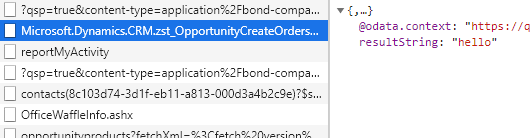
    8831.Capture.PNG

    and now I want to show an alert to the user containing this string but I guess I am missing something. This is my javascript code, line 16 is where I use the output

    function createordersbutton() {
    
    debugger;
    var entityId = Xrm.Page.data.entity.getId().replace("{", "").replace("}", "");
    
    var req = new XMLHttpRequest();
    req.open("POST", Xrm.Page.context.getClientUrl()   "/api/data/v9.1/opportunities(" entityId ")/Microsoft.Dynamics.CRM.zst_OpportunityCreateOrdersandEntitlements", false);
    req.setRequestHeader("OData-MaxVersion", "4.0");
    req.setRequestHeader("OData-Version", "4.0");
    req.setRequestHeader("Accept", "application/json");
    req.setRequestHeader("Content-Type", "application/json; charset=utf-8");
    req.onreadystatechange = function() {
        if (this.readyState === 4) {
            req.onreadystatechange = null;
            if (this.status === 204) {
                Xrm.Utility.alertDialog(this.resultString);
            } else {
                Xrm.Utility.alertDialog(this.statusText);
            }
        }
    };
    req.send();
    
    }


    Anh help would be much appreciated.

  • Suggested answer
    Pawar Pravin  Profile Picture
    5,237 on at

    As mentioned in blog please add success callback function to get output parameter in JS:

    pravinpawarweb.wordpress.com/.../

  • irenegr Profile Picture
    165 on at

    I did it like this

           if (this.status === 204 || this.status === 200) {

              result = JSON.parse(this.response);

              Xrm.Utility.alertDialog(result.resultString);

    Thank you.

Under review

Thank you for your reply! To ensure a great experience for everyone, your content is awaiting approval by our Community Managers. Please check back later.

Helpful resources

Quick Links

Responsible AI policies

As AI tools become more common, we’re introducing a Responsible AI Use…

Neeraj Kumar – Community Spotlight

We are honored to recognize Neeraj Kumar as our Community Spotlight honoree for…

Leaderboard > Customer experience | Sales, Customer Insights, CRM

#1
Tom_Gioielli Profile Picture

Tom_Gioielli 83 Super User 2025 Season 2

#2
Gerardo Rentería García Profile Picture

Gerardo Rentería Ga... 49 Most Valuable Professional

#3
#ManoVerse Profile Picture

#ManoVerse 40

Last 30 days Overall leaderboard

Product updates

Dynamics 365 release plans



