web
You’re offline. This is a read only version of the page.
close
Skip to main content

Announcements

News and Announcements icon
Community site session details

Community site session details

Session Id :
Finance | Project Operations, Human Resources, ...
Answered

Default Descriptions on Customer Payment Journal Voucher

(1) ShareShare
ReportReport
Posted on by 229

Dear all

I hope this post finds you well.

I have defined the following default description:
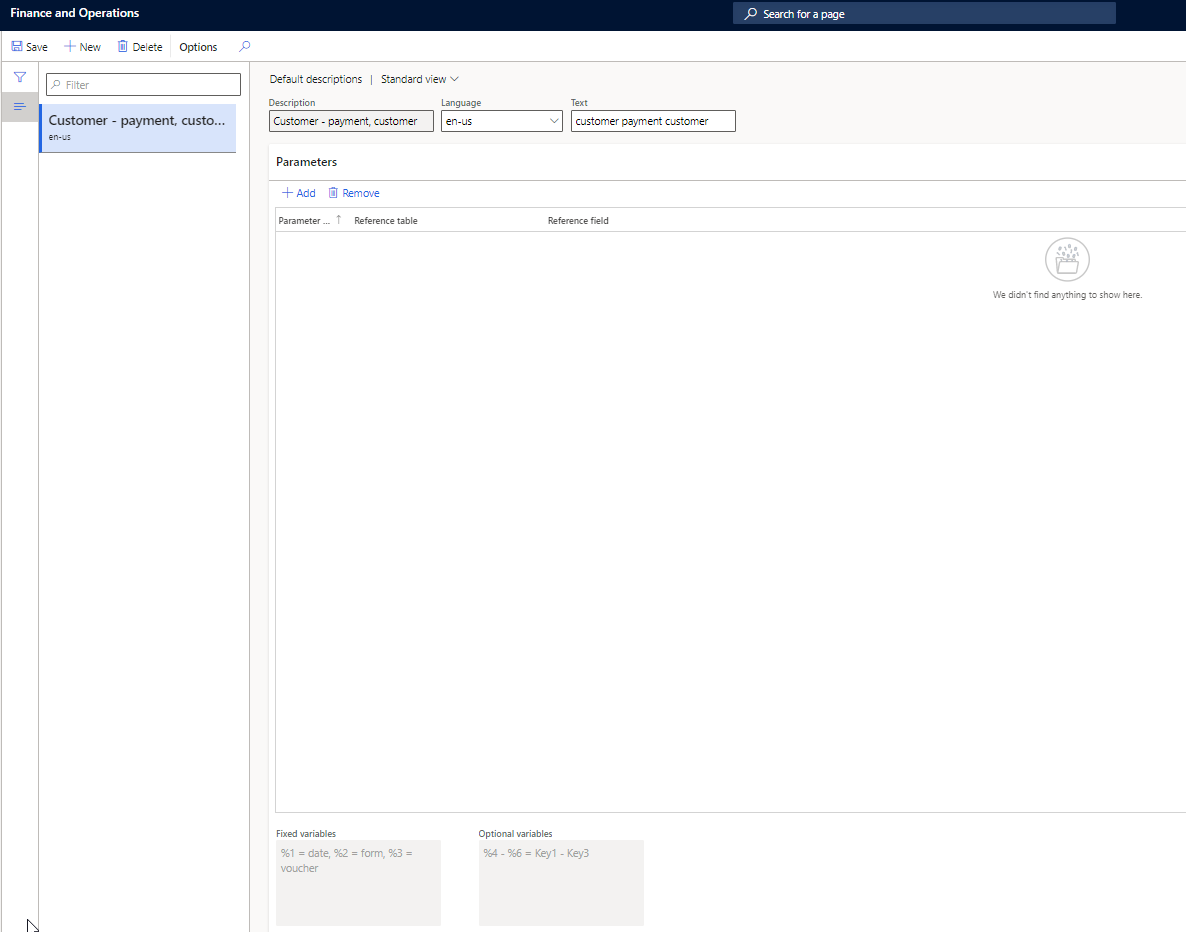
8154.print1.png

When the payment journal is posted I can see the description in the customer's transactions: 
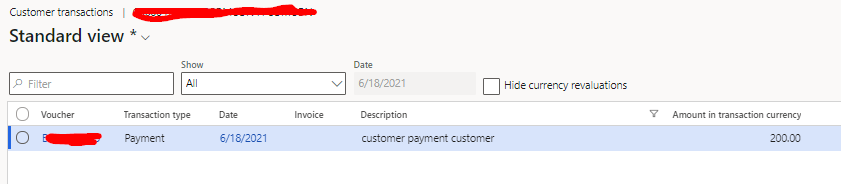
pastedimage1624012416902v2.png

In the Voucher, I can only see it in one of the lines:

pastedimage1624012733272v3.png

And in the actual Journal I also do not have any description:

pastedimage1624012841073v4.png

Does anyone know how can I also populate this two fields with the same description? 

Thanks.

I have the same question (1)
  • Suggested answer
    saurabh bharti Profile Picture
    15,059 Moderator on at

    Looks like we are missing this default description, like how we have Customer -invoice for both ledger and customer. We should have for payments but for payment we have only for customer trans

    pastedimage1624013981294v1.png

  • Afonso Rodrigues Profile Picture
    229 on at

    Yes, exactly. I have done this for Invoices and it worked fine with those two default descriptions. But for payments I was wondering if maybe there is any other default description.

  • Suggested answer
    Ludwig Reinhard Profile Picture
    Microsoft Employee on at

    Hello Alfonso,

    Can you share details how your method of payment is setup?

    Depending on this setup the details from the invoice will be inherited into the payment journal and voucher.

    Best regards,

    Ludwig

  • Afonso Rodrigues Profile Picture
    229 on at

    Hi Ludwig

    The payment method used in the example I gave is set up as follows:

    pastedimage1624028989591v1.png

    But this setup can change regarding the type of sale (if it is retail or not).
    In fact, If I set up the Default Description to have the payment method, it will only shows the payment method if the used payment method is defined in the AR Payment Methods. 
    If it is a retail sale, with the used payment method defined in the retail payment methods, it will not appear in the description. 

  • Verified answer
    Ludwig Reinhard Profile Picture
    Microsoft Employee on at

    Hi Alfonso,

    In your case the invoice description should be inherited into the payment voucher.

    Can you double check and compare your setup with what has been described here:

    dynamicsax-fico.com/.../

    Best regards,

    Ludwig

  • Afonso Rodrigues Profile Picture
    229 on at

    Hello Ludwig

    Thank you for your answer.

    I have watched the video that you mentioned and applied the corresponding configurations.

    As mentioned in the video, the payment description is only populated if we post the Customer Payment Journal via Payment Proposal. However, in the scenario that I am working, I have a specification where the Customer Payment Journal is automatic posted and settled against the Invoice upon the Invoice Posting moment. This makes it impossible to post the Journals via payment proposal and, thus, the description remains blank.

    Do you have any ideia how can make this work in any other way?

    Thank you.

  • Verified answer
    Ludwig Reinhard Profile Picture
    Microsoft Employee on at

    Hi Alfonso,

    I see.

    If you make the payment and settlement at once then you might need a system modification. Please have a talk with a colleague from the development department to see what can be modified to achieve what you need.

    Best regards,

    Ludwig

  • Afonso Rodrigues Profile Picture
    229 on at

    Hi Ludwig.

    Thank you for your attention on this question.

Under review

Thank you for your reply! To ensure a great experience for everyone, your content is awaiting approval by our Community Managers. Please check back later.

Helpful resources

Quick Links

Season of Sharing Community Challenge Winners!

Congratulations to our community stars!

Women in Power Builds Momentum

Expanding mentorship, skilling, and AI innovation

Congratulations to the June Top 10 Community Leaders

These are the community rock stars!

Leaderboard > Finance | Project Operations, Human Resources, AX, GP, SL

#1
André Arnaud de Calavon Profile Picture

André Arnaud de Cal... 414 Super User 2026 Season 1

#2
Subra Profile Picture

Subra 352

#3
Martin Dráb Profile Picture

Martin Dráb 275 Most Valuable Professional

Last 30 days Overall leaderboard

Product updates

Dynamics 365 release plans
