web
You’re offline. This is a read only version of the page.
close
Skip to main content

Announcements

No record found.

News and Announcements icon
Community site session details

Community site session details

Session Id :
Dynamics 365 Community / Forums / Finance forum / Exception occurred on ...
Finance forum

Exception occurred on the metadata service on client or server - error

(0) ShareShare
ReportReport
Posted on by 15

Hi experts,

Please help me in solving this error I get while selecting a Query for a  SSRS report's dataset.

I have Microsoft Dynamics 365 for Operations in my VM. 

  1. In Visual Studio 2015, I have created a new project and trying to customize an existing report.
  2. I open the report. Go to the dataset and select "Query" as the "Data Source Type" in the properties window. Go to the Query property and click "..." to open the dialog. 
  3. Select any Query and click next, I get the error "Exception occurred on the metadata service on client or server".
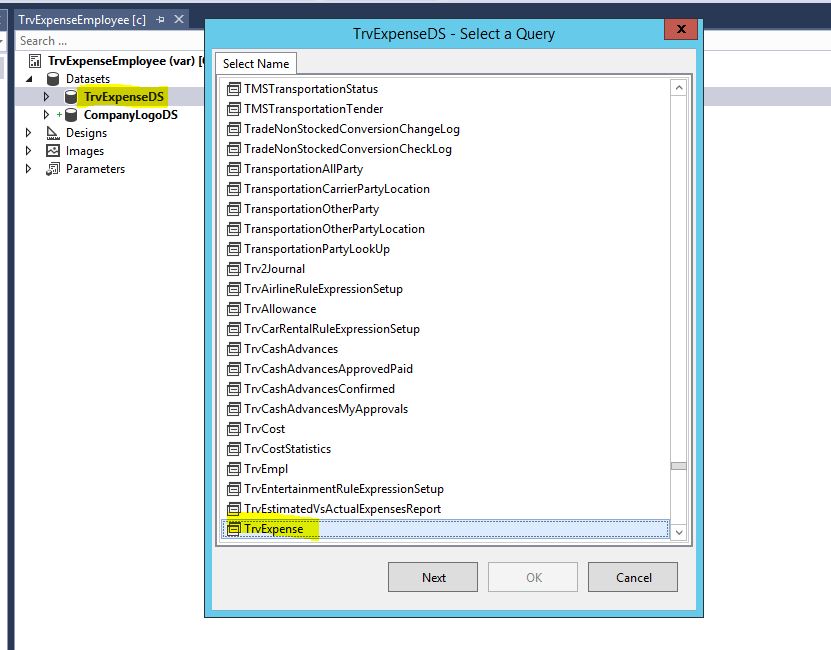
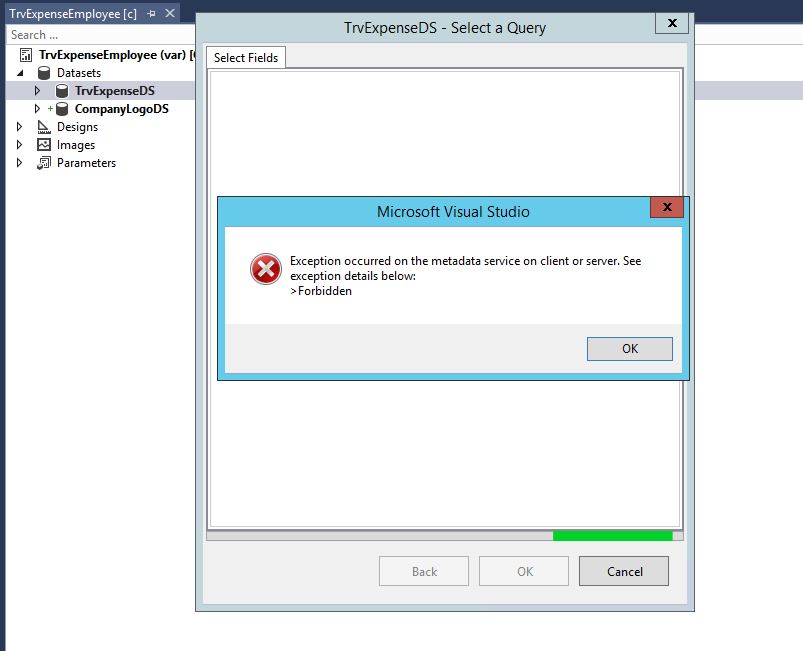
2063.MetadataError1.JPG

6787.MetadataError2.JPG

Thanks,

Syed

I have the same question (0)
  • Martin Dráb Profile Picture
    238,751 Most Valuable Professional on at

    What if you log into Operations and try it again?

  • Syed@Dynamics365 Profile Picture
    15 on at

    Hi Martin,

    I did login again into Operations. Restarted the VM . Restarted all services.

    None of the above helped.

    Thanks,

    Syed

  • Syed@Dynamics365 Profile Picture
    15 on at

    Hi Martin,

    I did try it. I log into Operations. Restarted the VM, restarted all the services. Still the error persists.

    Thanks

  • Martin Dráb Profile Picture
    238,751 Most Valuable Professional on at

    I see two options: either you look logs for more details, because you can anything until you know what's wrong, or you simply create a support request with Microsoft.

  • faiz7049 Profile Picture
    2,430 on at

    Are you connected with domain?

    i was same error before because i was not connect with domain.

  • faiz7049 Profile Picture
    2,430 on at

    and also try to run Visual Studio as administrator

  • Sakthiananth Profile Picture
    2,127 on at

    I was facing this issue but I managed to get rid of this error by doing the successful completed packages build and DB sync. after this successful process do deploy the reports using power shell. all the best Syed.

  • Community Member Profile Picture
    on at

    Hello,

    I was wondering if you had found a solution to this issue ?

    Thank you

  • Verified answer
    emincas Profile Picture
    on at

    Hi Matt,

    We have solved the problem.

    When try to change Dataset on SSRSReports, VS try to call the following webservice https://usnconeboxax1aos.cloud.onebox.dynamics.com/Services/MetadataService/

    with AuthUser administrator@contosoax7.onmicrosoft.com


    This settings is present in file C:\AOSService\PackagesLocalDirectory\Bin\DynamicsDevConfig.xml at the key 

    <OfflineAuthenticationAdminEmail>administrator@contosoax7.onmicrosoft.com</OfflineAuthenticationAdminEmail>


    We have changed this settings with AAD user, reopen VS and all works fine.

    8484.76202.1.png

  • Frantisek Profile Picture
    125 on at

    Reply to @emincas.


    Thank you. I can confirm that this solution works perfectly.

Under review

Thank you for your reply! To ensure a great experience for everyone, your content is awaiting approval by our Community Managers. Please check back later.

Helpful resources

Quick Links

November Spotlight Star - Khushbu Rajvi

Congratulations to a top community star!

Forum Structure Changes Coming on 11/8!

In our never-ending quest to help the Dynamics 365 Community members get answers faster …

Dynamics 365 Community Platform update – Oct 28

Welcome to the next edition of the Community Platform Update. This is a status …

Leaderboard > Finance

Last 30 days Overall leaderboard

Featured topics

Product updates

Dynamics 365 release plans
