Hi all,
I've created new Duplicate Detection rule and tried publishing the Duplicate Detection Rule, I got the below error while publishing irrespective of the Duplicate Detection Condition and the Entity.
I'm not sure why this really occurs.
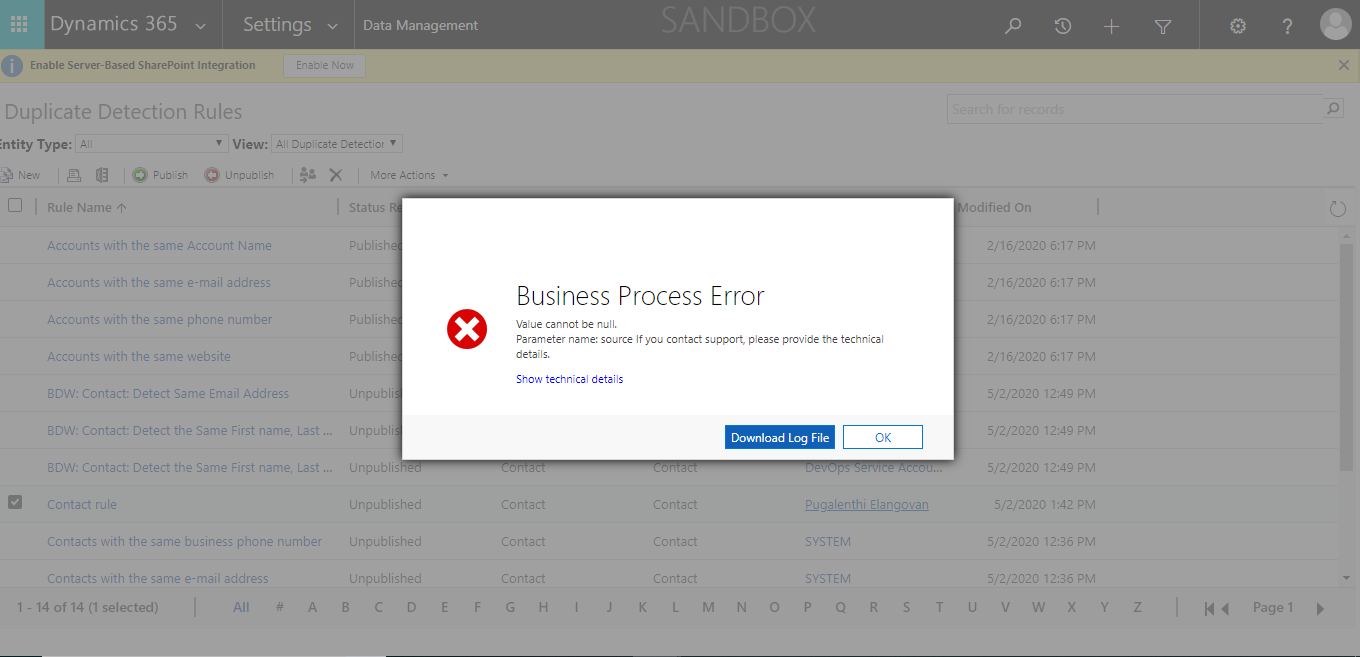
Can Anybody help me on this?
Error Log:
Unhandled exception:
Exception type: System.ServiceModel.FaultException`1[Microsoft.Xrm.Sdk.OrganizationServiceFault]
Message: System.Web.HttpUnhandledException (0x80004005): Exception of type 'System.Web.HttpUnhandledException' was thrown. ---> Microsoft.Crm.CrmException: Value cannot be null.
Parameter name: source
at Microsoft.Crm.Application.Pages.Dialogs.PublishDuplicateRuleDialogForm.ConfigureForm()
at Microsoft.Crm.Application.Controls.AppUIPage.OnPreRender(EventArgs e)
at Microsoft.Crm.Application.Controls.AppPage.OnPreRender(EventArgs e)
at System.Web.UI.Control.PreRenderRecursiveInternal()
at System.Web.UI.Page.ProcessRequestMain(Boolean includeStagesBeforeAsyncPoint, Boolean includeStagesAfterAsyncPoint)
at System.Web.UI.Page.HandleError(Exception e)
at System.Web.UI.Page.ProcessRequestMain(Boolean includeStagesBeforeAsyncPoint, Boolean includeStagesAfterAsyncPoint)
at System.Web.UI.Page.ProcessRequest(Boolean includeStagesBeforeAsyncPoint, Boolean includeStagesAfterAsyncPoint)
at System.Web.UI.Page.ProcessRequest()
at System.Web.UI.Page.ProcessRequest(HttpContext context)
at System.Web.HttpApplication.CallHandlerExecutionStep.System.Web.HttpApplication.IExecutionStep.Execute()
at System.Web.HttpApplication.ExecuteStepImpl(IExecutionStep step)
at System.Web.HttpApplication.ExecuteStep(IExecutionStep step, Boolean& completedSynchronously): Microsoft Dynamics CRM has experienced an error. Reference number for administrators or support: #9F4CAA9ADetail:
<OrganizationServiceFault xmlns:i="">www.w3.org/.../XMLSchema-instance" xmlns="">schemas.microsoft.com/.../Contracts">
<ActivityId>3905c8bf-d3a4-45e1-8ff4-3eda4ea914f3</ActivityId>
<ErrorCode>-2147220970</ErrorCode>
<ErrorDetails xmlns:d2p1="">schemas.datacontract.org/.../System.Collections.Generic" />
<HelpLink i:nil="true" />
<Message>System.Web.HttpUnhandledException (0x80004005): Exception of type 'System.Web.HttpUnhandledException' was thrown. ---> Microsoft.Crm.CrmException: Value cannot be null.
Parameter name: source
at Microsoft.Crm.Application.Pages.Dialogs.PublishDuplicateRuleDialogForm.ConfigureForm()
at Microsoft.Crm.Application.Controls.AppUIPage.OnPreRender(EventArgs e)
at Microsoft.Crm.Application.Controls.AppPage.OnPreRender(EventArgs e)
at System.Web.UI.Control.PreRenderRecursiveInternal()
at System.Web.UI.Page.ProcessRequestMain(Boolean includeStagesBeforeAsyncPoint, Boolean includeStagesAfterAsyncPoint)
at System.Web.UI.Page.HandleError(Exception e)
at System.Web.UI.Page.ProcessRequestMain(Boolean includeStagesBeforeAsyncPoint, Boolean includeStagesAfterAsyncPoint)
at System.Web.UI.Page.ProcessRequest(Boolean includeStagesBeforeAsyncPoint, Boolean includeStagesAfterAsyncPoint)
at System.Web.UI.Page.ProcessRequest()
at System.Web.UI.Page.ProcessRequest(HttpContext context)
at System.Web.HttpApplication.CallHandlerExecutionStep.System.Web.HttpApplication.IExecutionStep.Execute()
at System.Web.HttpApplication.ExecuteStepImpl(IExecutionStep step)
at System.Web.HttpApplication.ExecuteStep(IExecutionStep step, Boolean& completedSynchronously): Microsoft Dynamics CRM has experienced an error. Reference number for administrators or support: #9F4CAA9A</Message>
<Timestamp>2020-05-02T07:57:47.3549159Z</Timestamp>
<ExceptionRetriable>false</ExceptionRetriable>
<ExceptionSource i:nil="true" />
<InnerFault>
<ActivityId>3905c8bf-d3a4-45e1-8ff4-3eda4ea914f3</ActivityId>
<ErrorCode>-2147220891</ErrorCode>
<ErrorDetails xmlns:d3p1="">schemas.datacontract.org/.../System.Collections.Generic" />
<HelpLink i:nil="true" />
<Message>Value cannot be null.
Parameter name: source</Message>
<Timestamp>2020-05-02T07:57:47.3549159Z</Timestamp>
<ExceptionRetriable>false</ExceptionRetriable>
<ExceptionSource i:nil="true" />
<InnerFault i:nil="true" />
<OriginalException i:nil="true" />
<TraceText>
[Microsoft.Dynamics.Fps: Microsoft.Dynamics.ScheduleCommon.Fps.FpsPlugin]
[a4fd3ba0-2ab0-4f31-8527-28490ba35390: Resource Scheduling - Microsoft Dynamics Fps: PublishXml (post-operation)]
FpsPlugin: PluginLocal.Create, Depth: 1
FpsPlugin: PluginLocal.Create, Depth: 1
FpsPlugin: PluginContext Start
FpsPlugin: MessageName: Publish
FpsPlugin: PrimaryEntityName: duplicaterule
FpsPlugin: PrimaryEntityId: 00000000-0000-0000-0000-000000000000
FpsPlugin: SecondaryEntityName: none
FpsPlugin: Stage: 40
FpsPlugin: PreEntityImages.Count: 0
FpsPlugin: PostEntityImages.Count: 0
FpsPlugin: UserId: b6bfb919-ad62-ea11-a813-000d3a86ac79
FpsPlugin: InitiatingUserID: b6bfb919-ad62-ea11-a813-000d3a86ac79
FpsPlugin: IsolationMode: 1
FpsPlugin: Mode: 0
FpsPlugin: OrganizationName: orga4ad5349
FpsPlugin: OrganizationId: 48f2e196-3ba1-4709-a422-1cea4dcd8027
FpsPlugin: BusinessUnitId: dbf6a91d-a850-ea11-a813-000d3a86b155
FpsPlugin: CorrelationId: 6878b4a5-f064-4392-9bc9-e670831f33df
FpsPlugin: RequestId: 8b6e8e20-467d-463f-90f6-c912a1d7edbb
FpsPlugin: OperationId: 8b6e8e20-467d-463f-90f6-c912a1d7edbb
FpsPlugin: IsInTransaction: False
FpsPlugin: Depth: 1
FpsPlugin: IsExecutingOffline: False
FpsPlugin: PluginContext End
FpsPlugin: PluginLocal.Create, Depth: 1
FpsPlugin: InitializePlugin: local
FpsPlugin: ConfigurePluginFlagsSupportInternal()
FpsPlugin: CreateEntityOperation(duplicaterule)
FpsPlugin: PluginLocal.Dispose, Depth: 1
FpsPlugin:
Value cannot be null.
Parameter name: source
System.ArgumentNullException: Value cannot be null.
Parameter name: source
at System.Linq.Enumerable.Contains[TSource](IEnumerable`1 source, TSource value, IEqualityComparer`1 comparer)
at Microsoft.Dynamics.ScheduleCommon.Foundation.Operations.OperationFactory.<>c__DisplayClass9_0.<GetEntityOperationType>b__0(Type t)
at System.Linq.Enumerable.WhereArrayIterator`1.MoveNext()
at System.Linq.Enumerable.SingleOrDefault[TSource](IEnumerable`1 source)
at Microsoft.Dynamics.ScheduleCommon.Foundation.Operations.OperationFactory.GetEntityOperationType(String logicalName, Type[] publicTypes)
at Microsoft.Dynamics.ScheduleCommon.Foundation.Operations.OperationFactory.Create(IPluginExecutionContext pluginContext)
at Microsoft.Dynamics.ScheduleCommon.Foundation.Plugins.PluginBase.ExecutePlugin(ITracingService tracingService, IPluginExecutionContext pluginContext, IOrganizationServiceFactory serviceFactory, ISharedVariablesService sharedVariablesService)
at Microsoft.Dynamics.ScheduleCommon.Foundation.Plugins.SchedulePlugin.ExecutePlugin(ITracingService tracingService, IPluginExecutionContext pluginContext, IOrganizationServiceFactory serviceFactory, ISharedVariablesService sharedVariablesService)
at Microsoft.Dynamics.ScheduleCommon.Foundation.Plugins.PluginBase.Execute(IServiceProvider serviceProvider)
FpsPlugin: PluginLocal.Dispose, Depth: 1
FpsPlugin: PluginLocal.Dispose, Depth: 1
</TraceText>
</InnerFault>
<OriginalException i:nil="true" />
<TraceText i:nil="true" />
</OrganizationServiceFault>


