web
You’re offline. This is a read only version of the page.
close
Skip to main content

Notifications

Announcements

No record found.

Community site session details

Community site session details

Session Id :
Finance | Project Operations, Human Resources, ...
Answered

How to restrict to see another user request( record) in prepared by me form in ax 2012

(0) ShareShare
ReportReport
Posted on by 4

Dear Expertise ,

I have setup a Maintenance Request form where user can create a request for any maintenance . This system is like Purchase Requisition .

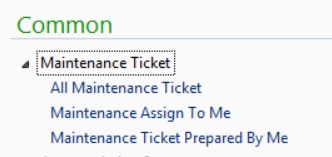
For this I am showing three form on front like below screenshot .
1541.jpg

 1 -  In All Maintenance  Ticket -  Manager can see All the Maintenance Ticket created by all users in Company .

2 - In  Maintenance Assign to Me -  Users Like mangers can see the ticket assign to him for approval .

3 -  In Maintenance Ticket Prepared by me -  User can see only self created ticket .

Now 1 & 2 points are working very fine , But the issue in 3rd point is currently  all users able to see self and other users ticket as well .

Now all users is able to see each other tickets in this form , My requirement is how to restrict other users ticket to other users .  

Please suggest .

I have the same question (0)
  • Verified answer
    nmaenpaa Profile Picture
    101,162 Moderator on at

    I would say 2 and 3 should work quite the same way. How did you implement 2?

    Anyway you can either use security to restrict the visibility of data, or add query range on the form to filter based on the current user id.

  • Verified answer
    Gunjan Bhattachayya Profile Picture
    35,423 on at

    Hi Naveen,

    Did you enable the "Created by " field for the table created?

    If so, you can add a range in the query you are using for "Maintenance Ticket Prepared by me" list page and set a value "curUserId()"

  • Naveen Mishra Profile Picture
    4 on at

    Point 2 is for when user create his ticket in  prepared by me form and click on Submit button this request will display to his manager in assign to me form . (Workflow added).

    I want to go with your second point -  "add query range on the form to filter based on the current user id".   and i already created below query and using this in query in prepared by me form .    

    pastedimage1599643789068v1.png

    Please let me know if any thing is missing in this query or need to do some more work on this query to achieve this .

  • Gunjan Bhattachayya Profile Picture
    35,423 on at

    Hi Naveen,

    I don't think anything else is needed. Set the value for the range and test if it works as expected.

  • Naveen Mishra Profile Picture
    4 on at

    Hi Gunjan,

    After add the value like below screenshot  ,  i am not able see my record as well . please suggest .

    pastedimage1599644613129v2.png

  • Suggested answer
    nmaenpaa Profile Picture
    101,162 Moderator on at

    You need to assign the range in runtime (when the form is opened).

    Your current range will use the string "curUserId()" as a range as far as I know.

  • Naveen Mishra Profile Picture
    4 on at

    Not understand sir . Please explain .

  • Suggested answer
    Gunjan Bhattachayya Profile Picture
    35,423 on at

    Sorry, I didn't see your earlier post.

    For the user you are testing with, has any records been created? Can you created a new record and test?

  • Naveen Mishra Profile Picture
    4 on at

    Hi Gunjan ,

    I am creating new record after set range and value like above ,  but the record is not displaying .

  • Gunjan Bhattachayya Profile Picture
    35,423 on at

    Naveen,

    Please change the value to (curUserId()), with the brackets, and check if that works.

Under review

Thank you for your reply! To ensure a great experience for everyone, your content is awaiting approval by our Community Managers. Please check back later.

Helpful resources

Quick Links

Responsible AI policies

As AI tools become more common, we’re introducing a Responsible AI Use…

Neeraj Kumar – Community Spotlight

We are honored to recognize Neeraj Kumar as our Community Spotlight honoree for…

Leaderboard > Finance | Project Operations, Human Resources, AX, GP, SL

#1
Martin Dráb Profile Picture

Martin Dráb 451 Most Valuable Professional

#2
André Arnaud de Calavon Profile Picture

André Arnaud de Cal... 428 Super User 2025 Season 2

#3
BillurSamdancioglu Profile Picture

BillurSamdancioglu 239 Most Valuable Professional

Last 30 days Overall leaderboard

Product updates

Dynamics 365 release plans
