web
You’re offline. This is a read only version of the page.
close
Skip to main content

Notifications

Announcements

No record found.

Community site session details

Community site session details

Session Id :
Microsoft Dynamics AX (Archived)

Do not delete data from datasource salesparmline in saleseditlines form?

(0) ShareShare
ReportReport
Posted on by 578

Good day!

I have the following code to open the proforma without closing form, but when I open the report the form is cleaned, in specific salesparmline, can it be avoided?

---

    salesFormLetter.initParameters(salesParmUpdate.data(),
                                   Printout::Current,
                                   NoYes::Yes,
                                   NoYes::No,
                                   NoYes::No,
                                   NoYes::No,
                                   NoYes::Yes,
                                   NoYes::No,
                                   false
                                   );

    salesFormLetter.editLinesChanged(editLinesChanged);
    salesFormLetter.reArrangeNow(reArrangeNow);
salesFormLetter.proforma(true);
salesFormLetter.printFormLetter(true);
salesFormLetter.run();

---
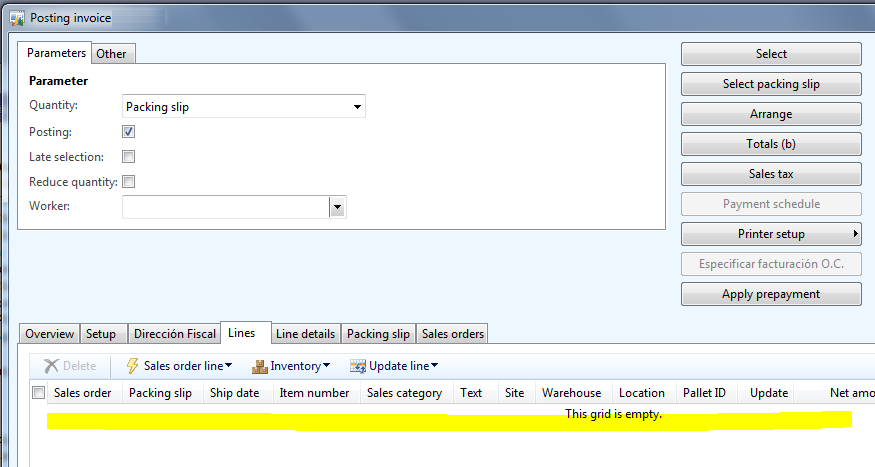
8156.ds.PNG

Thanks in advance

(This is a solution that I found to my question made here, however I think it is another problem and that is why open a new topic).

*This post is locked for comments

I have the same question (0)
  • Suggested answer
    Satish Panwar Profile Picture
    14,671 Moderator on at

    Hi ismaelivan,

    Do you have packing slip posted on the order already? If not, you need to call the above form and pass value "All" instead of packing slip. If you notice in screenshot above, the value in quantity field is packing slip. The lines on the form are controlled with the help of quantity file in header.

    salesFormLetter.specQty (SalesUpdate::All);

  • ismaelivan Profile Picture
    578 on at

    Hello Satish, thanks, When selecting the order and invoicing, the line appears

    4606.ds1.PNG

    But in the preview button, I add the previous code, that opens the proforma and keeps the form open, however it deletes salesparmline.

    I try to find where to reread the datasource, is possible?

    Sorry, by mistake I clicked on "Flag as spam/abuse", how can I solve it?

  • Suggested answer
    Satish Panwar Profile Picture
    14,671 Moderator on at

    if it's getting cleared, not sure if you will be able to get them back again unless you call the code that MS used to launching this form to begin with. When you open the form above (salesparmline and other tables are initialized and there is lot of logic in place). Let others weight in and see if there is any solution.

    As an alternative approach (if you don't get solution to above), see if this works:

    1. Use standard proforma form.. users enter whatever data they need to enter)

    2. Store data in a separate table.

    3. user preview and everything looks good.

    4. user now click on invoice form, you get the data that was saved earlier so users don't have to enter it again, user click ok and invoice is posted and you clear the data that was saved in your custom table.

  • ismaelivan Profile Picture
    578 on at

    Thanks Satish

    2. Store data in a separate table.

    I'm sorry but, I do not understand this point, I should also keep the data of these other tables?

    7446.ds3.PNG

    and once saved, how could you set the values to the form?

    Also in some cases, they select packinslip (custpackingslipjour) and also those lines are eliminated

    7446.ds3.PNG

  • Suggested answer
    Satish Panwar Profile Picture
    14,671 Moderator on at

    See if below make sense... Users will input data on the form "Posting invoice", you will use this data and show them the invoice. If it looks good to them, they will then post the invoice.

    First of all identify what is the data they will enter on this form.. because most of the data is populated from sales order, unless there is quantity change, we don't see any user modifying anything on the posting invoice form. If the question from user is only to not open the form twice, then you should revisit the request and convince them to just run the steps twice. I don't see  users reviewing proforma invoice always unless order volume is really low. Most of the companies run batch invoicing after order is shipped and details are picked from sales order.

    Now coming back to what you asked above:

    1. Say user enter data in 2 fields (assuming custom field addition) on posting invoice form, when user click on ok to preview the invoice, get data from these two fields and store in separate table (Or add a field or two in order header - Make sure order number is stored in the reference as it will be used to retrieve the information later on).

    2. User will preview the invoice and it looks good.

    3. user click on invoice generation now, while loading the form, you see if the value is present for the order in the custom fields you added, if yes, you populate the value on the posting invoice form. they click ok and now the invoice is posted/processed. you may want to store the same data on the invoice journal too (so that if user try to reprint the invoice, the data can be shown again). If data is same for multiple invoices then you can just pull that from the sales order table and don't have store them against the invoice (custinvoicejour). picking data from posting invoice form and pushing it to custinvoicejour/trans will require additional modifications as well.

    Above I have used sales table / custinvoicejour.. however if users are entering data against the line then table should be sales line and custinvoicetrans.

    If none of this make sense, it's ok. Please write in detail.. what are users doing on this form, which field and what you want to do with those fields. Put together an example so we can help you out.

  • ismaelivan Profile Picture
    578 on at

    Hello Satish, I already have a table where I store salesparmline and salesparmtable fields, I see that each time the form is opened it generates new lines in these two tables, in theory I should always select the last record in my table, I should set my values in the insert() method, it is right?

  • Verified answer
    Satish Panwar Profile Picture
    14,671 Moderator on at

    Either you can use initvalue() or prior to super() in insert() method. The only intent is to show the value on the form in similar way it was entered by user last time. Please know I have limited knowledge on technical side.

  • ismaelivan Profile Picture
    578 on at

    Do not worry, you have helped me, thank you very much

Under review

Thank you for your reply! To ensure a great experience for everyone, your content is awaiting approval by our Community Managers. Please check back later.

Helpful resources

Quick Links

Responsible AI policies

As AI tools become more common, we’re introducing a Responsible AI Use…

Neeraj Kumar – Community Spotlight

We are honored to recognize Neeraj Kumar as our Community Spotlight honoree for…

Leaderboard > 🔒一 Microsoft Dynamics AX (Archived)

#1
Martin Dráb Profile Picture

Martin Dráb 4 Most Valuable Professional

#1
Priya_K Profile Picture

Priya_K 4

#3
MyDynamicsNAV Profile Picture

MyDynamicsNAV 2

Last 30 days Overall leaderboard

Featured topics

Product updates

Dynamics 365 release plans



