web
You’re offline. This is a read only version of the page.
close
Skip to main content

Notifications

Announcements

Community site session details

Community site session details

Session Id :
Microsoft Dynamics NAV (Archived)

Single Sign On In NAV 2017

(0) ShareShare
ReportReport
Posted on by 2,582

Hi all,

I am working on Single Sign On in NAV 2017. After putting the following command with all the parameters:

Set-NavSingleSignOnWithOffice365 -NavServerInstance “ServerInstanceName” -NavWebServerInstanceName “WebServerInstanceName” -NavUser “YourNavUser” -AuthenticationEmail “YourOffice365Email” -NavServerCertificateThumbprint “SecurityCertificateThumbprint”

After putting the above command, a warning appears that ' The new settings value will not take effect until you stop and restart the service'

After stopping and restarting the service, I get the below message:
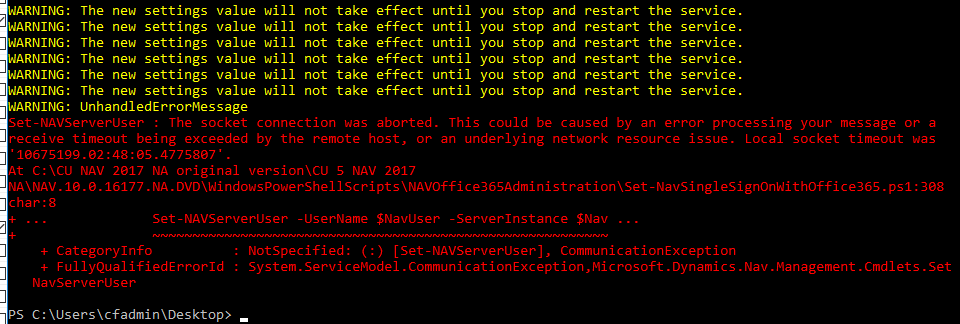
SSO-after-stopping-and-restarting-the-service.PNG

In the event log viewer the following appears:

Tenant:
<ii>The service MicrosoftDynamicsNavServer$FTLDev failed to start. This could be caused by a configuration error. Detailed error information: System.ArgumentException: It is likely that certificate 'CN=nav-srv01.fasttrackleasingllc.net, OU=Domain Control Validated' may not have a private key that is capable of key exchange or the process may not have access rights for the private key. Please see inner exception for detail. ---> System.Security.Cryptography.CryptographicException: Keyset does not exist

Kindly suggest the solution

*This post is locked for comments

I have the same question (0)
  • Community Member Profile Picture
    on at

    The reason could be in certificates cache.

    Try to clear it

  • Suggested answer
    Marcellus Profile Picture
    2,735 on at

    Hi Tina,

    In this msdn article: [View:https://msdn.microsoft.com/en-us/library/gg502478(v=nav.90).aspx]

    There is a section starting like this: "To grant access to the certificate’s private key to the service account for Microsoft Dynamics NAV server".  Could you try to follow the steps from there?

  • Tina Menezes Profile Picture
    2,582 on at

    Hi,

    Thank you. It is now giving the log in page. But on entering the credentials, it is giving some technical issue.

    SSO-error-after-logging-in.PNG

    Could anyone suggest the solution

  • Verified answer
    Marcellus Profile Picture
    2,735 on at

    Hi Tina,

    Open the web.config file using a texteditor from C:\inetpub\wwwroot\[Your NAV Service Name], find the ClientServicesCredentialType and set it to AccessControlService:

    <add key="ClientServicesCredentialType" value="AccessControlService" />

  • Tina Menezes Profile Picture
    2,582 on at

    Hi Marcell,

    Thank you. I changed ClientServicesCredentialType and ACS uri in the web.config file. I am getting the log in page for web client now too. But on logging in, I am getting another error. I have attached screenshot below

    DNS-error.PNG

    Kindly suggest the solution

  • Verified answer
    Marcellus Profile Picture
    2,735 on at

    Hi Tina,

    Looking back at your original question, I think there are more parameters required for the Set-NavSingleSignOnWithOffice365 PowerShell command, for example you need the NavWebAddress 'yourserver.cloudapp.net/.../WebClient

    Can you check this video please to make sure you have all the parameters? How Do I Set up Office 365 Single Sign On in Microsoft Dynamics NAV 2015

    If you need to run the powershell command again make sure you update the ACS URI attribute in the web.config file and the clientusersettings.config file.

  • Tina Menezes Profile Picture
    2,582 on at

    Yes Marcell. I have put the NavWebAddress and the NAV web address name parameters as well. I have completed all the steps as guided in the video that you mentioned. But I am still getting the above error.

  • Marcellus Profile Picture
    2,735 on at

    Hi Tina,

    Did you try to connect with the same address as what you've specified as your NavWebAddress in the PowerShell script? Just to make sure is it an address like 

    https://AzureServer.cloudapp.net/NAV


  • Suggested answer
    Maneesha Profile Picture
    5,891 on at

    this is config issue '

    pls config your profile

  • Tina Menezes Profile Picture
    2,582 on at

    Thanks all. My issue has been resolved. I have configured SSO for NAV web client and windows client as well.

Under review

Thank you for your reply! To ensure a great experience for everyone, your content is awaiting approval by our Community Managers. Please check back later.

Helpful resources

News and Announcements

Season of Giving Solutions is Here!

Quick Links

Responsible AI policies

As AI tools become more common, we’re introducing a Responsible AI Use…

Neeraj Kumar – Community Spotlight

We are honored to recognize Neeraj Kumar as our Community Spotlight honoree for…

Leaderboard > 🔒一 Microsoft Dynamics NAV (Archived)

#1
HoangNam Profile Picture

HoangNam 7

Last 30 days Overall leaderboard

Featured topics

Product updates

Dynamics 365 release plans



