web
You’re offline. This is a read only version of the page.
close
Skip to main content

Notifications

Announcements

No record found.

Community site session details

Community site session details

Session Id :
Finance | Project Operations, Human Resources, ...
Answered

Filter does not work correctly on Security configuration form

(0) ShareShare
ReportReport
Posted on by 23

Hi All,

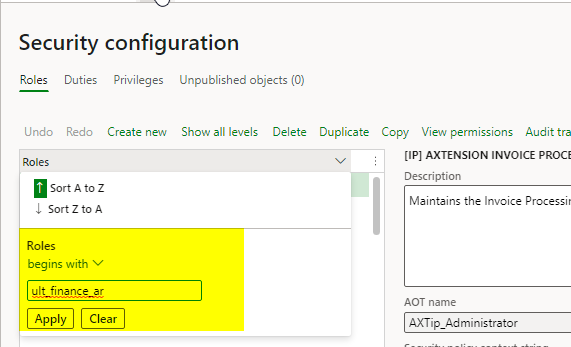
After we applied V29 of D365FO, we have a minor issue with the security configuration form. When we apply a filter on the roles the filer is not applied correctly:
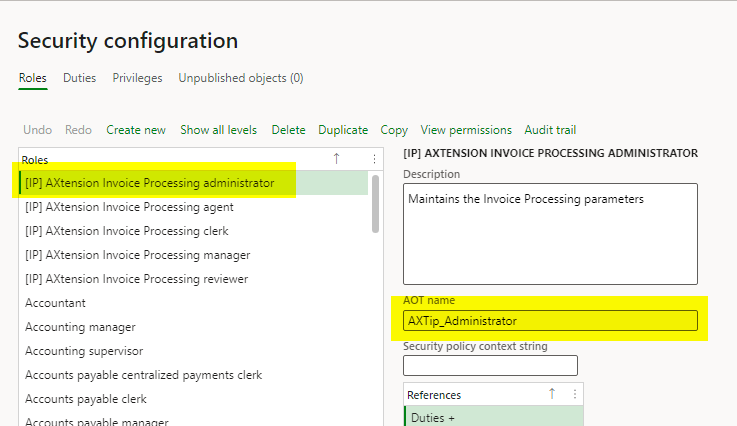
pastedimage1666878664658v1.png

apply a filter:

pastedimage1666878707349v2.png

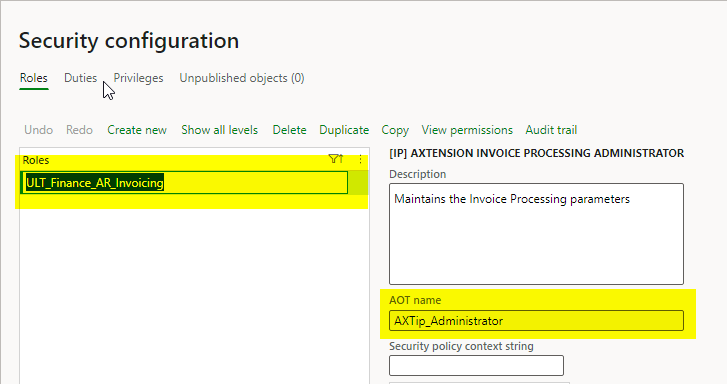
Result:

pastedimage1666878740652v3.png

As you can see, the AOT Name did not change. If I continue now with adding duties or privileges they will be pplied to the wrong role (the one that you still see in the AOT Name field). 

This only happens when you filter direct after opening the form. If I open the form, click a random role and then apply the filter, it works as it should.

Anyone has the same experience ?

Thanks,

Gerard

I have the same question (0)
  • Verified answer
    André Arnaud de Calavon Profile Picture
    301,148 Super User 2025 Season 2 on at

    Hi Gerard,

    I can replicate the same issue in my environment running 10.0.29. Tomorrow, I will test this in a 10.0.30 and 10.0.31 environment to see if it has been solved.

    For now, pay attention and apply the workaround you suggested yourself.

  • g.verbruggen Profile Picture
    23 on at

    Thanks André for taking the time to check this !

  • Verified answer
    André Arnaud de Calavon Profile Picture
    301,148 Super User 2025 Season 2 on at

    Hi Gerard,

    FYI. I have tested it on 10.0.31 and here it is working correctly.

  • g.verbruggen Profile Picture
    23 on at

    Thanks!!

Under review

Thank you for your reply! To ensure a great experience for everyone, your content is awaiting approval by our Community Managers. Please check back later.

Helpful resources

Quick Links

Responsible AI policies

As AI tools become more common, we’re introducing a Responsible AI Use…

Neeraj Kumar – Community Spotlight

We are honored to recognize Neeraj Kumar as our Community Spotlight honoree for…

Leaderboard > Finance | Project Operations, Human Resources, AX, GP, SL

#1
André Arnaud de Calavon Profile Picture

André Arnaud de Cal... 449 Super User 2025 Season 2

#2
Martin Dráb Profile Picture

Martin Dráb 422 Most Valuable Professional

#3
BillurSamdancioglu Profile Picture

BillurSamdancioglu 239 Most Valuable Professional

Last 30 days Overall leaderboard

Product updates

Dynamics 365 release plans