web
You’re offline. This is a read only version of the page.
close
Skip to main content

Notifications

Announcements

Community site session details

Community site session details

Session Id :
Service | Customer Service, Contact Center, Fie...
Unanswered

Omnichannel within Unified Service Desk (USD)

(0) ShareShare
ReportReport
Posted on by 10

Hi guys, 

has anyone ever successfully used Omnichannel within USD?

I have an exisiting USD implementation, with the correct pre-requisites, I managed to install it the OC add-on. However, navigating within USD and going in the Omnichannel app, still the presence is not loading (meaning you cannot manage conversations).

But, even before this, I couldn't understand if using the OC within USD I should see the same interface of the browser or if I should see something completely different (as in some screen of MS guide). I cannot find screen/demos on the web other the couple of the MS guide, so I'm completely clueless.

NB: Omnichannel is completely configured and works completely fine using the browser, but our client wants to use it in the USD.

Screen of MS documentation:
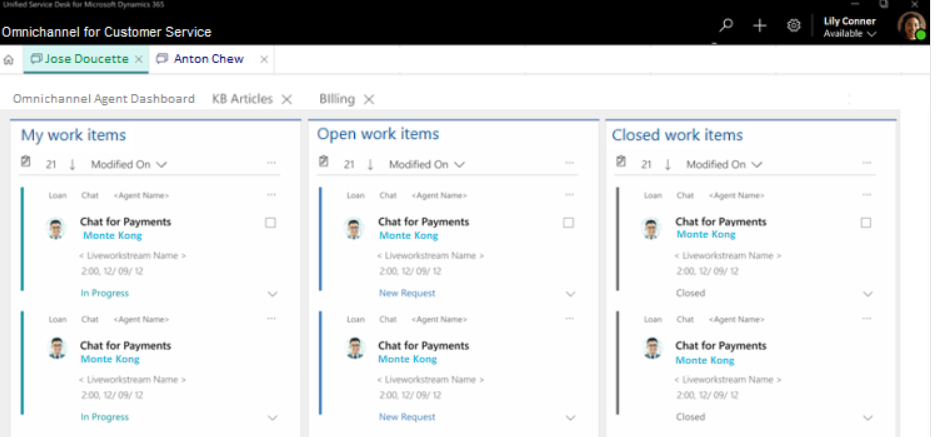
pastedimage1594288850586v1.png

Screen of my current OC/USD implementation:

pastedimage1594288900203v2.png

I have the same question (0)
  • Community Member Profile Picture
    on at

    Hi,

    Any update on this issue? I have the same problem. On the web I can perfectly use omnichannel for customer service but on USD I only get a blank home screen.

    Any hint is appreciated, thanks!

    Regards,

    Alejandrausd_5F00_omni.png

  • AlessioBongiorno Profile Picture
    10 on at

    Hi Jean,

    thank for the answer. I've already created a support ticket last week but also MS support is a little bit struggling (there are omnichannel experts and USD experts, but the area in between is quite grey).

    So, I wanted to know if there is anyone that has experience with OC within USD or at least saw it working because I cannot find any succesful example online.

    Alessio

  • Jean Joel Kakou Profile Picture
    on at

    Thank you for sharing on the community Forum.

    This issue need to be analyzed in depth, it would be fine to create a support ticket for more investigation.

    To submit your next support request, check out our new Dynamics 365 Help + Support Portal.  The portal is easy to use and provides a support experience tailored to the needs of Dynamics customers. Dynamics 365 administrators can access the portal at admin.powerplatform.microsoft.com.

Under review

Thank you for your reply! To ensure a great experience for everyone, your content is awaiting approval by our Community Managers. Please check back later.

Helpful resources

News and Announcements

Season of Giving Solutions is Here!

Quick Links

Responsible AI policies

As AI tools become more common, we’re introducing a Responsible AI Use…

Neeraj Kumar – Community Spotlight

We are honored to recognize Neeraj Kumar as our Community Spotlight honoree for…

Leaderboard > Service | Customer Service, Contact Center, Field Service, Guides

#1
Tom_Gioielli Profile Picture

Tom_Gioielli 20 Super User 2025 Season 2

#2
TAHER Mehdi Profile Picture

TAHER Mehdi 14

#3
Pallavi Phade Profile Picture

Pallavi Phade 9

Last 30 days Overall leaderboard

Featured topics

Product updates

Dynamics 365 release plans
