web
You’re offline. This is a read only version of the page.
close
Skip to main content

Notifications

Announcements

Community site session details

Community site session details

Session Id :
Finance | Project Operations, Human Resources, ...
Unanswered

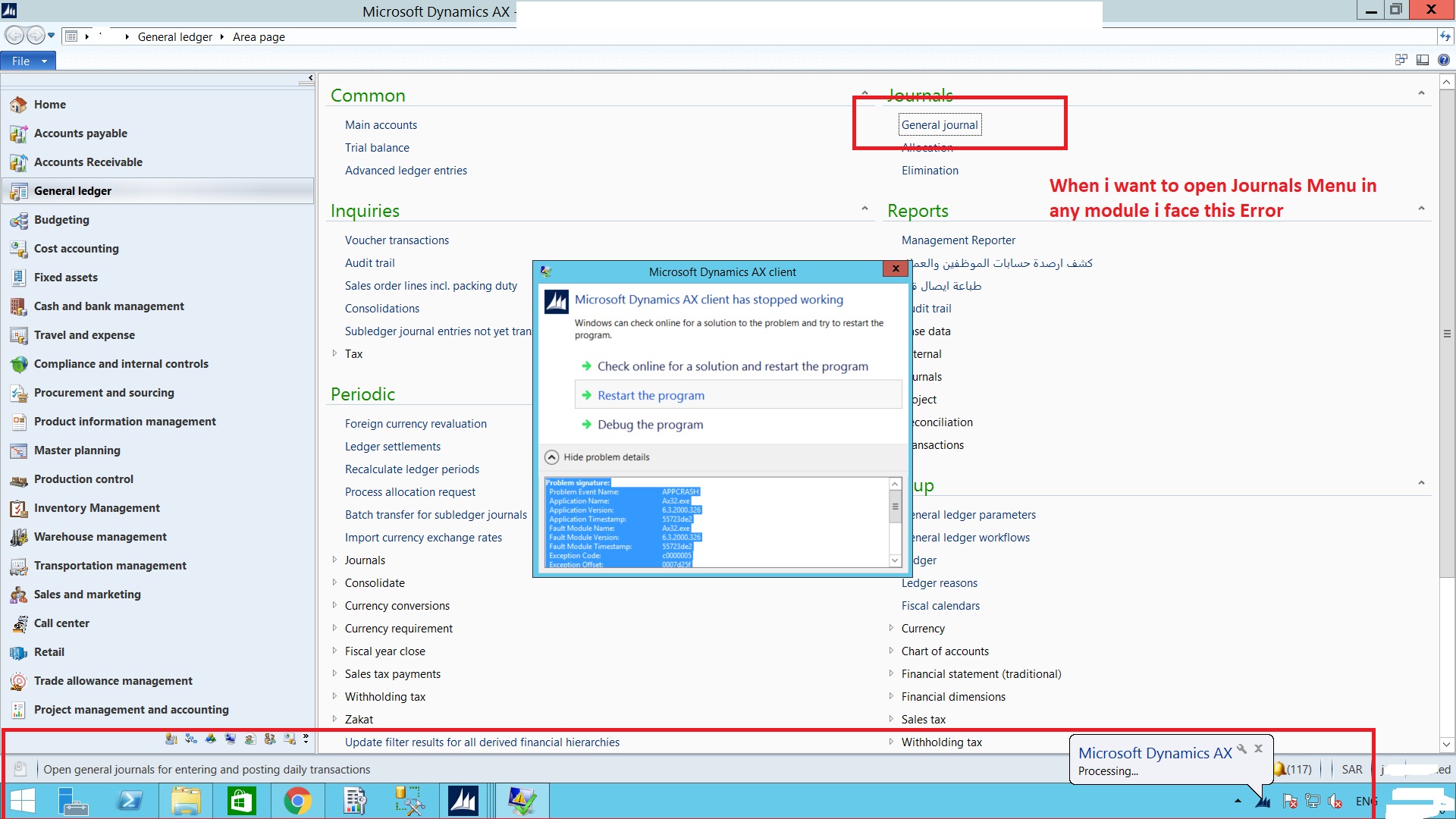
Microsoft Dynamics ax client has stop working

(0) ShareShare
ReportReport
Posted on by 3,110

Dynamics-ax-surface.jpg

Hi Experts,

When i am opening Any menu it work properly but If i try to open "Journals" Menu of any Module i face the above shown error in image"Microsoft Dynamics ax client has stop working "

Please check the details  as well with error 

Problem signature:
Problem Event Name: APPCRASH
Application Name: Ax32.exe
Application Version: 6.3.2000.326
Application Timestamp: 55723de2
Fault Module Name: Ax32.exe
Fault Module Version: 6.3.2000.326
Fault Module Timestamp: 55723de2
Exception Code: c0000005
Exception Offset: 0007d25f
OS Version: 6.3.9600.2.0.0.16.7
Locale ID: 1033

Read our privacy statement online:
go.microsoft.com/.../

If the online privacy statement is not available, please read our privacy statement offline:
C:\Windows\system32\en-US\erofflps.txt

Note : I have already delete AUC and kiti files as well as Reset USAGE DATA..........

Best Regards,

Shabir Ahmad

I have the same question (0)
  • nmaenpaa Profile Picture
    101,166 Moderator on at

    Does it work for other users?

    What changes were made to the system since it was last working?

  • Gunjan Bhattachayya Profile Picture
    35,423 on at

    Hi Shabir,

    Is this happening for all users or only one user? In case this is happening for everyone while opening the journal form, Have you tried to compile the form "LedgerJournalTable" and check if there are any errors?

  • Shabir Ahmad Profile Picture
    3,110 on at

    Hi Both,

    This issue is for all the users

    Best Regards,

    Shabir Ahmad

  • Gunjan Bhattachayya Profile Picture
    35,423 on at

    Hi Shabir,

    Please try the compile and check if there are any issues with the form or the underlying table(s).

  • E. R. Profile Picture
    739 on at

    try to open ax as administrator then try to open this form.

  • Shabir Ahmad Profile Picture
    3,110 on at

    Thanks to both,

    This issue was resolved, I imported a "Ledger Journal Table" to my system, this form was contain error(Test Server). After that I took a copy from the production server and import it to the Test server now working :) :)

    Best Regards,

    Shabir Ahmad

  • Gunjan Bhattachayya Profile Picture
    35,423 on at

    Since you were having issues with the journal form only, errors in the form was the most likely cause.

Under review

Thank you for your reply! To ensure a great experience for everyone, your content is awaiting approval by our Community Managers. Please check back later.

Helpful resources

News and Announcements

Season of Giving Solutions is Here!

Quick Links

Responsible AI policies

As AI tools become more common, we’re introducing a Responsible AI Use…

Neeraj Kumar – Community Spotlight

We are honored to recognize Neeraj Kumar as our Community Spotlight honoree for…

Leaderboard > Finance | Project Operations, Human Resources, AX, GP, SL

#1
Abhilash Warrier Profile Picture

Abhilash Warrier 679 Super User 2025 Season 2

#2
André Arnaud de Calavon Profile Picture

André Arnaud de Cal... 429 Super User 2025 Season 2

#3
Martin Dráb Profile Picture

Martin Dráb 264 Most Valuable Professional

Last 30 days Overall leaderboard

Product updates

Dynamics 365 release plans



