Hi All,
Does anyone know how to add the Excel elements to an ER format that are used to generate payment advice, control report and attending note documents?
Here is the problem: I have a derived version of an existing payment model (ISO20022 credit transfer SE), but the elements used to generate the attached documents (payment advice, control report and attending note) are missing from the format designer and when I try to generate the payment these documents are not created, just the XML file for the credit transfer.
Here is an example of the original format (ISO20022 credit transfer (SE)) that includes the elements CoveringLetter, VendAttendingNote and VendControlReport

And here is a screenshot of the list of all elements available in the drop down "Add":
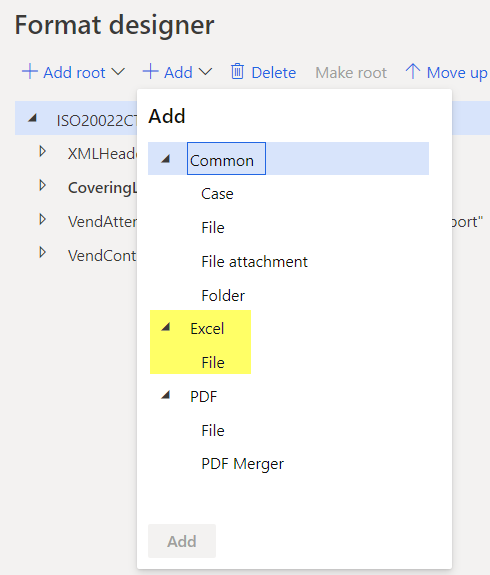
Unfortunately, my derived format doesn't have such elements:

And the options Excel and PDF aren't available in the drop down "Add":

Is there a way to enable/restore such elements in the format?
I also tried to add the templates/attachments to my format.
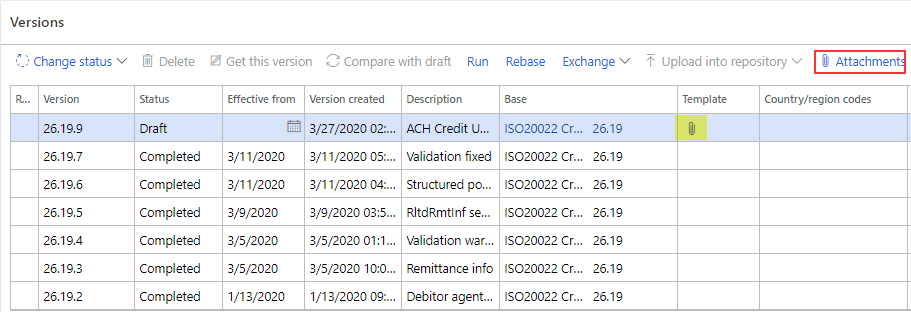
And I can upload the files without problems

But as soon as I complete the version change (Change status > Complete) the attachments are removed. In fact, if you switch to the designer before changing the status and then you click save you get warning messages like this one: File ERCoveringLetter.xlsx is linked to no file components and will be removed after changing status of configuration version.
Here are few info regarding my environment:
- Application release: Microsoft Dynamics 365 for Finance and Operations (10.0.6)
- Platform release: Update30 (7.0.5407.41390)
Please let me know if you need any additional info.
Thanks in advance.
Michele







