web
You’re offline. This is a read only version of the page.
close
Skip to main content

Announcements

News and Announcements icon
Community site session details

Community site session details

Session Id :
Customer experience | Sales, Customer Insights,...
Answered

"No Update" feature in Marketing Form - New release in wave 2

(0) ShareShare
ReportReport
Posted on by 82

Hi everyone,

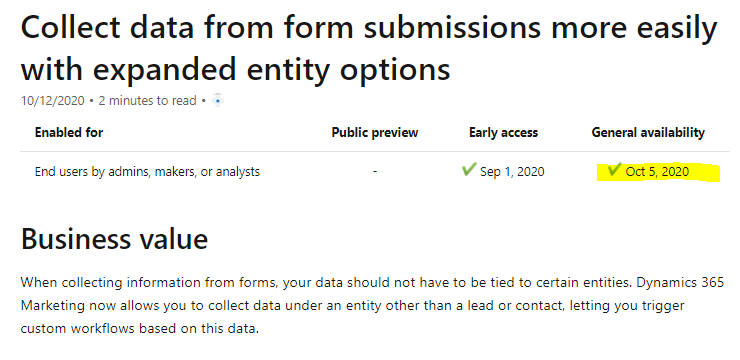
I would like to ask about the option "No update" in Update feature of Marketing Form just released in wave 2. 
pastedimage1603849813039v1.png

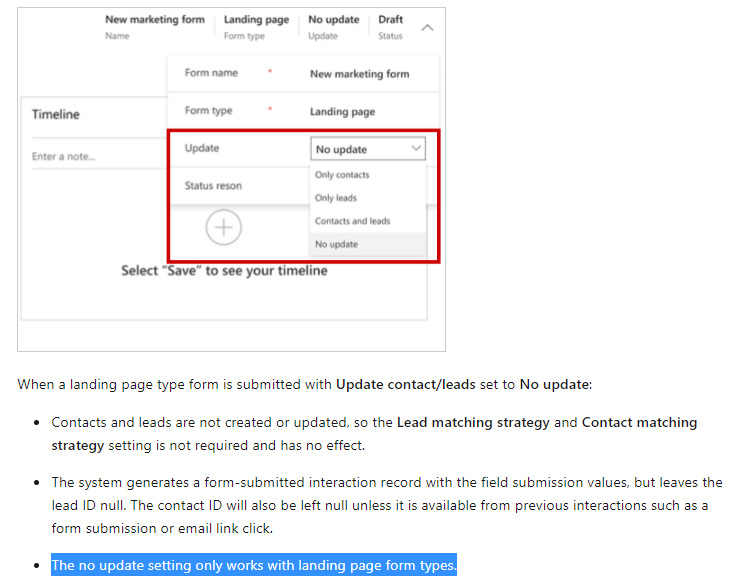
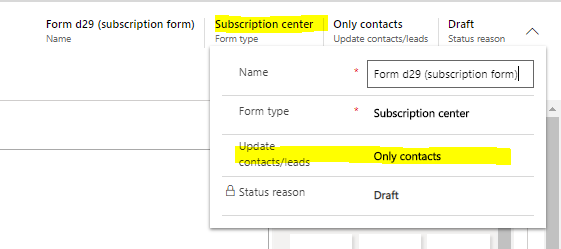
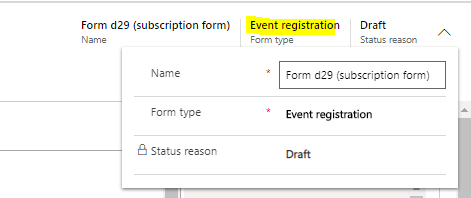
Due to the document in the following link, the no update setting only work on Landing page form, but when I check on my environment, the setting is also available in Subscription Form & Forward to friend form, but not in Event registration form. 

Link: docs.microsoft.com/.../marketing-forms
pastedimage1603850157914v2.png

Screenshot in my environment show that this setting is not available only in event registration form.
pastedimage1603851011285v3.pngpastedimage1603851041575v4.png

I really need this setting available on event registration form. So is there no update in document so far? Or this setting will be available on event registration form in the future? 

Thanks.

I have the same question (0)
  • RajarajanS Profile Picture
    Microsoft Employee on at

    Hello, 

    Thank you for reaching out. 

    As of now, 

    The matching strategy for event-registration forms is read-only because it's defined globally by your active "Event administration" settings.  Create leads for event registration are defined on the event record for the event where the form is used. For other types of forms, you'll find those types of settings that can be changed through the settings, but as of now, we do have a mode to change it. 

    Hope this helps.

    Best regards,

    Raj

    Please mark as verified if the answer is helpful. Welcome to join hot discussions in Dynamics 365 Forums.

  • Duy Bao VN1 Profile Picture
    82 on at

    Hi Raj,

    As you said, if I understand it correctly, there will not have the "no update" setting on Event registration because it is defined in "Event administration"?

  • Suggested answer
    Defne Ayanoglu Profile Picture
    Microsoft Employee on at

    Hi,

    Thank you for your feedback.

    This new feature to collect submissions only works with landing page type forms, and is not supported with event registration forms, subscription forms or forward to friend type forms, because these forms are used for their specific purposes (e.g. registering page visitors to an event). "No update" to the Contacts or leads would result in them not being registered to that certain event, as they will not go through the customer journey.

    The No update stops the form submission to be further processed after form submission record is created.

    So, when you select a Landing page type form, on top of "Only contacts" or "Only leads", you will also see "No update" option.

    The reason you are seeing "Update for" field there is, in other form types(subscription and forward to friend) you have the possibility to switch among contact or lead update options, while missing the "No update". In event type forms, none of these options are supported.

    What this feature brings new, is to allow you to do "No update" to contacts and leads with the submissions of a landing page type form. This allows you to keep the submissions without automated updates to Contact/Leads and provide you with more fields that you can insert into form that are not Contact or lead fields. Also allows you to create Workflows or Flows to update different entities other than Contact/Lead.

    Best Regards,

    Defne

  • Duy Bao VN1 Profile Picture
    82 on at

    Hi Defne,

    Thank a lot for your reply. I just wondering about this case => ""No update" to the Contacts or leads would result in them not being registered to that certain event, as they will not go through the customer journey."

    In the future, can we select which type of field that we can update to contact or lead and which type of field that we can select "No Update" option? E.g. Name & Email field will be no update and Event registration will be updated.

    Best regards,

    Bao

  • Verified answer
    Defne Ayanoglu Profile Picture
    Microsoft Employee on at

    Hi Bao,

    In the case you are describing, this could be very difficult to differentiate forms that update and forms that have fields that do not update.

    Unfortunately, changing update settings event registration is currently not supported. Have you considered changing the matching strategy to match both Name and Email, and if a match, update the Contact/Lead field of Event?

    Best Regards,
    Defne

    Please mark answers that were useful as verified, to let others see if the thread might be useful for them. Thank you. 

Under review

Thank you for your reply! To ensure a great experience for everyone, your content is awaiting approval by our Community Managers. Please check back later.

Helpful resources

Quick Links

Season of Sharing Community Challenge Launch!

Jump in, show your community spirit, and win prizes!

Women in Power Builds Momentum

Expanding mentorship, skilling, and AI innovation

Congratulations to the May Top 10 Community Leaders

These are the community rock stars!

Leaderboard > Customer experience | Sales, Customer Insights, CRM

#1
Nagaraju_Matta Profile Picture

Nagaraju_Matta 123

#2
Hamza H Profile Picture

Hamza H 112 Super User 2026 Season 1

#3
Abhilash Warrier Profile Picture

Abhilash Warrier 70 Super User 2026 Season 1

Last 30 days Overall leaderboard

Product updates

Dynamics 365 release plans



