web
You’re offline. This is a read only version of the page.
close
Skip to main content

Notifications

Announcements

No record found.

Community site session details

Community site session details

Session Id :
Microsoft Dynamics AX (Archived)

Modify a percentage of completion on the Project contrat

(0) ShareShare
ReportReport
Posted on by 1,261

Hi all,

i am trying to follow the steps from Tech net to Manage customer payment retention for projects Fixed price and T&M;

1) Set up customer retention term - 10% on  100% project  -Done

2) Add the customer retention term to the project contrat - Done

3) Update the % of work completed on the project - problem

I am struguling with #3 as in 1 place they say enter the % on the project - general tab - as there is no such field

in the other place they say, enter the % on the contrat status, which seems more logical.

Click Project management and accounting > Common > Projects > Project contracts. Open a project contract from the project contract list page. In the Project contracts form, on the Action Pane, on the Maintain tab, in the Process group, click Manage contract status. In the Contract status form, click Update percentage


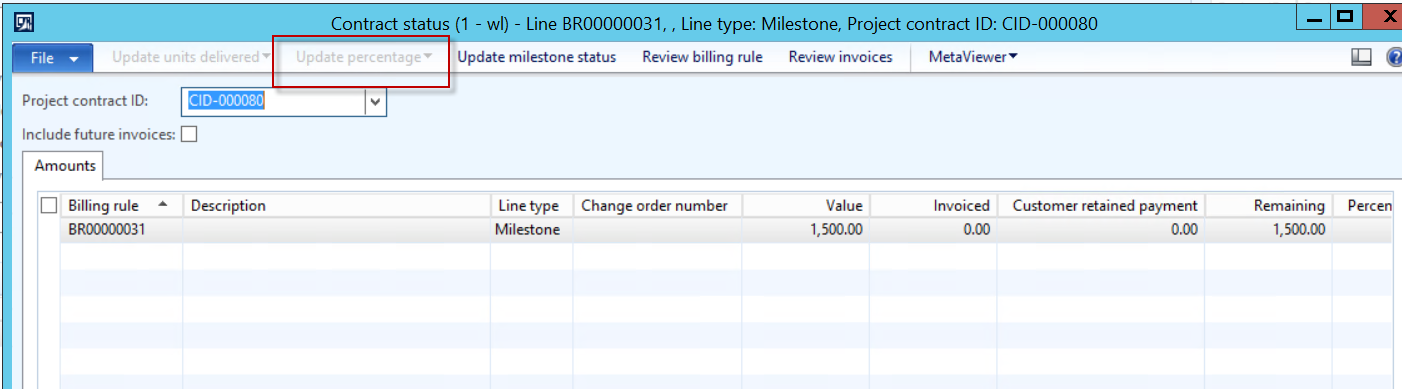
But when i get to the button, the button is greyed out! impossible to enter the 100% completion..
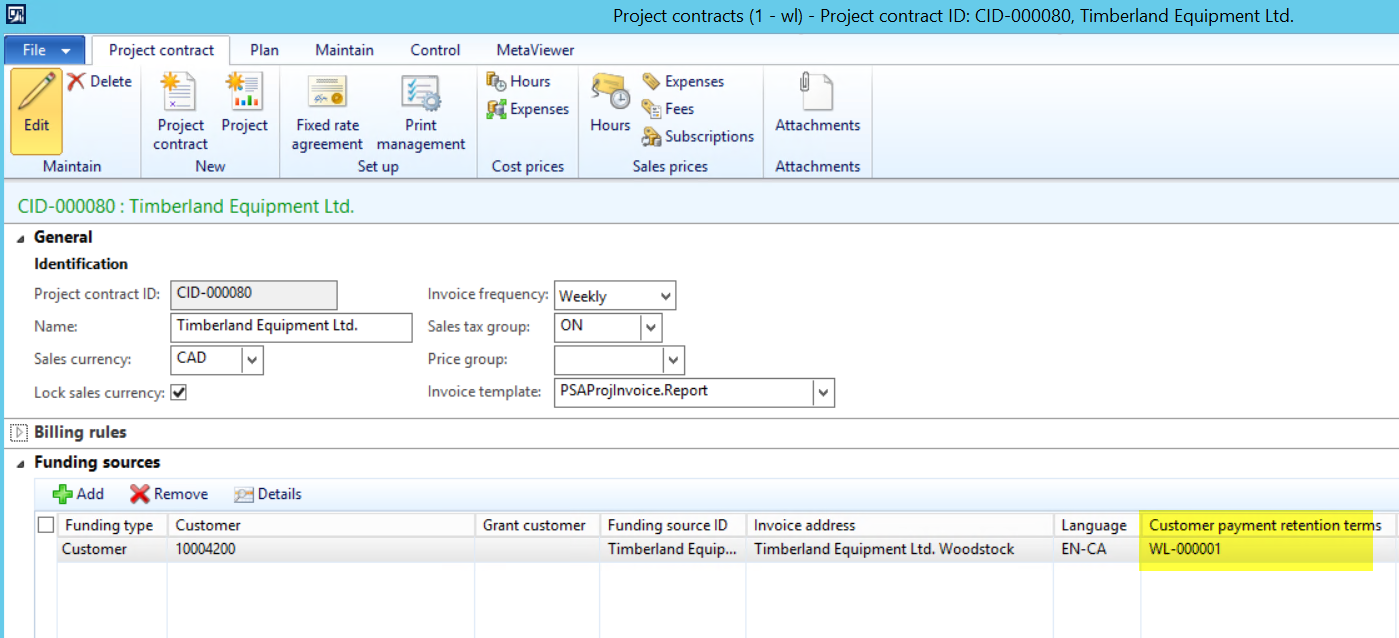
Contract.png

8055.Button.png

*This post is locked for comments

I have the same question (0)
  • Suggested answer
    Community Member Profile Picture
    on at

    Hi

    I'm not so sure of the functionality behind this. Technically I see that Update percentage button will be enabled only if the contract lines does not have a fee marked as credit note.

  • Suggested answer
    Ludwig Reinhard Profile Picture
    Microsoft Employee on at

    Hello Veronika,

    How did you Setup you billing rule? Is it Setup with the line type "Progress"? If so, the field that you cannot edit and is greyed out should become available for editing. Would be great if you could test and provide some feedback. Thanks,

    Ludwig

  • Veronika Filonenko Profile Picture
    1,261 on at

    Hi sorry,

    Here is the billing rule, i used Milestone. So it should work.

    4_2D00_15_2D00_2016-11_2D00_06_2D00_21-AM.png

    Also, all other posts do not mention this path to use for customer retention. (to update manually the % of completion)

    All other posts say, to create a Fee category and check the 'Customer payment retention' check box. that is what i did, but i still hit an error where it says: Project category is missing

    4_2D00_15_2D00_2016-11_2D00_06_2D00_21-AM.png

    Here are the posts that were beneficial :

    https://community.dynamics.com/ax/f/33/p/141678/309268#309268

    https://sandeepchaudhury.wordpress.com/2012/03/12/customer-payment-retention-functionality-in-microsoft-dynamics-ax-2012/#comment-18969

    Nothing seems to work

  • Verified answer
    David Massey Profile Picture
    on at

    The update percentage button in the manage contract status form is to set the percent complete for a progress billing rule.

    If you want to change the percentage retained from the customer on an invoice, you can change the value on the invoice proposal prior to posting

  • Rajashree Joshi Profile Picture
    5 on at

    Hello Rudwig,

    I got the same issue mentioned by Veronika. I set the line type "Progress", and mentioned the contract amount but still the "Update Percentage" is grayed out and am not able to post the invoice journal.

    Thanks,

    Rajashree

Under review

Thank you for your reply! To ensure a great experience for everyone, your content is awaiting approval by our Community Managers. Please check back later.

Helpful resources

Quick Links

Responsible AI policies

As AI tools become more common, we’re introducing a Responsible AI Use…

Neeraj Kumar – Community Spotlight

We are honored to recognize Neeraj Kumar as our Community Spotlight honoree for…

Leaderboard > 🔒一 Microsoft Dynamics AX (Archived)

#1
Martin Dráb Profile Picture

Martin Dráb 4 Most Valuable Professional

#1
Priya_K Profile Picture

Priya_K 4

#3
MyDynamicsNAV Profile Picture

MyDynamicsNAV 2

Last 30 days Overall leaderboard

Featured topics

Product updates

Dynamics 365 release plans



