web
You’re offline. This is a read only version of the page.
close
Skip to main content

Notifications

Announcements

No record found.

Community site session details

Community site session details

Session Id :
Microsoft Dynamics AX (Archived)
Answered

Issue with 'Edit Query' in wave template - AX7

(0) ShareShare
ReportReport
Posted on by 405

We have wave template where we would like to join sales table with shipment table so that we can put range on salesTable fields. 
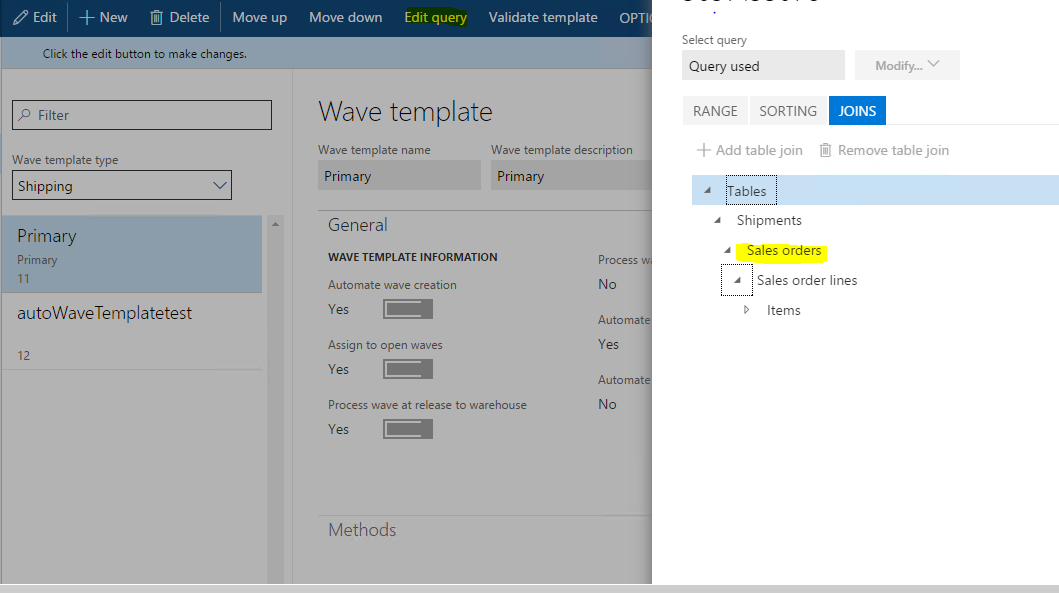
Edit-query-screen.PNG

We observed the template we created with salesTable criteria is not picked up during work order creation.

Upon debugging we observed range for 'defaultdimnsion = 2' has been applied automatically.

SELECT * FROM WHSShipmentTable(WHSShipmentTable) WHERE ((WHSShipmentTable(WHSShipmentTable).)) EXISTS JOIN * FROM SalesTable(SalesTable_1) WHERE WHSShipmentTable.OrderNum = SalesTable.SalesId AND ((DefaultDimension = 2))
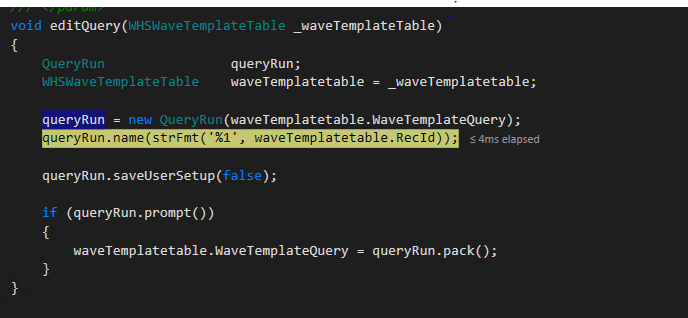
1055.Query.PNG

there is no range applied in AOT query, Cleared usage data, restarted IIS, SQL to clear caches.

Not able to figure out from where its pulling defaultdimension range.

*This post is locked for comments

I have the same question (0)
  • Guy Terry Profile Picture
    28,924 Moderator on at

    I can check AX 7 tomorrow, but when I do the same in AX 2012 R3, AX automatically adds Shipment 'Work order type' = 2 to the query range. I think it is right to do this. Can you check the 'Range' tab in your screenshot?

  • Vishal Dhavgaye Profile Picture
    405 on at

    Thank you Terry.

    I have checked it out the ranges, there are no ranges applied. The result you are getting in AX2012 is correct as WhsShipmentTable have fixed relation i.e. workOrderType =2. AX7 coming up with range on defaultDimension = 2 although relation exists on workOrderType field.  

    Can you please check in AX7 if you are getting the same result. I see this issue in AX7 whenever fixed relation exists on query table.

  • Guy Terry Profile Picture
    28,924 Moderator on at

    In AX7 (with Aug 2016 update) I set up a query on a Wave template to ignore some sales orders, but not others. As far as I can see, the query doesn't work; the Wave template is applied to all my sales orders, even if they don't match the range on the query. Is that what you are seeing?

    I can't debug to find the actual query that is being used.

  • Verified answer
    Ivan (Vanya) Kashperuk Profile Picture
    on at

    I can reproduce this as well, so it's a bug.

    Looks like it uses the wrong datasource when applying the "Fixed field relation", so instead of applying the filter on WHSShipmentTable, it applies it on the field with the same ID, but on the SalesTable. It happens that the field with the same ID is DefaultDimension.

    If you can, please open a support case, so we get it on AX 7 RTM / AX 7 Fall release as well

  • Verified answer
    Ivan (Vanya) Kashperuk Profile Picture
    on at

    The bug is in Classes\SysQueryBuilder\Methods\addDataSourceTable(), where they switch on the type of relation field - for ThisField, they add the range on the newDataSource, which in our case is the SalesTable (Because the relation is defined on WHSShipmentTable)

  • Vishal Dhavgaye Profile Picture
    405 on at

    Thank you Ivan. We are raising support ticket with Microsoft for the same.

    We can mark this as answer.

    Thanks everyone for looking into it.

  • Verified answer
    Ivan (Vanya) Kashperuk Profile Picture
    on at

    You need to mark it as answer since you are the author

Under review

Thank you for your reply! To ensure a great experience for everyone, your content is awaiting approval by our Community Managers. Please check back later.

Helpful resources

Quick Links

Responsible AI policies

As AI tools become more common, we’re introducing a Responsible AI Use…

Neeraj Kumar – Community Spotlight

We are honored to recognize Neeraj Kumar as our Community Spotlight honoree for…

Leaderboard > 🔒一 Microsoft Dynamics AX (Archived)

#1
Priya_K Profile Picture

Priya_K 4

#1
Martin Dráb Profile Picture

Martin Dráb 4 Most Valuable Professional

#3
Ali Zaidi Profile Picture

Ali Zaidi 2

Last 30 days Overall leaderboard

Featured topics

Product updates

Dynamics 365 release plans



