web
You’re offline. This is a read only version of the page.
close
Skip to main content

Notifications

Announcements

No record found.

Community site session details

Community site session details

Session Id :
Microsoft Dynamics AX (Archived)

On Order quantity Duplicate from Cancelled Purchase Orders

(0) ShareShare
ReportReport
Posted on by

We have a few Purchase Orders that have been cancelled and for some reason if I look at the on-hand stock & transactions the PO is showing twice so the original quantity appears twice as much On-Order.

In my example attached:

PO-000131  for 1,000 

this order was cancelled

On hand stock shows On order 2,000

Transactions show PO-000131 for 1,000 twice

Any idea why? can anyone help?
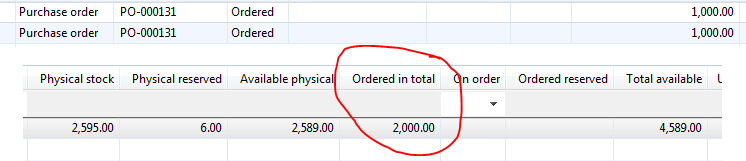
PODuplicateONOrder.png

*This post is locked for comments

I have the same question (0)
  • André Arnaud de Calavon Profile Picture
    301,020 Super User 2025 Season 2 on at

    Hi carsz,

    It could be caused by a bug or customization. Usually when you cancel a line or part of the quantity, the inventory transactions should be adjusted accordingly.

    Can you check the status on the order lines? What is the remaining quantity now? Possibly you can try to "re-open" the order and then first cancel the lines (set delivery remainder to 0).

  • Bashir Ahmad Profile Picture
    5,248 on at

    Is there any Customization You have on Screen.?

  • Community Member Profile Picture
    on at

    We do have customization on different areas, not specific to purchase order though.

    At least one of the purchase orders has no lines (they were removed before it was cancelled)

  • André Arnaud de Calavon Profile Picture
    301,020 Super User 2025 Season 2 on at

    Probably the lines were removed in an incorrect way, leaving orphaned records. If the PO lines don't exist anymore, you can try to delete the related information from e.g. the tables InventTransOriging and InventTrans. Caution: there might be more tables involved. Do this from the AX table browser and test it in a separate environment first.

  • Community Member Profile Picture
    on at

    The lines are still showing on the PurchLine Table (even when they have been removed from the PO) and they all show as Line Status: Cancelled

  • André Arnaud de Calavon Profile Picture
    301,020 Super User 2025 Season 2 on at

    Hi,

    Check if there are cancelled PO lines where the quantity in the inventory transactions are updated correctly. Then check how it should look. Possibly you still have to do some manual updates/deletes on the inventory transaction tables.

  • Community Member Profile Picture
    on at

    André, how is the best way to delete that information from the InventTrans table?

  • André Arnaud de Calavon Profile Picture
    301,020 Super User 2025 Season 2 on at

    Hi,

    This cannot be answered on a forum. Try to get a very experienced consultant on-site if you need assistance. This person should be able to do troubleshooting, having knowledge of the data model and experienced with this kind of corrections. It is too dangerous to just suggest the steps what to do.

  • Community Member Profile Picture
    on at

    Ok thanks anyways

  • mehmetyunus27 Profile Picture
    57 on at

    Hello Microsoft Family,

    I have encountered the same error. My case is about the change management. After all workflow steps are completed, i press "Request Change" button and purchase order header's document state is turning into "Draft" status. After i cancel this purchase order, purchase order line status turns into "Cancelled" status but the records on inventory transaction table at the receipt status "On order" still exist.[quote user="carsz"]

    We have a few Purchase Orders that have been cancelled and for some reason if I look at the on-hand stock & transactions the PO is showing twice so the original quantity appears twice as much On-Order.

    In my example attached:

    PO-000131  for 1,000 

    this order was cancelled

    On hand stock shows On order 2,000

    Transactions show PO-000131 for 1,000 twice

    Any idea why? can anyone help?

    PODuplicateONOrder.png

    [/quote]

Under review

Thank you for your reply! To ensure a great experience for everyone, your content is awaiting approval by our Community Managers. Please check back later.

Helpful resources

Quick Links

Responsible AI policies

As AI tools become more common, we’re introducing a Responsible AI Use…

Neeraj Kumar – Community Spotlight

We are honored to recognize Neeraj Kumar as our Community Spotlight honoree for…

Leaderboard > 🔒一 Microsoft Dynamics AX (Archived)

#1
Priya_K Profile Picture

Priya_K 4

#1
Martin Dráb Profile Picture

Martin Dráb 4 Most Valuable Professional

#3
Ali Zaidi Profile Picture

Ali Zaidi 2

Last 30 days Overall leaderboard

Featured topics

Product updates

Dynamics 365 release plans



