web
You’re offline. This is a read only version of the page.
close
Skip to main content

Notifications

Announcements

No record found.

Community site session details

Community site session details

Session Id :
Microsoft Dynamics AX (Archived)

Accrual Schemes - D365

(0) ShareShare
ReportReport
Posted on by 46,625 Super User 2025 Season 2

Trying to determine why my period 12 posting in a 12 month accrual scheme is posting an amount with the opposite sign of the previous 11 periods.  Any ideas?  Thanks

Accrual Scheme Config

1_2D00_10_2D00_2018-3_2D00_51_2D00_32-PM.jpg

Here's my journal

1_2D00_10_2D00_2018-3_2D00_50_2D00_49-PM.jpg

Here are the transactions created using the Ledger Accrual function - all looks good

1_2D00_10_2D00_2018-3_2D00_42_2D00_34-PM.jpg

But when I post the journal, the final period's posting is $1,000 in transaction currency, but flips to -$1,000 for Accounting and Reporting currency.
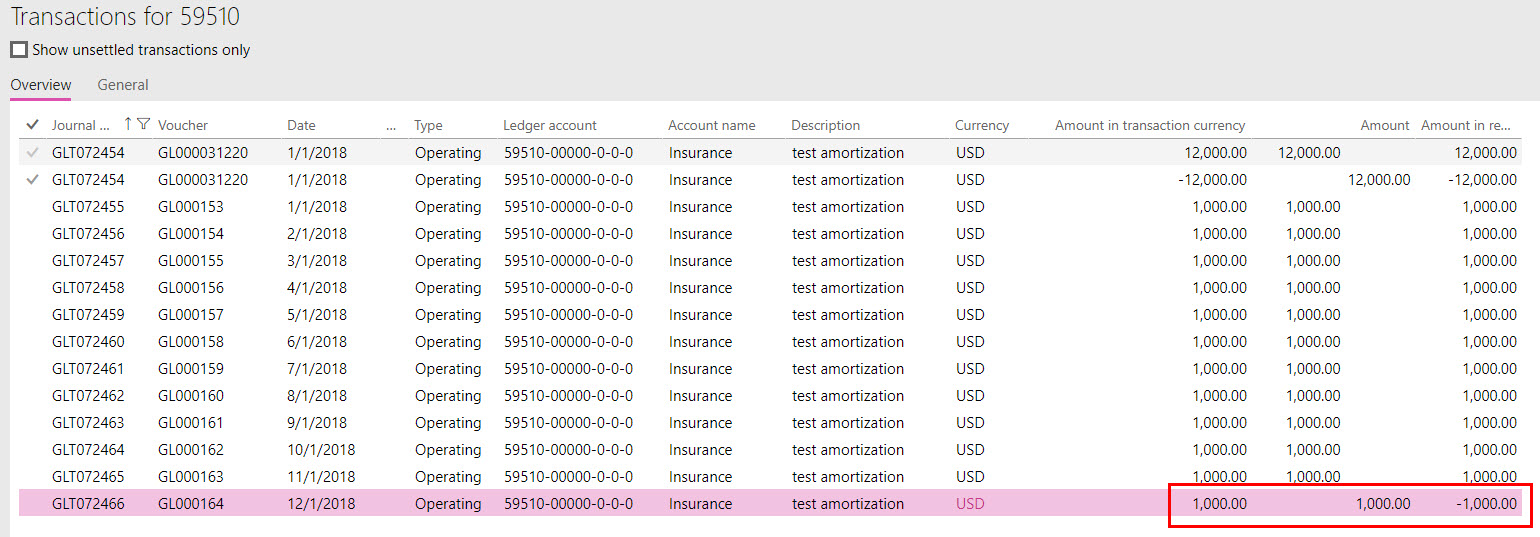
1_2D00_10_2D00_2018-3_2D00_49_2D00_23-PM.jpg

*This post is locked for comments

I have the same question (0)
  • Ludwig Reinhard Profile Picture
    Microsoft Employee on at

    Hello Frank,

    You post 'minus' 12000 on account 14050.

    If you split this over the months, you will get a credit of 'minus' 1000 a month.

    That should be ok, right?

    About the last posting on account 59510: Do you know if this period is open or set on hold?

    If you flip signs for your voucher, that is post 12000 on account 14050, are the posting right then?

    Best regards,

    Ludwig

  • Frank Hamelly | MVP, MCP, CSA Profile Picture
    46,625 Super User 2025 Season 2 on at

    The reason I put a credit of 12,000 is to force the accounting to be correct, plus the journal won't even post if the 12,000 is a debit.  It throws an error saying the journal is out of balance.

    All periods in the year are open.

    I've tried every combination of different Accrual Scheme configurations and journal details I can think of and the only combination that comes close to producing the desired entries are the ones seen in my screenshots.  This combination would be perfect if not for the entry in the last period having signs reversed.  I'm wondering if it's a bug?

  • Verified answer
    Ludwig Reinhard Profile Picture
    Microsoft Employee on at

    Hello Frank,

    The only thing that I could find on LCS was

    Solution 3779175Accrual Posting period calculation is not proper

    fix.lcs.dynamics.com/.../Solution;qc=1abe4024148135a1c7d043dbc8ad2b53f6c925c6690f4fb2abd4ce9206cc82a8

    I am not sure whether this helps in your case but they say that you should Setup the accrual with a mid-month posting setup. Can you test whether this helps?

    In addition, can you change your setup 'yearly' to 'monthly' to see if this makes a difference?

    Best regards,

    Ludwig

  • Suggested answer
    Frank Hamelly | MVP, MCP, CSA Profile Picture
    46,625 Super User 2025 Season 2 on at

    Figured it out.  The accounts configured in the Accrual scheme are merely 'clearing accounts'.  When I set the Debit and Credit accounts = same account rather than what I assumed were to be an Accrual account and a Charges account, it worked as expected.  This makes sense as it allows you to use the same accrual scheme for multiple Accrual and Charges account combinations in the journal.

Under review

Thank you for your reply! To ensure a great experience for everyone, your content is awaiting approval by our Community Managers. Please check back later.

Helpful resources

Quick Links

Responsible AI policies

As AI tools become more common, we’re introducing a Responsible AI Use…

Neeraj Kumar – Community Spotlight

We are honored to recognize Neeraj Kumar as our Community Spotlight honoree for…

Leaderboard > 🔒一 Microsoft Dynamics AX (Archived)

#1
Priya_K Profile Picture

Priya_K 4

#1
Martin Dráb Profile Picture

Martin Dráb 4 Most Valuable Professional

#3
Ali Zaidi Profile Picture

Ali Zaidi 2

Last 30 days Overall leaderboard

Featured topics

Product updates

Dynamics 365 release plans



