web
You’re offline. This is a read only version of the page.
close
Skip to main content

Notifications

Announcements

No record found.

Community site session details

Community site session details

Session Id :
Finance | Project Operations, Human Resources, ...
Answered

Data Management Framework Parameters Will Not Open

(0) ShareShare
ReportReport
Posted on by

Hi All,

We recently created new (on-prem) development virtual machines with the platform updates for version 10.0.21 for finance and operations apps (October 2021).  I'm working on a custom data entity and everything is compiling fine.  However, when I go to test it, I need to refresh the data entities list in the data management workspace framework parameters form.  When I click on the framework parameters tile, nothing happens.  I tried debugging and found an exception is being swallowed in the DMFParameters form on the DMFBYODParameters.insertDefaultValue method when it tries to get the CLRInterop type for Microsoft.Dynamics.AX.Framework.Tools.DMF.ServiceProxy.DMFSharedTypesServiceReference.ServiceContractClient: 

pastedimage1633104103639v1.png

I'm unable to debug into CLRInterop::getType.  The exception is mentioning a null reference
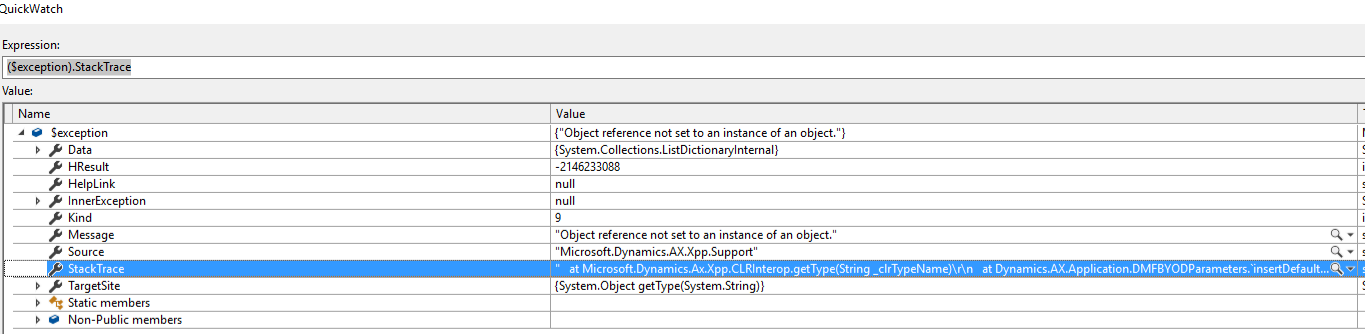
pastedimage1633104304702v2.png

I wondered if we are missing some component or configuration process or possibly a permissions issue?  I checked the event viewer and didn't find anything useful in there.  I'm attempting to do a full build of my custom models and checked the "build referenced packages" check box to see if that would help but I'm not confident about it.  Does anyone have a suggestion on how to troubleshoot this problem?  

I have the same question (0)
  • André Arnaud de Calavon Profile Picture
    301,025 Super User 2025 Season 2 on at

    Hi Brawndo,

    Have you checked if on the AOS the Microsoft Dynamics Import Export Framework service (or similar name) is running?

  • Suggested answer
    Alireza Eshaghzadeh Profile Picture
    14,679 Super User 2025 Season 2 on at

    Hi Brawndo,

    Do you mean that you cannot export data from entities in data management? have you tested this behavior for standard entities and as example export to excel?

    If yes, as Andre mentioned, please check if the service for "Microsoft dynamics 365 for operations - Data import/export Framework Service" i s running.

  • Greg's Mom Profile Picture
    on at

    Hi Andre,

    Thanks for the suggestion.  It's a good thought but unfortunately I checked and confirmed that both the Microsoft Dynamics 365 Unified Operations: Data Import Export Framework Service and the Microsoft Dynamics 365 Unified Operations: Batch Management Service are both running.  I've restarted those services to ensure they could stop and start but still have the same problem.  

  • Greg's Mom Profile Picture
    on at

    Hi Alireza,

    No, I am not even trying to import/export data yet.  I am just trying to open the Framework Parameters in the Data Management Workspace.  When I click on that tile nothing happens, the parameters form won't open.  When I debugged to see what was going on, I found an exception being thrown by the code that I mentioned in the original post.  

  • Suggested answer
    Greg's Mom Profile Picture
    on at

    We found a work around in a yammer post.  I'll post it here in case anyone else runs into the same problem in the future.  

    Updating the cloud hosted environments and they worked fine.  After applying the update to a local VM, the data management framework was not working fine.  They traced it down to some DLLs that were not getting updated during the installation process.  

    These files are in the AOSService\Webroot\ folder.  They believed these files had special permissions on them and were getting access denied during a copy/paste even after shutting down batch, DIXF, and web services.  He was able to copy them over only after manually deleting the files.  The files are all of the files in the AOSService\Webroot folder that start with Microsoft.Dynamics.AX.Framework.Tools.DMF.  

    My infrastructure guy who manages our developer VMs was able to use this info and copy those DLLs from a working cloud hosted environment to the on-prem VMs and data management started working fine again.  

    I'm unsure why the update process was not able to write those updated files out on the on-prem VMs.  Maybe some permissions issue?

  • Alexban Profile Picture
    45 on at

    Thank you! I was able to solve this problem by copying all 8 Microsoft.Dynamics.AX.Framework.Tools.DMF.* files from  AOSService\Webroot\bin folder of a cloud-hosted 10.0.21 vm to the same folder (AOSService\Webroot\bin and NOT AOSService\Webroot) of my one-box 10.0.21 dev vm

    pastedimage1634047795091v2.png

  • Verified answer
    nmaenpaa Profile Picture
    101,160 Moderator on at

    Hi Brawndo,

    you wrote that you created new dev machines and had this issue. But in a later message you wrote that the issue was caused "by some DLLs that were not getting updated during the installation process."

    So were these brand new machines, or did you install Microsoft D365 updates on them?

    If you installed updates, I think you might have overlooked some details, and therefore ended up with a system where all components were not updated. Even though you were now able to resolve the issue by manually copying some files, it's good to be aware of the correct update process on local VMs. I've blogged about it in the past: https://community.dynamics.com/365/financeandoperations/b/365foroperationstechnical/posts/issues-after-installing-binary-updates-to-local-dev-machine

  • Greg's Mom Profile Picture
    on at

    Thank you, Nikolaos.  Sorry for the confusing and contradicting information.  You're right, these were 10.0.20 VMs which had the update applied to them.  I'm going to forward the link you provided to my infrastructure guy who prepares our environments and ask if he sees anything in there that he missed.  Appreciate the help!  

  • Sohaib Cheema Profile Picture
    49,438 User Group Leader on at

    I faced this issue today for version 10.0.23 and here is the reason I found. It happens for deployment of package in the wrong way. You must modify the DefaultTopologyData.XML file as mentioned in the documentation. Get the list of modules and paste the information in correct format in the XML file before the package installation.

  • manthan94 Profile Picture
    17 on at

    Hello Brawndo,

    Hope you are doing well!

    I have upgraded my Local VHD from 10.0.17 to 10.0.23 and faced same issue.

    After that i have copy all 9 DLL Microsoft.Dynamics.AX.Framework.Tools.DMF* from cloud hosted to local VHD

    now i am able to open Framework Parameters but IMPORT/EXPORT is not working now.

    Any idea/suggestion will be appreciated :)

    Thanks

Under review

Thank you for your reply! To ensure a great experience for everyone, your content is awaiting approval by our Community Managers. Please check back later.

Helpful resources

Quick Links

Responsible AI policies

As AI tools become more common, we’re introducing a Responsible AI Use…

Neeraj Kumar – Community Spotlight

We are honored to recognize Neeraj Kumar as our Community Spotlight honoree for…

Leaderboard > Finance | Project Operations, Human Resources, AX, GP, SL

#1
Martin Dráb Profile Picture

Martin Dráb 611 Most Valuable Professional

#2
André Arnaud de Calavon Profile Picture

André Arnaud de Cal... 529 Super User 2025 Season 2

#3
Sohaib Cheema Profile Picture

Sohaib Cheema 285 User Group Leader

Last 30 days Overall leaderboard

Product updates

Dynamics 365 release plans



