web
You’re offline. This is a read only version of the page.
close
Skip to main content

Notifications

Announcements

No record found.

Community site session details

Community site session details

Session Id :
Microsoft Dynamics AX (Archived)

Unfiltered data in dialog field

(0) ShareShare
ReportReport
Posted on by 1,307

Hi,

I create a query in Queries node by filtering the data by adding the field in the range and filtering the data with wildcard character.

Wildcard-Range.png

Later I used the query in a form as datasource and called the the filtered field as dialog field.

Wildcard-code.png


after this when I click the button and see the values in drop down, the last four values must not be displayed with respect to the wildcard provided.
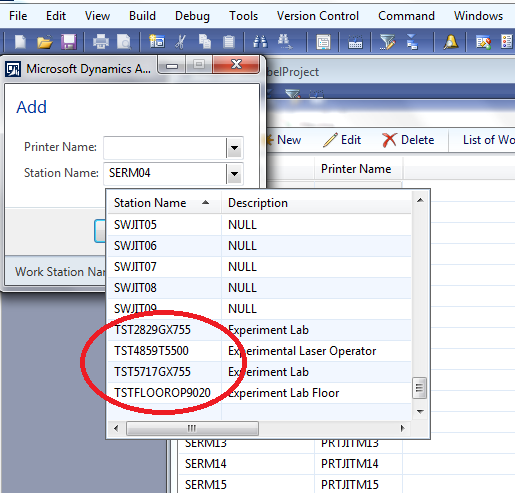
unlike-wildcard-JIT.png

Could someone please let me know why the system didn't filter these values and also how to filter these values


Thanks,

Lakshmi


*This post is locked for comments

I have the same question (0)
  • André Arnaud de Calavon Profile Picture
    300,911 Super User 2025 Season 2 on at

    Hi Lakshmi,

    You used the extended data type in a dialog, not the query. If you need the query, you have to override the lookup method for the dialog control. The dialog execution, even if called from a form, will not inherit a query or filters unless you handle the lookup yourself.

  • 5400 Profile Picture
    7,162 on at

    How are filtering your EDT value through query. EDT value is coming from your table not from query. if you want to display the UI on click event instead of using dialog please use form dialog with above control with custom lookup.

    If you want to use dialog, you have to override lookup method and call it in control.  

  • Lakshmi Karambakkam Profile Picture
    1,307 on at

    Though I used the EDT, I called the datasource (SMCWorkStation_1) in the query node and that's the reason 95% of the data got filtered , but only these 4 values are unfiltered.

    How will this be possible if its only considering EDT?

    thanks,

    Lakshmi

  • Martin Dráb Profile Picture
    237,801 Most Valuable Professional on at

    If you run your query directly, does it return right data?

    If not, it's not important where you use it and we don't have to discuss it.

    If it does, the problem must in how you use the query. Please tell us how did you relate it to your EDT. Did you create a custom lookup form and configured the EDT to use it? (It might look obvious, but you didn't mention it so nobody can be sure).

  • Lakshmi Karambakkam Profile Picture
    1,307 on at

    I called the query node as  datasource in a form, and it is returning the right data.

    The extra 4 values did not populate.

    Wildcard-data.png

    I did not create a custom lookup form. I added Query  as form datasource and also  called Query node datasource (SMCWorkStation_1) in the dialogfield

    DialogField                 dlgStationName = dialog.addFieldValue(extendedtypestr(SMCStationName),any2str(SMCWorkStation_1.StationName),"@SMC49");

    EDT is specified as per the syntax of the dialogfield but the values that come as drop down will depend on the field SMCWorkStation_1.StationName and since the Query is added as datasource only filtered values must populate...because 95% of the data is filtered data apart from those 4 values that are not filtered

    I think this should work because SMCWorkStation_1 has only filtered data.

  • Verified answer
    Martin Dráb Profile Picture
    237,801 Most Valuable Professional on at

    No, your code doesn't do what you think it does. This code:

    dialog.addFieldValue(
        extendedtypestr(SMCStationName),
        any2str(SMCWorkStation_1.StationName),
        "@SMC49");

    never use your query for anything. It creates a dialog field with SMCStationName EDT (which also defines which lookup will be used) and sets the current StationName as the value of the dialog field. If you want to change the lookup, you have to override lookup() method or create a custom lookup form and link it with the EDT (or, more likely, with a new EDT designed for this case).

  • Lakshmi Karambakkam Profile Picture
    1,307 on at

    I am trying to override the lookup() method. Could you please help me in providing syntax for how to pass wildcard characters like *JIT* and *SER* to the below querybuildrange.

    SysTableLookup          sysTableLookup = SysTableLookup::newParameters(tableNum(SMCWorkStation),this);

       Query                   query = new Query();

       QueryBuildDataSource    queryBuildDataSource = query.addDataSource(tableNum(SMCWorkStation));

       QueryBuildRange         queryBuildRange = queryBuildDataSource.addRange(fieldNum(SMCWorkStation, StationName));

  • Suggested answer
    Martin Dráb Profile Picture
    237,801 Most Valuable Professional on at

    I thought you wanted to use your AOT query. You could do it by Query query = new Query(queryStr(SMCWorkStationPrinters));.

    If you want to create a new query anyway, add two ranges for your field:

    queryBuildDataSource.addRange(fieldNum(SMCWorkStation, StationName)).value("JIT");
    queryBuildDataSource.addRange(fieldNum(SMCWorkStation, StationName)).value("SER");
  • Martin Dráb Profile Picture
    237,801 Most Valuable Professional on at

    Also note that your query will be very inefficient, because SQL Server won't be able to use indexes - you should try to get rid of the wildcards. The fact that you're looking for information in a middle of a field value suggests that it's not atomic and you should split it into more fields. You'll see that your tables will be easier to use if you follow the rules of entity-relationship design.

  • Lakshmi Karambakkam Profile Picture
    1,307 on at

    Thanks for everyone who replied me.

    Thanks for your detailed guidance Martin. I finally made a lookup form with lookup method in it and added the display menu item in the main form. So now I am able to create new records through  dialog.

Under review

Thank you for your reply! To ensure a great experience for everyone, your content is awaiting approval by our Community Managers. Please check back later.

Helpful resources

Quick Links

Responsible AI policies

As AI tools become more common, we’re introducing a Responsible AI Use…

Neeraj Kumar – Community Spotlight

We are honored to recognize Neeraj Kumar as our Community Spotlight honoree for…

Leaderboard > 🔒一 Microsoft Dynamics AX (Archived)

#1
Martin Dráb Profile Picture

Martin Dráb 4 Most Valuable Professional

#1
Priya_K Profile Picture

Priya_K 4

#3
MyDynamicsNAV Profile Picture

MyDynamicsNAV 2

Last 30 days Overall leaderboard

Featured topics

Product updates

Dynamics 365 release plans



