web
You’re offline. This is a read only version of the page.
close
Skip to main content

Notifications

Announcements

Community site session details

Community site session details

Session Id :
Microsoft Dynamics AX (Archived)

Intercompany invoice

(0) ShareShare
ReportReport
Posted on by

Dear,

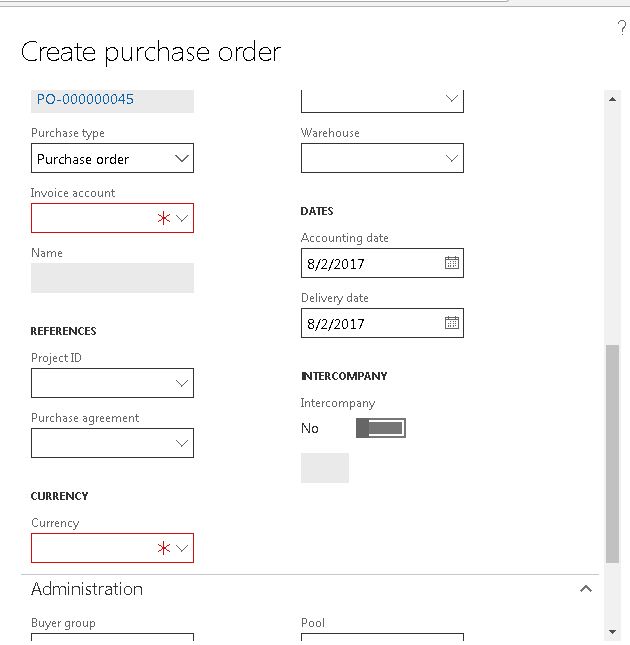
I have to "process invoice for intercompany vendor". I tried to create "Intercompany" purchase order from the below path =>"Procurement and sourcing>Purchase orders>All purchase orders" and generate an invoice for the intercompany PO. But "Intercompany" check box is disabled in the "Create purchase order" form and could not enable it? Please help me here
4118.Intercompany.JPG

*This post is locked for comments

I have the same question (0)
  • Suggested answer
    Ludwig Reinhard Profile Picture
    Microsoft Employee on at

    Hi Prabhu.rengasamy,

    The intercompany parameter is autopatically set active once an intercompany relationship between your vendor and a customer in another company is created.

    Please open your vendor account - select the General tab and find the intercompany Setup button. Through this button you have to establish a relationship to your intercompany customer. Once that is done, an intercompany-PO can be created.

    Best regards,

    Ludwig

  • Community Member Profile Picture
    on at

    Intercomp1.JPG

    Hi Ludwig,

    Thanks for your quick response.

    With the help of your tips, I found the "intercompany" option in the vendor settings. I could not enable the intercompany setting. Please let me know if i have to change any other setting.

    Thanks.

  • Suggested answer
    Ludwig Reinhard Profile Picture
    Microsoft Employee on at

    Hi,

    The IC setup needs to be made through this form

    3527.ic2.png

    3527.ic2.png

    Best regards,

    Ludwig

  • Verified answer
    Sagar Suman Profile Picture
    6,587 Super User 2025 Season 2 on at

    Hi Prabhu.rengasamy,

    You first need to setup a vendor and a customer for the legal entities in which you want to do inter company trade.

    Lets say you are in company B and you want to buy from company A so you will have to make a vendor named as company A in company B and you will have to make a customer named as company B in company A.

    Once this is done you will have to setup inter company trade for these then only you will be able to check or un check the inter company check mark.

    Kindly refer to this for more clarity technet.microsoft.com/.../aa498226.aspx

  • Community Member Profile Picture
    on at

    InterComp3.JPG

    Hi Ludwig,

    Thanks for the steps. I have followed the steps to setup the intercompany relationship and got the warning message - Both company and reference ID should be filled in for the customer."  . I could not find the place to set up company and reference id . Please help me.

  • Verified answer
    Ludwig Reinhard Profile Picture
    Microsoft Employee on at

    Hi Prabhu.rengasamy,

    In Company 5165 you specified vendor account no. 000001

    But for Company 5150 you have not filled the corresponding customer account. => the field 'my account' is blank

    Can you fill that one and try again?

    Best regards,

    Ludwig

  • Verified answer
    Community Member Profile Picture
    on at

    Thanks, Ludwig, It worked.

  • Community Member Profile Picture
    on at

    Hi Sagar,

    Thanks for your explanation.

Under review

Thank you for your reply! To ensure a great experience for everyone, your content is awaiting approval by our Community Managers. Please check back later.

Helpful resources

News and Announcements

Season of Giving Solutions is Here!

Quick Links

Responsible AI policies

As AI tools become more common, we’re introducing a Responsible AI Use…

Neeraj Kumar – Community Spotlight

We are honored to recognize Neeraj Kumar as our Community Spotlight honoree for…

Leaderboard > 🔒一 Microsoft Dynamics AX (Archived)

#1
Martin Dráb Profile Picture

Martin Dráb 4 Most Valuable Professional

#2
TAHER Mehdi Profile Picture

TAHER Mehdi 3

#3
Nakul Profile Picture

Nakul 2

Last 30 days Overall leaderboard

Featured topics

Product updates

Dynamics 365 release plans



