web
You’re offline. This is a read only version of the page.
close
Skip to main content

Notifications

Announcements

No record found.

Community site session details

Community site session details

Session Id :
Finance | Project Operations, Human Resources, ...
Unanswered

Help on Hyper-V machine

(0) ShareShare
ReportReport
Posted on by 709

Hello,

I'm sorry as this is not "really" related to D365 F&O, but maybe some of you may experienced this before and know how to solve.

I setup Hyper-V in my laptop for Dynamics 365 F&O (comes from LCS), and after a while I'm open this using 2 monitors. So the Virtual Machine is open ion my 2nd monitor. But now I didn't have the 2nd monitor already, but it seems the VM still open on the "other side". I tried to play the Project setting, from PC only to the other one but still not working.
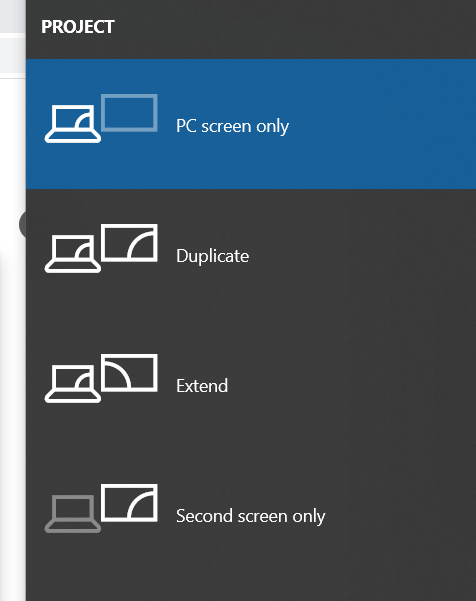
pastedimage1662483339665v1.png

Some blog that I found suggest me to change from Registry editor to delete from this key : Computer\HKEY_LOCAL_MACHINE\SYSTEM\CurrentControlSet\Control\GraphicsDrivers\Configuration

Computer\HKEY_LOCAL_MACHINE\SYSTEM\CurrentControlSet\Control\GraphicsDrivers\Connectivity

Computer\HKEY_LOCAL_MACHINE\SYSTEM\CurrentControlSet\Control\GraphicsDrivers\Scale Factor

and restart

But still not working.

When I connect to my VM, when it start to run I can see it is open in the "2nd monitor" which actually not exist.

Is anyone here ever experienced this ? I don't know how to restore it to 1 screen again, and I don't have the 2nd monitor for me to drag it, so I cannot use my VM now.

Thanks,

I have the same question (0)
  • André Arnaud de Calavon Profile Picture
    300,915 Super User 2025 Season 2 on at

    Hi ShaqAX,

    Your question is outside of the topic of this forum. There are some other forums where you can ask this question. However, I will try to help a bit. Not sure if it will be helpful as I have not experienced your issue myself.

    Is the VM in a saved state? If so, have you considered removing the saved state and start the VM?

    Usually, I do connect to the VM using a remote desktop; not opening the VM by double clicking in Hyper-V. I have not had any issue with multiple monitors when connecting or disconnecting when switching from one to two or from to to one monitor.

  • ShaqAX Profile Picture
    709 on at

    Hi Andre,

    Yes, I realized it is out of topic as I apologized already, sorry again, only I thought many people are using this VHD as well and may have experienced it.

    I'm not having infrastructure background for this VM thing, so probably first is what is a "saved state". I usually just Turn it Off and then start again, usually by clicking Connect button (then when the new window pop up, I remember it will ask me to Start)

    pastedimage1662521687871v1.png

    2nd-ly, if I remember correctly I was once using Remote Desktop, but if not mistaken I should open from this "Connect" first hand and login to that VM to know the IP address. I'm not using Remote Desktop afterward since I found the IP address keep changing. So I just use Connect and Start.

    And actually there is one time (last night), when I changing the Project from "PC Screen Only" and "Duplicate", then the "opened VM" displayed in the my PC Screen, then I resize it to fit my Notebook screen and start to work. But then now when I start my Notebook again, the VM back to the 2nd "not existed" monitor.

    Thanks

  • André Arnaud de Calavon Profile Picture
    300,915 Super User 2025 Season 2 on at

    Hi ShaqAX,

    When you save the VM instead of turning off, then there would be an option available to delete the saved state. In your scenario, the suggestion from me is not applicable as the VM was already off.

    Can you elaborate on what you mean with "changing the Project"?

  • ShaqAX Profile Picture
    709 on at

    Hi Andre,

    I'm sorry, it's the Project option ini Windows Notification panel, as in "Projection" I assumed. This one ->

    pastedimage1662596037548v1.png

    And it will bring to the options : PC Screen Only, Duplicate, Extend etc like my first screen capture.

    I actually asking this also in the "more appropriate" forum, the more "Windows issues", though still  no answer. 

    Thanks

  • ShaqAX Profile Picture
    709 on at

    Ok, I'm now using Remote Desktop Connection and able to continue my work inside that VM. Although the issue of running VM from Hyper-V Manager is still an issue.

    Thanks.

Under review

Thank you for your reply! To ensure a great experience for everyone, your content is awaiting approval by our Community Managers. Please check back later.

Helpful resources

Quick Links

Responsible AI policies

As AI tools become more common, we’re introducing a Responsible AI Use…

Neeraj Kumar – Community Spotlight

We are honored to recognize Neeraj Kumar as our Community Spotlight honoree for…

Leaderboard > Finance | Project Operations, Human Resources, AX, GP, SL

#1
Martin Dráb Profile Picture

Martin Dráb 664 Most Valuable Professional

#2
André Arnaud de Calavon Profile Picture

André Arnaud de Cal... 522 Super User 2025 Season 2

#3
Sohaib Cheema Profile Picture

Sohaib Cheema 303 User Group Leader

Last 30 days Overall leaderboard

Product updates

Dynamics 365 release plans



