web
You’re offline. This is a read only version of the page.
close
Skip to main content

Notifications

Announcements

No record found.

Community site session details

Community site session details

Session Id :
Customer experience | Sales, Customer Insights,...
Suggested Answer

Having some issues while designing a solution

(1) ShareShare
ReportReport
Posted on by 22

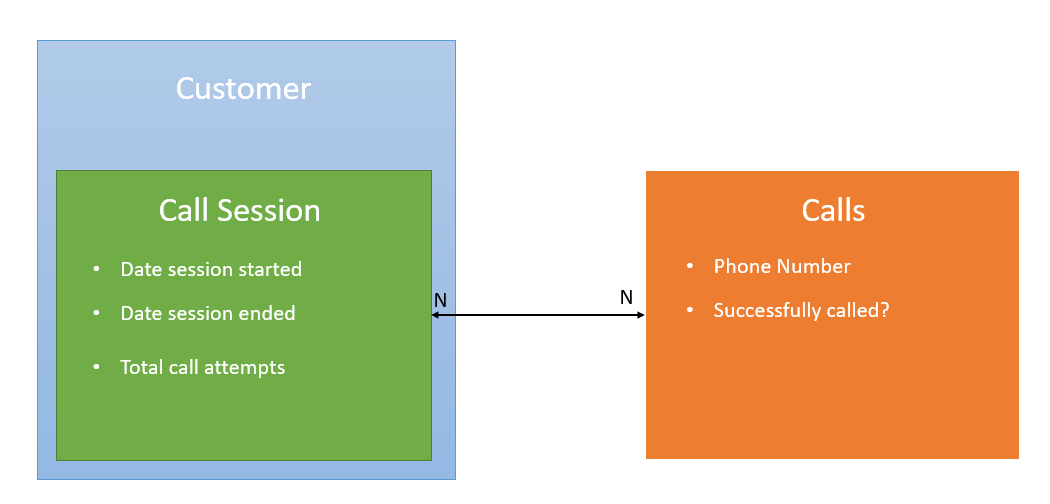
I have a parent form of type (Customer) but need a way to map a call session to a list of call attempts (see diagram below)
pastedimage1595435262134v1.png

I was looking into creating two entities (Call Session) and (Calls) where Call Session and Calls have a many to many relationship. This seems like a logical approach from a data perspective as it allows me to report call sessions further down the line. 

If I use a subgrid on the customer form where the main entity used is call session, how do I then allow a user to create individual calls for that session using a quick create form? The main aim im trying to achieve here is avoid the caller leaving the customer form at any time as they will have to update fields on the main customer form while they work. 

I have the same question (0)
  • sdfasdf Profile Picture
    842 on at

    Hello,

    One approach I can think of would be for you to customize your Call Sessions subgrid on the Customer entity form by adding a custom button "New Call". Once clicked, this custom button can trigger a JavaScript function that will create a Call Session record, open the Call entity's quick create form, and automatically associate it with the Call Session record and the Customer record.

    Although this approach might work for your scenario, it will require some development efforts to put together the required JavaScript code.

    I hope this helps!

  • Anthony Dsouza Profile Picture
    7 on at
    Hi @Michael Kyle,
    I would recommend use as much as OOTB capabilities, you can follow the below steps
     
    • Create Call Session entity, add fields (start/end, status, rollup total attempts, lookup to Customer).
    • Create Call entity or use built-in Phone Call activity. Add lookup to Call Session.
    • Configure 1:N relationships: Customer→Call Session, Call Session→Calls.
    • Add subgrids:
      • Customer form → Call Sessions.
      • Call Session form → Calls.
    • Create Quick Create forms for Call and Call Session (minimal fields). Note: Enable Quick Create on entity.
    • Add business rules / Power Automate flows: set Session Start on first call, set Session End on successful call, recalculate rollup if needed.
    • Grant Create/Read access for new entities and share app/views.
  • Suggested answer
    DennisvanHelvertVHDA Profile Picture
    24 on at
    Hi, i agree with both @Anthony Dsouza and @sdfasdf.
     
    According to my opinion, it would be best to create a new entity for call sessions with a 1:n relation from customer > call session, and also a 1:n relation from call session > calls.
     
    Furthermore, i would also add 'total call attempts' and 'succesful call attempts' on the 'call session' entity as a rollup field (or formula field).
    And, i would automatically update 'date session started & ended' using, for example, a powerautomate which runs on each create/update of a 'call'.
     
     
    However, from an user perspective i think it might be a bit strange to use call sessions. Of course, i'm not entirely sure of your business goals, but maybe you can rename 'call session' to 'call regarding xxx' and then automatically fill in the topic in a 'call'.
  • Tom_Gioielli Profile Picture
    2,797 Super User 2025 Season 2 on at
    @Michael Kyle, have any of the above answers helped? If so, can you please mark as verified or confirmed so future visitors can benefit from the expertise provided by the community?

Under review

Thank you for your reply! To ensure a great experience for everyone, your content is awaiting approval by our Community Managers. Please check back later.

Helpful resources

Quick Links

Responsible AI policies

As AI tools become more common, we’re introducing a Responsible AI Use…

Neeraj Kumar – Community Spotlight

We are honored to recognize Neeraj Kumar as our Community Spotlight honoree for…

Leaderboard > Customer experience | Sales, Customer Insights, CRM

#1
Pallavi Phade Profile Picture

Pallavi Phade 98

#2
Tom_Gioielli Profile Picture

Tom_Gioielli 60 Super User 2025 Season 2

#3
Gerardo Rentería García Profile Picture

Gerardo Rentería Ga... 43 Most Valuable Professional

Last 30 days Overall leaderboard

Product updates

Dynamics 365 release plans
