web
You’re offline. This is a read only version of the page.
close
Skip to main content

Notifications

Announcements

No record found.

Community site session details

Community site session details

Session Id :
Microsoft Dynamics AX (Archived)

visual studio is not installed properly.

(0) ShareShare
ReportReport
Posted on by 1,737

 i am trying to open the visual studio dynamic project from the AOT i am facing this error.

i am already installed the service pack one for visual studio it is throwing same error.

i am open the Application setup from the computer drive i am running the dynamics ax components, i am check the visual studio tools i am click next and it is show the below screen .visual-studio.png
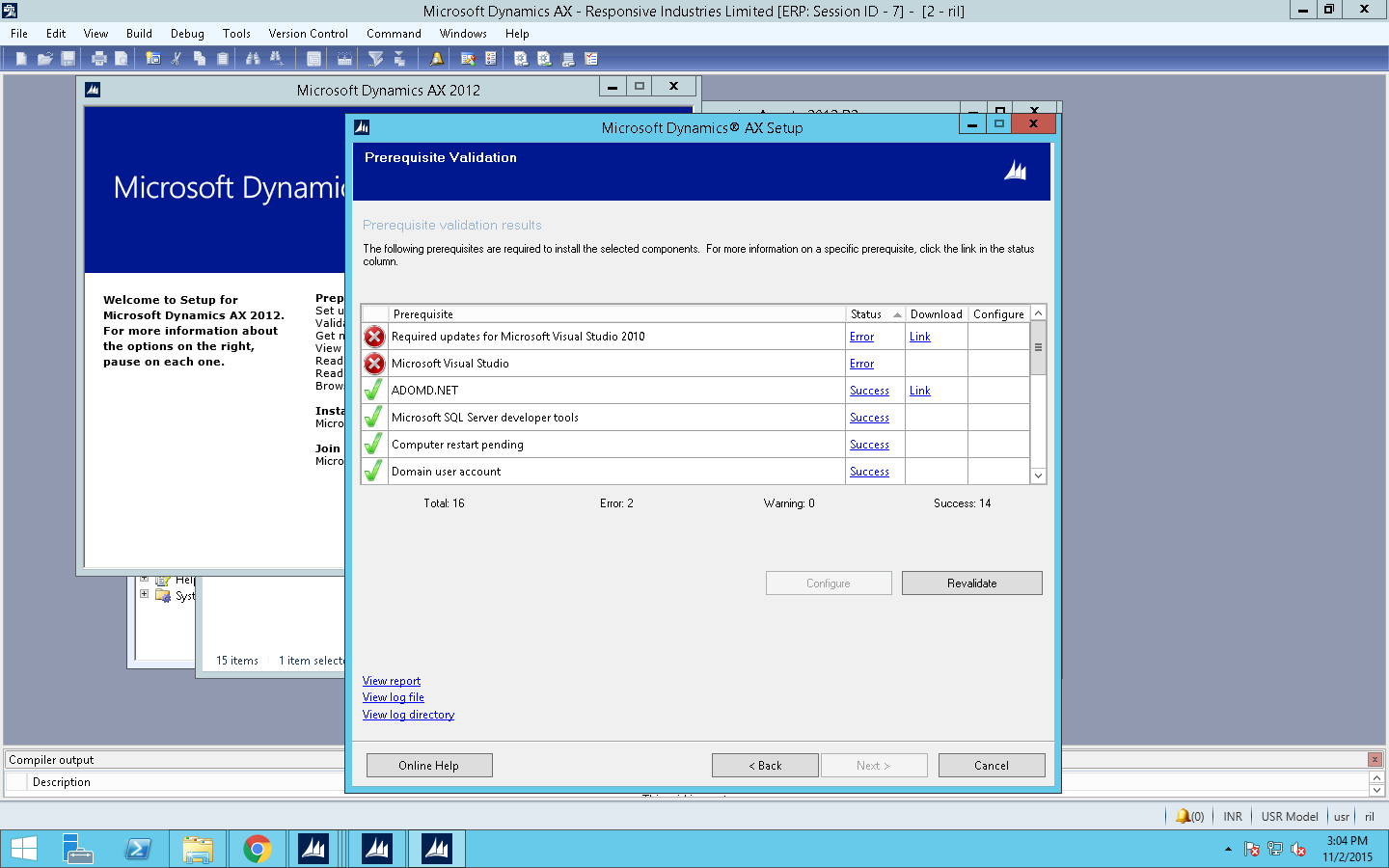
 i am click the link and i am download the visual studio tools for dynamics ax, i am finish the installation.

i am restart the dynamics ax but it is throwing the same error.

"The operation cannot be completed because Visual Studio Tools for Microsoft Dynamics AX are not installed. Install the missing component and try again."

can any one know about this issue please help me.

*This post is locked for comments

I have the same question (0)
  • Mohamed Asarafali Profile Picture
    445 on at

    Which version of AX you are using. which version of VS installed

    AX 2012 R3 CU8 doesnt support VS 2010, it will support only VS 2013 update 2 or later

  • Suggested answer
    Bashir Ahmad Profile Picture
    5,248 on at

    Please Install OpenXMLSDKv2 and MSChart and then try it

  • srinivas pamidi Profile Picture
    1,737 on at

    hai mohamed asaraf ali,

    My ax kernal version :6.3.164.0

    i am install the VS 2010,

    it is ok for this Dynamics ax,

    how to get the vs 2013.

  • Suggested answer
    Mohamed Asarafali Profile Picture
    445 on at

    As per the kernal version you are still using the R3 RTM.

    No need of installing VS 2013

    there is another forum (contains verified answer)  Almost identical to whats your issue. check it out

    community.dynamics.com/.../154281

    I would suggest to update it with CU8 (Which is available in partner source)  and install the VS 2013 ( www.microsoft.com/.../details.aspx ). But if you are updating CU8, you need to update your installation file also, checkout the following link.

    axlearning.blogspot.ae/.../installation-of-visual-studio-tools-on.html

  • srinivas pamidi Profile Picture
    1,737 on at

    hai ali,

    thank you fro providing this beautiful link and i have one problem in that blog.

    how to download the "Microsoft Visual Studio Team Explorer 2010" in my system.

    how to solve this problem.

Under review

Thank you for your reply! To ensure a great experience for everyone, your content is awaiting approval by our Community Managers. Please check back later.

Helpful resources

Quick Links

Responsible AI policies

As AI tools become more common, we’re introducing a Responsible AI Use…

Neeraj Kumar – Community Spotlight

We are honored to recognize Neeraj Kumar as our Community Spotlight honoree for…

Leaderboard > 🔒一 Microsoft Dynamics AX (Archived)

#1
Martin Dráb Profile Picture

Martin Dráb 4 Most Valuable Professional

#1
Priya_K Profile Picture

Priya_K 4

#3
MyDynamicsNAV Profile Picture

MyDynamicsNAV 2

Last 30 days Overall leaderboard

Featured topics

Product updates

Dynamics 365 release plans



