web
You’re offline. This is a read only version of the page.
close
Skip to main content

Notifications

Announcements

No record found.

Community site session details

Community site session details

Session Id :
Small and medium business | Business Central, N...
Suggested Answer

Strange behavior of the BCPT Suite

(0) ShareShare
ReportReport
Posted on by 35

Who 's also using the BCPT Suite and noticed some strange behavior?

This is a simple test, Insert 100 records.

codeunit 50502 "LoadLedgerLockTable"
{
    SingleInstance = true;

    trigger OnRun()
    begin
        If not IsInitialized or true then begin
            InitRun();
            IsInitialized := true;
        end;
        CreateLedgerEntries();
    end;

    var
        BCPTTestContext: Codeunit "BCPT Test Context";
        IsInitialized: Boolean;

    local procedure InitRun()
    var
    begin
    end;

    local procedure CreateLedgerEntries()
    var
        LedgerEntryLockTable: Record LedgerEntryLockTable;
        Counter: Integer;
    begin
        for Counter := 1 to 100 do begin
            BCPTTestContext.StartScenario('Add Ledger Locktable');
            LedgerEntryLockTable.Init();
            LedgerEntryLockTable.Insert(true);
            Commit();
            BCPTTestContext.EndScenario('Add Ledger Locktable');
            BCPTTestContext.UserWait();
        end;
    end;

}

Next step, configure a Test Suite

pastedimage1610568397550v1.png

Add the the correct codeunit

pastedimage1610571320785v5.png

pastedimage1610568489122v4.png

So far so good... let's summarize.

Run Codeunit in 10 sessions. At this moment we don't have a base.

I hit start and I wait... first of all, The screen doesn't get refreshed (so you don't know when the run is finished)
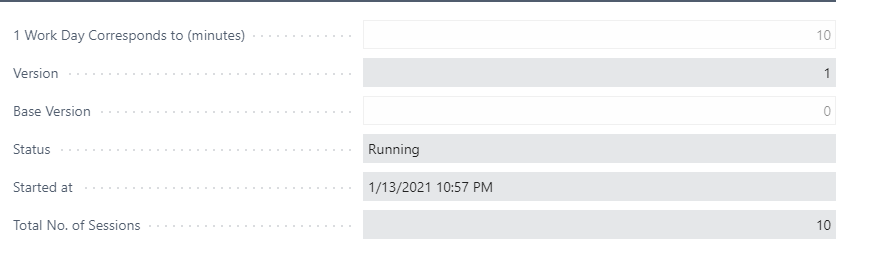
pastedimage1610575157123v6.png

Base version stays 0, version goes to 1
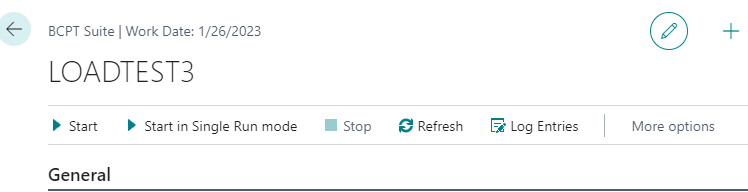
pastedimage1610575460915v7.png

If you want to see the "Log Entries" of session 1 (in fact 0), you get nothing

pastedimage1610575512460v8.png

Since the filter users "version No. = 1. I don't think this is ok? This should be the active "Version No."

If you run the test multiple times, the fields don't get filled in on the BCPT Suite Lines, so you can't compare againts you base run.

pastedimage1610575712973v9.png

I'm a bit confused here...

I have the same question (0)
  • Suggested answer
    Marco Mels Profile Picture
    on at

    Hello,

    We currently do not have dedicated Dev support via the Dynamics 365 Business Central forums, but I wanted to provide you some additional resources to assist.  If you need assistance with debugging or coding I would recommend discussing this on one of our communities.

    www.yammer.com/dynamicsnavdev

    dynamicsuser.net/.../developers

    I will open this up to the community in case they have something to add.

    Thanks.

  • PConijn Profile Picture
    51 on at
    Hi,
     
    I have been fiddling around with BCPT and I am getting this same issue (we are currently testing on BC24.3). Have you ever been able to find a solution?

Under review

Thank you for your reply! To ensure a great experience for everyone, your content is awaiting approval by our Community Managers. Please check back later.

Helpful resources

Quick Links

Responsible AI policies

As AI tools become more common, we’re introducing a Responsible AI Use…

Neeraj Kumar – Community Spotlight

We are honored to recognize Neeraj Kumar as our Community Spotlight honoree for…

Leaderboard > Small and medium business | Business Central, NAV, RMS

#1
OussamaSabbouh Profile Picture

OussamaSabbouh 2,606

#2
YUN ZHU Profile Picture

YUN ZHU 931 Super User 2025 Season 2

#3
Jainam M. Kothari Profile Picture

Jainam M. Kothari 773 Super User 2025 Season 2

Last 30 days Overall leaderboard

Featured topics

Product updates

Dynamics 365 release plans



