web
You’re offline. This is a read only version of the page.
close
Skip to main content

Notifications

Announcements

No record found.

Community site session details

Community site session details

Session Id :
Small and medium business | Business Central, N...
Answered

Update only some fields in Item card through Configuration Package

(0) ShareShare
ReportReport
Posted on by 307

I only need to update value of 2 fields :Gen. Prod. Posting Group, Inventory Posting Group:
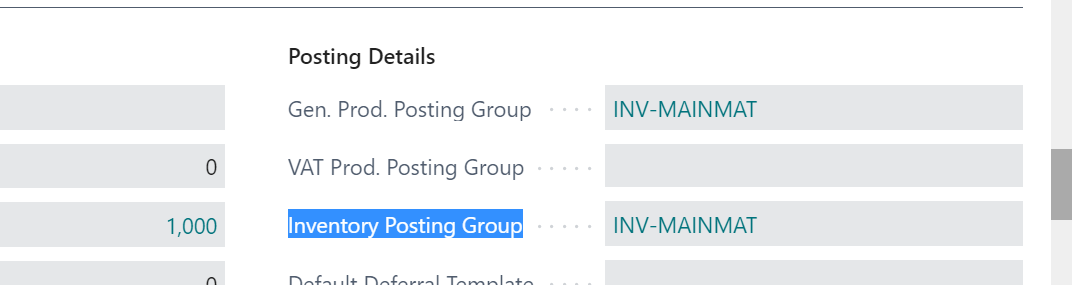
pastedimage1662795567421v1.png

I use Configuration Package. 

Do I need to include all fields, or I only need to include 3 field: No, Gen. Prod. Posting Group, Inventory Posting Group ?

pastedimage1662795838486v2.png

Thanks

I have the same question (0)
  • Verified answer
    Guy McKenzie Profile Picture
    1,336 on at

    Just the 3 fields is all you need.

    Or try edit in excel for a simple small update like this.

  • Suggested answer
    Amit Baru Profile Picture
    3,037 on at

    Hi,

    Yes with 3 fields only.

    Regards

    Amit Sharma

    www.erpconsultors.com

  • Suggested answer
    Inge M. Bruvik Profile Picture
    1,111 Moderator on at

    I recommend you use edit in Excel for this. Much easier than the configuration package.

  • Suggested answer
    Amit Baru Profile Picture
    3,037 on at

    Hi,

    Adding more information:

    Excel Edit functionality is available only in SAAS version. If you are using on-perm then i  think this feature is not there.

    Regards

    Amit Sharma

    www.erpconsultors.com

  • jacakal bhatti Profile Picture
    10 on at

    I totally agreed with you my problem is solved completely. Thankyou so much. Have a nice day to all…

    https://doradotarde.com/

  • Hoang Ng Profile Picture
    307 on at

    Thanks Amit.

    I am using on-premise so Configuration Package is good way for me.

  • Suggested answer
    Amit Baru Profile Picture
    3,037 on at

    Hi,

    Most Welcome.

    Regards

    Amit Sharma

    www.erpconsultors.com

    Press Yes if info is useful.

  • Suggested answer
    Inge M. Bruvik Profile Picture
    1,111 Moderator on at

    The edit it Excel also works on prem if  it is configured.

    docs.microsoft.com/.../configuring-excel-addin

  • Suggested answer
    Nitin Verma Profile Picture
    21,708 Moderator on at

    Hi,

    Instead you can use Edit in excel feature

    Thanks

  • Suggested answer
    YUN ZHU Profile Picture
    95,718 Super User 2025 Season 2 on at

    Hi, Just export the Key(s) and the fields you need to modify.

    More details about Configuration Package:

    https://yzhums.com/4286/

    Hope this helps.

    Thanks.
    ZHU

Under review

Thank you for your reply! To ensure a great experience for everyone, your content is awaiting approval by our Community Managers. Please check back later.

Helpful resources

Quick Links

Responsible AI policies

As AI tools become more common, we’re introducing a Responsible AI Use…

Neeraj Kumar – Community Spotlight

We are honored to recognize Neeraj Kumar as our Community Spotlight honoree for…

Leaderboard > Small and medium business | Business Central, NAV, RMS

#1
OussamaSabbouh Profile Picture

OussamaSabbouh 2,664

#2
YUN ZHU Profile Picture

YUN ZHU 960 Super User 2025 Season 2

#3
Jainam M. Kothari Profile Picture

Jainam M. Kothari 773 Super User 2025 Season 2

Last 30 days Overall leaderboard

Featured topics

Product updates

Dynamics 365 release plans



