web
You’re offline. This is a read only version of the page.
close
Skip to main content

Announcements

No record found.

News and Announcements icon
Community site session details

Community site session details

Session Id :
Small and medium business | Business Central, N...
Unanswered

Vendor Remittance - The report couldn't be generated

(0) ShareShare
ReportReport
Posted on by 4,030
I entered Manual Check in the Payment Journal. I tried to print Remittance Advice. I get this error:
The report couldn't be generated because it was empty. Adjust your filters and try again.
Please advise how to fix.
My environment is setup for US Region as mentioned in following article.
https://learn.microsoft.com/en-ca/dynamics365/business-central/ui-extensions-send-remittance-advice
 
I tired to print from Payment Journals >> Related >> Payments >> Send Remittance Advice.
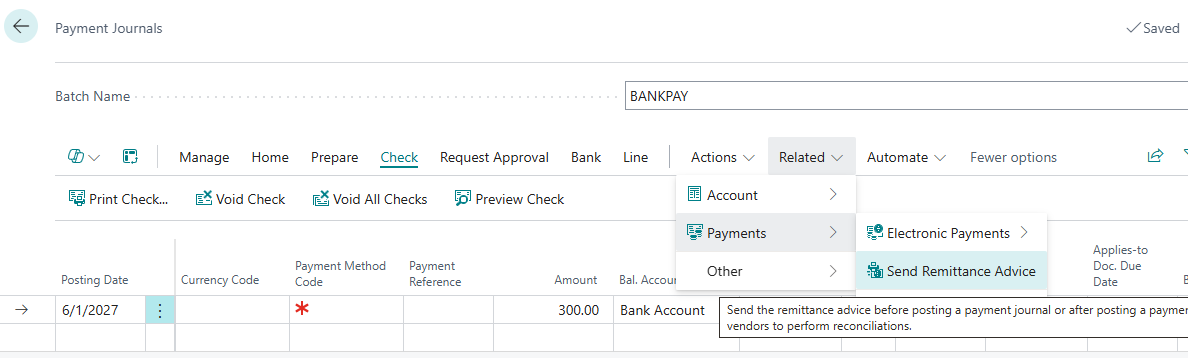


Error message:
The report couldn’t be generated, because it was empty. Adjust your filters and try again.
AL call stack:
"Report Selections"(Table 77).SaveReportAsPDFInTempBlob line 21 - Base Application by Microsoft version 28.0.46665.49824
"Report Selections"(Table 77).SendToDiskForVend line 16 - Base Application by Microsoft version 28.0.46665.49824
"Document Sending Profile"(Table 60).SendToDiskVendor line 15 - Base Application by Microsoft version 28.0.46665.49824
"Document Sending Profile"(Table 60).SendVendor line 16 - Base Application by Microsoft version 28.0.46665.49824
"Document Sending Profile"(Table 60).SendVendorRecords line 23 - Base Application by Microsoft version 28.0.46665.49824
SendPmtJnlRemitAdvice(PageExtension 4022).SendVendorRecords line 12 - Send remittance advice by email by Microsoft version 28.0.46665.48257
SendPmtJnlRemitAdvice(PageExtension 4022)."SendRemittanceAdvice - OnAction"(Trigger) line 6 - Send remittance advice by email by Microsoft version 28.0.46665.48257

 
I have the same question (0)

Under review

Thank you for your reply! To ensure a great experience for everyone, your content is awaiting approval by our Community Managers. Please check back later.

Helpful resources

Quick Links

Introducing the 2026 Season 1 community Super Users

Congratulations to our 2026 Super Stars!

Meet the Microsoft Dynamics 365 Contact Center Champions

We are thrilled to have these Champions in our Community!

Congratulations to the April Top 10 Community Leaders

These are the community rock stars!

Leaderboard > Small and medium business | Business Central, NAV, RMS

#1
OussamaSabbouh Profile Picture

OussamaSabbouh 2,012 Super User 2026 Season 1

#2
YUN ZHU Profile Picture

YUN ZHU 986 Super User 2026 Season 1

#3
Teagen Boll Profile Picture

Teagen Boll 659 Super User 2026 Season 1

Last 30 days Overall leaderboard

Featured topics

Product updates

Dynamics 365 release plans



