web
You’re offline. This is a read only version of the page.
close
Skip to main content

Notifications

Announcements

No record found.

Community site session details

Community site session details

Session Id :
Microsoft Dynamics AX (Archived)

Master Scheduling is run...planned orders not created in MRP

(0) ShareShare
ReportReport
Posted on by 1,307

Hi,

An item was added to the salesline. Automatically the net requirements got created.

Then I run the master scheduling, the planned kanban orders are also created in Net requirements.
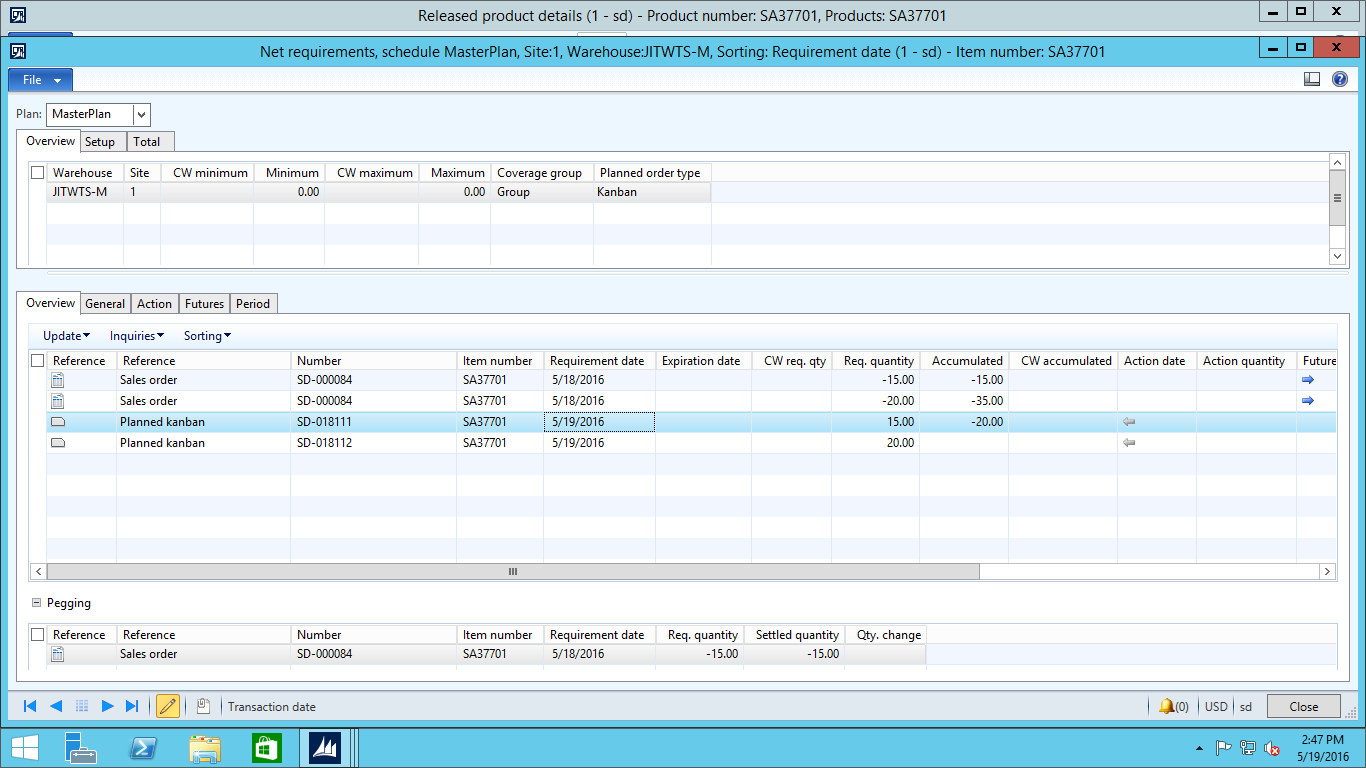
NetRequirements.png

But they are not visible in Master Planning --> Planned Orders. What needs to be done so that the planned orders are visible in Master Planning?

Thanks,

lakshmi

*This post is locked for comments

I have the same question (0)
  • Tim Schofield Profile Picture
    on at

    Do you have more than one master plan? Did you select the plan shown in your screenshot when you went to the Planned orders form?

  • Lakshmi Karambakkam Profile Picture
    1,307 on at

    We have only one Master plan. I used the same plan while running the master schedule.

    I also saw the planned orders with the same plan. Below is the coverage group being used.

    Are there any other settings which also needs to be checked?

    DefaultCoverageGroup.png

    Thanks,

    Lakshmi

  • Tim Schofield Profile Picture
    on at

    Sorry Lakshmi, I'm stumped. I don't have a lot of experience with planned kanbans, but I've looked at the standard demo data and found an item which uses planned kanbans, and as soon as I have updated the master plan on the Net requirements screen I can see the planned kanbans in the planned order form. You haven't got any customizations on that form have you?

  • Verified answer
    Lakshmi Karambakkam Profile Picture
    1,307 on at

    I found out that in our system once a master scheduling is run, the system automatically firms the orders and so they are not visible in planned orders but we can view them directly in the kanban schedule board.

    Thanks for trying out for me. I am working for the first time in MRP.

  • Tim Schofield Profile Picture
    on at

    Sorry Lakshmi - the Firm time fence (3 days) is in your screen shot. I should have spotted that!

Under review

Thank you for your reply! To ensure a great experience for everyone, your content is awaiting approval by our Community Managers. Please check back later.

Helpful resources

Quick Links

Responsible AI policies

As AI tools become more common, we’re introducing a Responsible AI Use…

Neeraj Kumar – Community Spotlight

We are honored to recognize Neeraj Kumar as our Community Spotlight honoree for…

Leaderboard > 🔒一 Microsoft Dynamics AX (Archived)

#1
Martin Dráb Profile Picture

Martin Dráb 4 Most Valuable Professional

#1
Priya_K Profile Picture

Priya_K 4

#3
MyDynamicsNAV Profile Picture

MyDynamicsNAV 2

Last 30 days Overall leaderboard

Featured topics

Product updates

Dynamics 365 release plans



