web
You’re offline. This is a read only version of the page.
close
Skip to main content

Announcements

No record found.

News and Announcements icon
Community site session details

Community site session details

Session Id :
Dynamics 365 Community / Forums / Finance forum / D365FO Archiving and B...
Finance forum

D365FO Archiving and BI Strategy

(0) ShareShare
ReportReport
Posted on by

Hi,

I cannot find any Microsoft D365FO Transactional Database "Archiving" Strategy that is compatible with BYOD and PowerBI. What's Microsoft recommendation? Can someone help please?

Attached a concept diagram

pastedimage1563206993182v1.png

Categories:
I have the same question (0)
  • Suggested answer
    nmaenpaa Profile Picture
    101,172 Moderator on at

    You can export the prod DB to test system, and from there you can bring it anywhere you like. So that would match the bottom left of your picture.

    However you can't remove old posted transactions from your system (for example older than x years).

    You can also copy your BYODB database and archive the copy.

    But why would you need it?

    Same question about BYODB, why would you need two of them?

    What business requirement are you trying to resolve?

  • Verified answer
    Sukrut Parab Profile Picture
    71,739 Moderator on at

    There were some archiving tools for old versions , not sure about D365FO though . The approach Microsoft suggest when you go on D365 cloud version is to go with required data for example , open transactions , master data etc.  Archiving strategy is needed when you have lot of data , which was case I have seen at few customers where they have DB size in terabytes.

    If you have not implemented /implementing D365 FO suggestion is to archive data  in your old system.  Also in your diagram, you don't need two BYODB . If you have Archive DB you can directly use that for reporting.

  • Community Member Profile Picture
    on at

    Thanks for your reply Nikolaos,

    Why we cannot remove old posted transactions from the system? is that a system limitation?.

    I cannot see a reason to "archive" a copy from Production environment, for that Microsoft offer backups and replication technology to facilitate Disaster Recovery if needed to secondary hosts/data centre.

    We are planning our initial D365FO Implementation and we have some doubts related to system performance. We are expecting the DB to grow rapidly due to the high number of business units, sites and countries running over the same PROD environment. We are expecting a huge number of internal transactions and with many 3rd party companies.

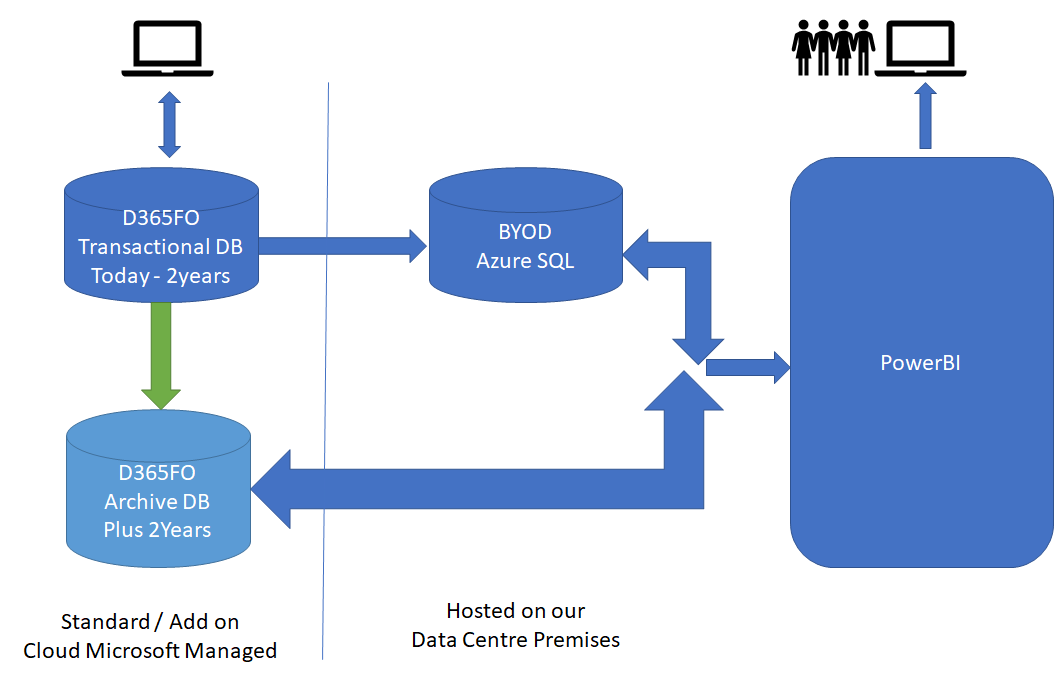
    There is a concern that the (cloud based) PROD environment response performance could be slow if posted transactions are not archived into a "read-only" archived environment after for example 2 years. The idea is to keep the PROD database as slim as possible to boost response time. As we need the archive transactions for PowerBI, the idea is to move both DBs using BYOD and then configure PowerBI to read from both reporting environments. In doing that we keep the PROD environment not only slim but also isolated from PowerBI. As I said the idea is to get the best Performance possible.

    Maybe we do not need two BYOD (as Sukrut Parab suggest) only one as per below new image

    We have no enough experience with D365FO architecture and we want to understand. If archiving is not needed we want to know why and how Microsoft is going to ensure the performance is not dropping dramatically after the DBs start growing.
    pastedimage1563266916061v1.png

  • Community Member Profile Picture
    on at

    Thanks Sukrut, can you see my previous reply to you both please?

  • Suggested answer
    nmaenpaa Profile Picture
    101,172 Moderator on at

    Yes, not being able to delete posted transactions is a feature of Dynamics AX and Dynamics 365 for Finance and Operations. Posted transactions mean data such as invoices, and ledger entries.

    Once something is posted, you can't change it anymore.

    In AX2012 Microsoft created a tool called Intelligent Data Management Framework (IDMF) which you could use to clean up such posted transactions, by combining old transactions to summary transactions. But this tool is not available for D365FO.

    The most important thing is to have a good clean up strategy for all log, history, and worksheet data. You can clean up batch history, integration staging tables, journals etc.

    I'd also like to say that usually large amounts of data doesn't mean bad performance. Normally performance bottlenecks are related to large amount or volume of ongoing transactions, but any cleanup don't have impact on this.

  • Suggested answer
    Sukrut Parab Profile Picture
    71,739 Moderator on at

    When you say database size is going to increase rapidly , how big is database going to be you think ? What's the size of database In your current system .

    Deleting transactions is not possible in cloud version . The reason I asked you about DB size is because , one of our customer we upgraded from AX 2012 with all the data(Ax 2012 system had all the data from their legacy system)  , customer is using D365 FnO from last 2+ years and we haven't encounter any major performance issues. if you see any issues  there are tools to help you like telemetry in LCS , which has bunch of functionality added and its still improving.  Keeping database slim doing doesn't mean you are not going to encounter  performance issues.

  • Community Member Profile Picture
    on at

    Looks like Archiving is not needed and that the Key is a good Monitoring Strategy.

    Cheers and thanks.

  • Sukrut Parab Profile Picture
    71,739 Moderator on at

    Great . If any of above answer helped you close the thread by marking answers verified.  

Under review

Thank you for your reply! To ensure a great experience for everyone, your content is awaiting approval by our Community Managers. Please check back later.

Helpful resources

Quick Links

November Spotlight Star - Khushbu Rajvi

Congratulations to a top community star!

Forum Structure Changes Coming on 11/8!

In our never-ending quest to help the Dynamics 365 Community members get answers faster …

Dynamics 365 Community Platform update – Oct 28

Welcome to the next edition of the Community Platform Update. This is a status …

Leaderboard > Finance

Last 30 days Overall leaderboard

Featured topics

Product updates

Dynamics 365 release plans
