web
You’re offline. This is a read only version of the page.
close
Skip to main content

Notifications

Announcements

Community site session details

Community site session details

Session Id :
Microsoft Dynamics AX (Archived)

AX2012 R3 CU9 VS 2013 Update4 big errors. Install fine but don't work and makes errors

(0) ShareShare
ReportReport
Posted on by 110

Have a problem with visual studio 2013 update, ax2012 R3 CU9 and Visual Studio 2013Dev Tools

The errors starts when install a Visual Studio 2013Dev Tools (sucessfully)

Have 3 problems in 3 diferents pcs with the same configuratión and installation and 1 problem to all pcs.

1) When open a vs2013 an try to get a report model ax

"se producto una excepción en el inicializador de tipo de "Microsoft.Dynamicas.Frameworks.BusinessConnector.SesionCache"
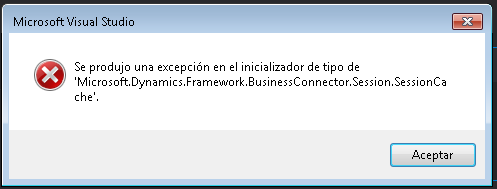
errorvs2013devtools1.png

2) in other pc when open a vs2013 an try to get a report model ax

"Referencia de objeto no establecida como instanacia de un objeto"
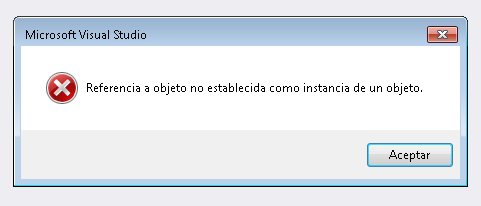
errorvs2013devtools2.png

3) in other pc when open axclient (ax32.exe)
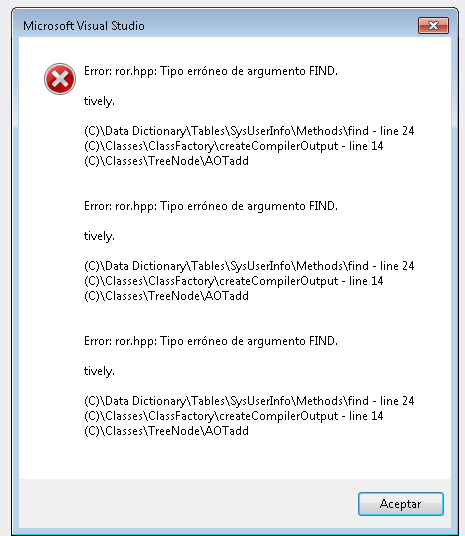
errorvs2013devtools3.png

4) when all of this pcs open a axclient (ax32.exe) cause the next error
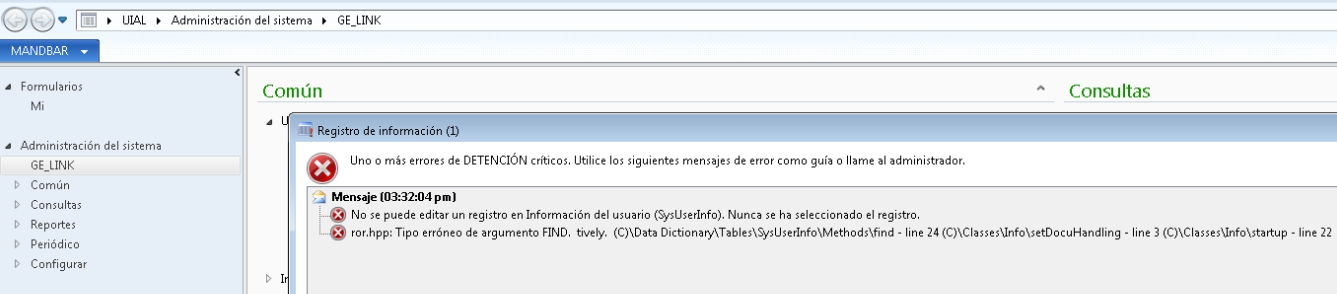
errorvs2013devtools4.jpg

NO se puede editar un registro en información de usuario (SysUserInfo). Nunca se ha seleccionado el registro.

ror.hpp. Tipo erroneo de argumento FIND. tively. (c)\DataDictionary\Tables\SysUserInfo\Methods\find- line 24 (C)\Classes\Info\setDocuhandling - line 3 (C)\Classes\Info\Statup - line 22

5) the labels in diferents places (menus, captions, links) are errors.  Look at the caption "Administracion del sistema GE_LINK

whats happenging !!!

whats wrong!!!

Note. the others pcs with ax clients without VS2013 and Visual Studio 2013Dev Tools  are fine.

can any helpme to understand this problem

*This post is locked for comments

I have the same question (0)
  • Jonas Jhy IT Profile Picture
    110 on at

    The visual studio 2013 update is 4.

  • André Arnaud de Calavon Profile Picture
    301,551 Super User 2025 Season 2 on at

    Hi Jonas,

    Please don't use capitals in your titles. It is considered as screaming on this forum which is not allowed. I have changed it for you as moderator.

    Update: Please also provide the errors in English. That makes it more easy for all community members to respond. In this case I can't understand the errors, so I also can't help you.

  • Douglas Noel Profile Picture
    3,905 on at

    Hi Jonas,

    no idea on that, but already have seen strange "labels" like your described (somethink like "_LINK", or shortened or strange main menu entries) in a lot of other cases.

    The solution in my case was always to do a cleanup of the caching files (especiually the kernel kti file)

    can you try a "cache cleanup",

    stop the axclient

    removing ALL the auc files in %LOCALAPPDATA% (something like c:\users\<youruser>\appdata\local)

    all ax_{GUID}.auc files

    all ax_GUI_{GUID}.auc files

    all ax_NONGUI_{GUID}.auc files

    all axsys*.kti files

    moreover

    look at %LOCALAPPDATA%\Microsoft\Dynamics Ax\


    one or more directories VSAssemblies{GUID} reside here


    Fastest Way: delete all these VSAssemblies folders

    OtheWay: each of these folders shoild contain a AxClientAssemblyCache.auc file, deletet this


    restart the ax client


    do you still have the strange labels like GE_LINK ?


    regards


    Douglas


  • Jonas Jhy IT Profile Picture
    110 on at

    ok. lets do that

    ¿do you still have the strange labels like GE_LINK ?

    yes  

  • Douglas Noel Profile Picture
    3,905 on at

    Sorry,

    but it should be worth the try.

    Never seen this GE_LINK, only _LINK, and this has been on clients with neither VSTools nor VS itself.

    At the moment, no idea.

    We have a similar situation CU9 and VS13 but don't use Upd4. In short time we plan to use Vs13/4.

    If we're going to see similar issues I'll update this thread.

    Regards

    Douglas

  • Jonas Jhy IT Profile Picture
    110 on at

    hi douglas

    "...The solution in my case was always to do a cleanup of the caching files (especiually the kernel kti file)..."

    this solution helpme with the labels problems. thanks!

    but I still having the others problems.

    1) When open a vs2013 an try to get a report model ax

    "se producto una excepción en el inicializador de tipo de "Microsoft.Dynamicas.Frameworks.BusinessConnector.SesionCache"

    2) in other pc when open a vs2013 an try to get a report model ax

    "Referencia de objeto no establecida como instanacia de un objeto"

  • Jonas Jhy IT Profile Picture
    110 on at

    well today  the problem still with visual studio update4.

    with vs update2 we dont have problem.

  • Ghetz Profile Picture
    3,013 on at

    WOW, old post, but I have the same problem today.

    I just isntalled Visual Studio 2013 in my AOS server, because I wanted to do some CIL debugging. Now all of a sudden, I login to AX client and I get strange labels like "GE_LINK" and "MANDBAR" as we can see in the screenshots of the original poster.

    (My system is also in Spanish by the way)

    Fixed deleting AUC AND KTI files from the user's appdata folder

Under review

Thank you for your reply! To ensure a great experience for everyone, your content is awaiting approval by our Community Managers. Please check back later.

Helpful resources

News and Announcements

Season of Giving Solutions is Here!

Quick Links

Responsible AI policies

As AI tools become more common, we’re introducing a Responsible AI Use…

Neeraj Kumar – Community Spotlight

We are honored to recognize Neeraj Kumar as our Community Spotlight honoree for…

Leaderboard > 🔒一 Microsoft Dynamics AX (Archived)

#1
TAHER Mehdi Profile Picture

TAHER Mehdi 3

#2
Martin Dráb Profile Picture

Martin Dráb 2 Most Valuable Professional

#2
Nakul Profile Picture

Nakul 2

Last 30 days Overall leaderboard

Featured topics

Product updates

Dynamics 365 release plans



