web
You’re offline. This is a read only version of the page.
close
Skip to main content

Notifications

Announcements

No record found.

Community site session details

Community site session details

Session Id :
Microsoft Dynamics AX (Archived)

Axapta colour schema from server 2008 to 2016

(0) ShareShare
ReportReport
Posted on by

Hi

This is a low tech question I think, but our users complain about the new brighter and less contrasted colour schema when they use Axpata via our 2016 RDP farm.  On the snippet, Axapta from our 2008 servers is in-front, and the new 2016 is in the background. Is there anyway to change the colour schema on the 2016 servers, so it looks like a 2008 server. Working with the new brigther Axpata puts a lot of strain on the eyes for 6 - 8 hours a day.
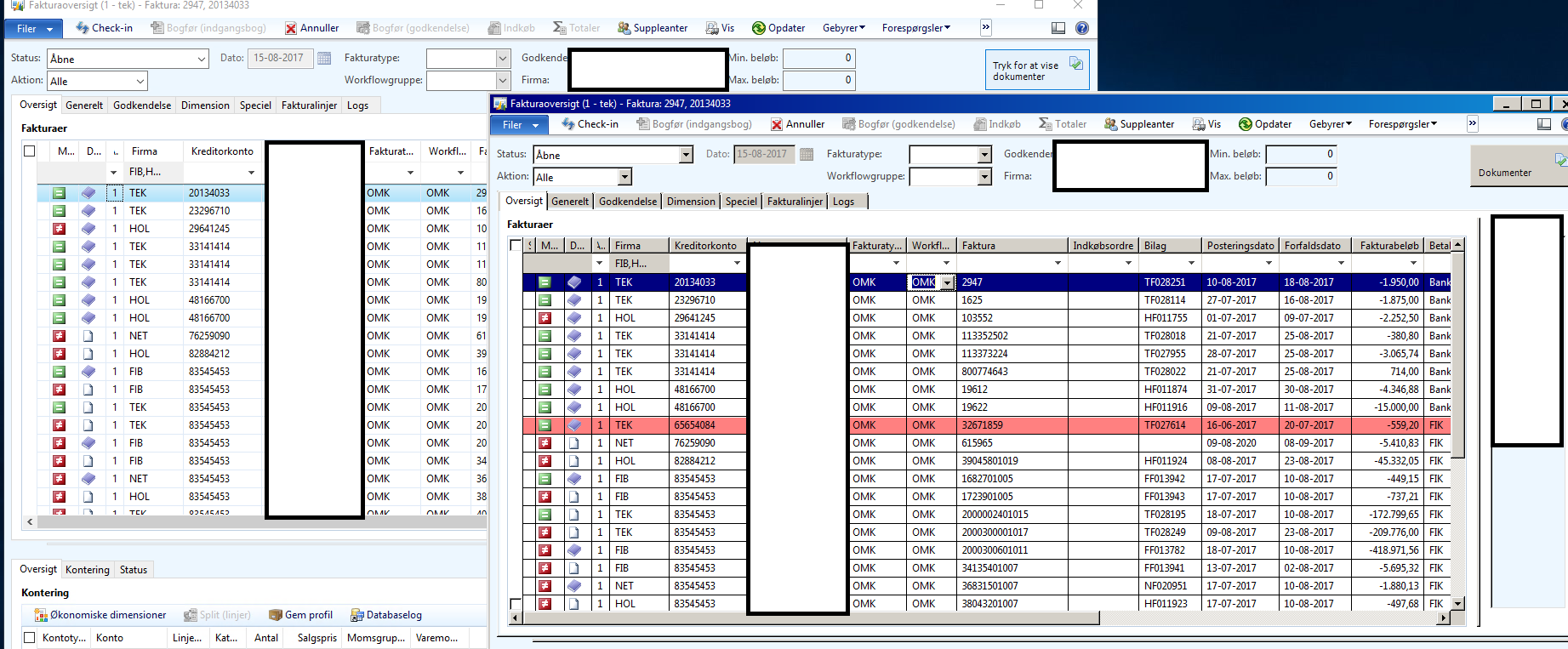
RDPvsCitrix.png

*This post is locked for comments

I have the same question (0)
  • Suggested answer
    Vilmos Kintera Profile Picture
    46,149 on at

    AX is picking up whatever your Windows Theme is on the RDS host for the user profile.

    If you cannot find Windows theme out-of-the-box that you are happy with, it is quite easy to bring in additional themes (maybe even the old one?).

    I do not remember if you need Desktop Experience to be installed as a pre-requisite for changing themes, but it is highly likely. If Desktop Experience is required, and you have done a Core installation, I am afraid you need to re-do your Windows setup from scratch, since only in earlier versions you could install D.E. separately.

    docs.microsoft.com/.../windows-server-2016

    Once you have found/installed a theme you or your users like, you can simply push a Group Policy for those servers for all users to switch the theme.

  • Community Member Profile Picture
    on at

    So i finally got around to this isssue...

    I've tried to apply the old color scheme from server 2008 via a reg fix posted on a Xenapp forum - this didn't help.

    Available themes from windows store doesn't contain a "classic" or older theme. With 3rd party themes, word, excel and everything looks weird!

    It doesn't look like it is possible to change this!?!?

  • Suggested answer
    Vilmos Kintera Profile Picture
    46,149 on at

    Your options are listed above. You could try to use an older theme pack from a different Windows installation, see if that works.

Under review

Thank you for your reply! To ensure a great experience for everyone, your content is awaiting approval by our Community Managers. Please check back later.

Helpful resources

Quick Links

Responsible AI policies

As AI tools become more common, we’re introducing a Responsible AI Use…

Neeraj Kumar – Community Spotlight

We are honored to recognize Neeraj Kumar as our Community Spotlight honoree for…

Leaderboard > 🔒一 Microsoft Dynamics AX (Archived)

#1
Martin Dráb Profile Picture

Martin Dráb 4 Most Valuable Professional

#1
Priya_K Profile Picture

Priya_K 4

#3
MyDynamicsNAV Profile Picture

MyDynamicsNAV 2

Last 30 days Overall leaderboard

Featured topics

Product updates

Dynamics 365 release plans



