web
You’re offline. This is a read only version of the page.
close
Skip to main content
Community site session details

Community site session details

Session Id :
Customer experience | Sales, Customer Insights,...
Suggested Answer

Plugins for lookup

(0) ShareShare
ReportReport
Posted on by 160

hi 

i am writing a plugin on "PLAN CLASS TABLE". I have another table "CLASS REQUIREMENTS". this table has a lookup field "PLAN CLASS" from PLANCLASS TABLE. i want to

read second table. please guide which is best way to do this.

666740.Capture.PNG

I have the same question (0)
  • Suggested answer
    Amit Katariya007 Profile Picture
    10,409 Super User 2025 Season 2 on at
    RE: Plugins for lookup

    Hello ManPreet,

    As you will register your plugin on the Plan Class Table,

    1. You will get the GUID of the Plan Class Table record.

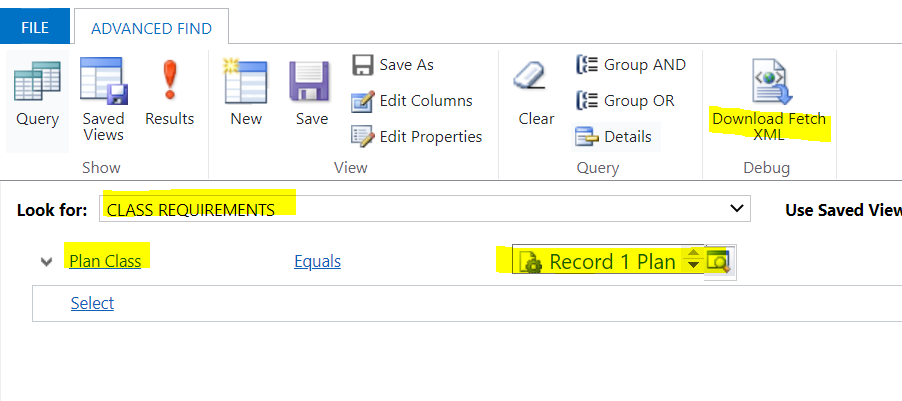
    2. Now Just create a query on the "Class Requirement Table" just like below.

    select Class Requirement table

    where Plan class Table Record guid = from step 1.
    pastedimage1651471638577v2.png

    Download this Fetch XML.

    3. Fetch XML will look like below.


    and that is how you will get the data.

    4. Replace GUID with the Dynamic GUID when your plugin will run.

    pastedimage1651471804522v1.png

    Thank you,

    Amit Katariya

  • happysingh0009 Profile Picture
    160 on at
    RE: Plugins for lookup

    hi sir

    i am beginner so dont know how to create query on table. can  please explain it in details

  • Suggested answer
    Amit Katariya007 Profile Picture
    10,409 Super User 2025 Season 2 on at
    RE: Plugins for lookup

    Just like I did above you can follow the same...that is why I have attached the screen shots for your reference.

    It is very easy to understand the Fetch XML.

    Line number 2 describes the Entity/table on which this query run.

    Line 3 to 16 have attributes which we will get.

    Line 18 to 20, it is a filter criteria that means "Where" condition...

    docs.microsoft.com/.../use-fetchxml-construct-query

    www.c-sharpcorner.com/.../

    dynamics-chronicles.com/.../fetchxml-overview-essential-syntax

    Also for the C# code you can refer below articles.

    d365demystified.com/.../

    carldesouza.com/.../

    mylearnings26.wordpress.com/.../

  • happysingh0009 Profile Picture
    160 on at
    RE: Plugins for lookup

    i performed these steps. now how i can add this code to my pre-written code. this was a part of bigger project. i want to use the value of these attributes to perform some tasks.

  • Suggested answer
    Amit Katariya007 Profile Picture
    10,409 Super User 2025 Season 2 on at
    RE: Plugins for lookup

    Have you already registered the plugin on the PLAN CLASS TABLE?

    if yes then you can merge this New code with the old one. And make sure get the attribute result before your main operation so that your code will work as expected and will not provide null exception.

  • Suggested answer
    Bipin D365 Profile Picture
    28,983 Moderator on at
    RE: Plugins for lookup

    Hi,

    You can generate your fetch xml query from advanced find easily. Open advanced find and add below condition then click on Download fetch xml ribbon button.

    CR101.PNG

    Building -> Class Reuqirement Table 

    Employee -> Plan Class(lookup)

    Now use below tool to convert your fetxh xml to c#

    https://www.ashishvishwakarma.com/FetchXmlFormatter/

    Now check below blog on how to use this code in your plugin class file 

    https://carldesouza.com/dynamics-365-fetchxml-c/

    Please mark my answer verified if this is helpful!

    Regards,

    Bipin Kumar

    Follow my Blog: xrmdynamicscrm.wordpress.com/

Under review

Thank you for your reply! To ensure a great experience for everyone, your content is awaiting approval by our Community Managers. Please check back later.

Helpful resources

Quick Links

Responsible AI policies

As AI tools become more common, we’re introducing a Responsible AI Use…

Neeraj Kumar – Community Spotlight

We are honored to recognize Neeraj Kumar as our Community Spotlight honoree for…

Leaderboard > Customer experience | Sales, Customer Insights, CRM

#1
Tom_Gioielli Profile Picture

Tom_Gioielli 183 Super User 2025 Season 2

#2
#ManoVerse Profile Picture

#ManoVerse 121

#3
Gerardo Rentería García Profile Picture

Gerardo Rentería Ga... 61 Most Valuable Professional

Last 30 days Overall leaderboard

Product updates

Dynamics 365 release plans
