web
You’re offline. This is a read only version of the page.
close
Skip to main content

Notifications

Announcements

No record found.

Community site session details

Community site session details

Session Id :
Microsoft Dynamics AX (Archived)

Negative "Quantity available to release" when do Release to warehouse

(0) ShareShare
ReportReport
Posted on by

Dear all,

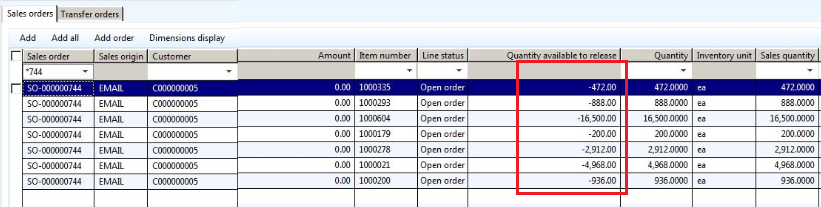
When I open "Release to warehouse" screen, I found that the  Quantity available to release is Negative
0160.0.PNG

Therefore I couldn't confirm shipment.

When I check the Physical on-hand Inventory I found that all these quantity is in baydoor location.
When I do remove all Load then scan Sales Picking list again, I entered the location "Baydoor" but I got error message "Unable to reserve inventory for work"

0878.01.PNG

Please share with me how can I solve this issue?

Thank you

*This post is locked for comments

I have the same question (0)
  • Guy Terry Profile Picture
    28,924 Moderator on at

    Hi,

    The 'quantity available to release' column is supposed to show the quantity that is already reserved to the sales order line. Can you go to Sales order 744 and look at the Inventory transactions for one of the order lines. What is the Issue or Receipt status of the transaction(s). Is the quantity negative or positive?

  • Verified answer
    Community Member Profile Picture
    on at

    Thank you, Terry.

    This one has been solved, I did transfer these quantity back to Dist. location, one by one.

    At the first time, i couldn't transfer because I did on total quantity.

Under review

Thank you for your reply! To ensure a great experience for everyone, your content is awaiting approval by our Community Managers. Please check back later.

Helpful resources

Quick Links

Responsible AI policies

As AI tools become more common, we’re introducing a Responsible AI Use…

Neeraj Kumar – Community Spotlight

We are honored to recognize Neeraj Kumar as our Community Spotlight honoree for…

Leaderboard > 🔒一 Microsoft Dynamics AX (Archived)

#1
Martin Dráb Profile Picture

Martin Dráb 4 Most Valuable Professional

#1
Priya_K Profile Picture

Priya_K 4

#3
MyDynamicsNAV Profile Picture

MyDynamicsNAV 2

Last 30 days Overall leaderboard

Featured topics

Product updates

Dynamics 365 release plans



