web
You’re offline. This is a read only version of the page.
close
Skip to main content
Community site session details

Community site session details

Session Id :
Finance | Project Operations, Human Resources, ...
Answered

Invoice amount is 0

(0) ShareShare
ReportReport
Posted on by 25

Dear all,

i really need your help about this problem, so the user is creating invoice from multiple receipt, and when the user want to post it the amount of expense is 0

invoice-amount-0.png

and when i try to close it, it shows this prompt

invoice-amount-0-prompt.png

if it's because of under distribution/over distribution, what should i do to make the amount appear as it should be?

thanks

I have the same question (0)
  • Suggested answer
    Ludwig Reinhard Profile Picture
    Microsoft Employee on at
    RE: Invoice amount is 0

    Hello Aldo,

    Have all POs that are included in the invoice been confirmed?

    Can you let us know how you created the single invoice so that we can replicate your steps?

    Also let us know your AX2012 version to ensure that this behavior is not the result of a bug.

    Best regards,

    Ludwig

  • Aldo Biondy Profile Picture
    25 on at
    RE: Invoice amount is 0

    Hello Ludwig,

    yes the PO included in the invoice have been confirmed

    actually the one who made it is not me and when i ask the user they told me they created it just like the standard way (Purchase Order > invoice tab > generate new invoice)

    my AX2012 version is AX2012 R3

    Thanks

  • Suggested answer
    Ludwig Reinhard Profile Picture
    Microsoft Employee on at
    RE: Invoice amount is 0

    Hello Aldo,

    Can you get the replication steps from your colleagues?

    If multiple POs are involved then they must have somehow arranged them into one single invoice and I wonder what they have done in detail and how the different POs look like.

    Can you possibly share some screenprints?

    Many thanks,

    Ludwig

  • Aldo Biondy Profile Picture
    25 on at
    RE: Invoice amount is 0

    Hello Ludwig,

    Sorry if i'm not explaining it in detail it but the invoice is made from a single PO but with multiple receipt

    Previously the user already invoiced the PO but the amount came out just fine. but when they want to invoice it again the totals amount came out but when they check the subledger journal/accounting distribution is 0

    so what they doing to make the invoices are

    1. create 1 purchase requisition

    2. release it into 1 purchase order

    3. make multiple product receipt from 1 purchase order

    4. make 2 invoice before this problem from that same 1 purchase order

    5. then they create new invoice again using the same purchase order but the amount in subledger journal/accounting distribution is 0 but the totals amount is there

    here's some screenprints but because of company privacy, i have to censored some few parts:

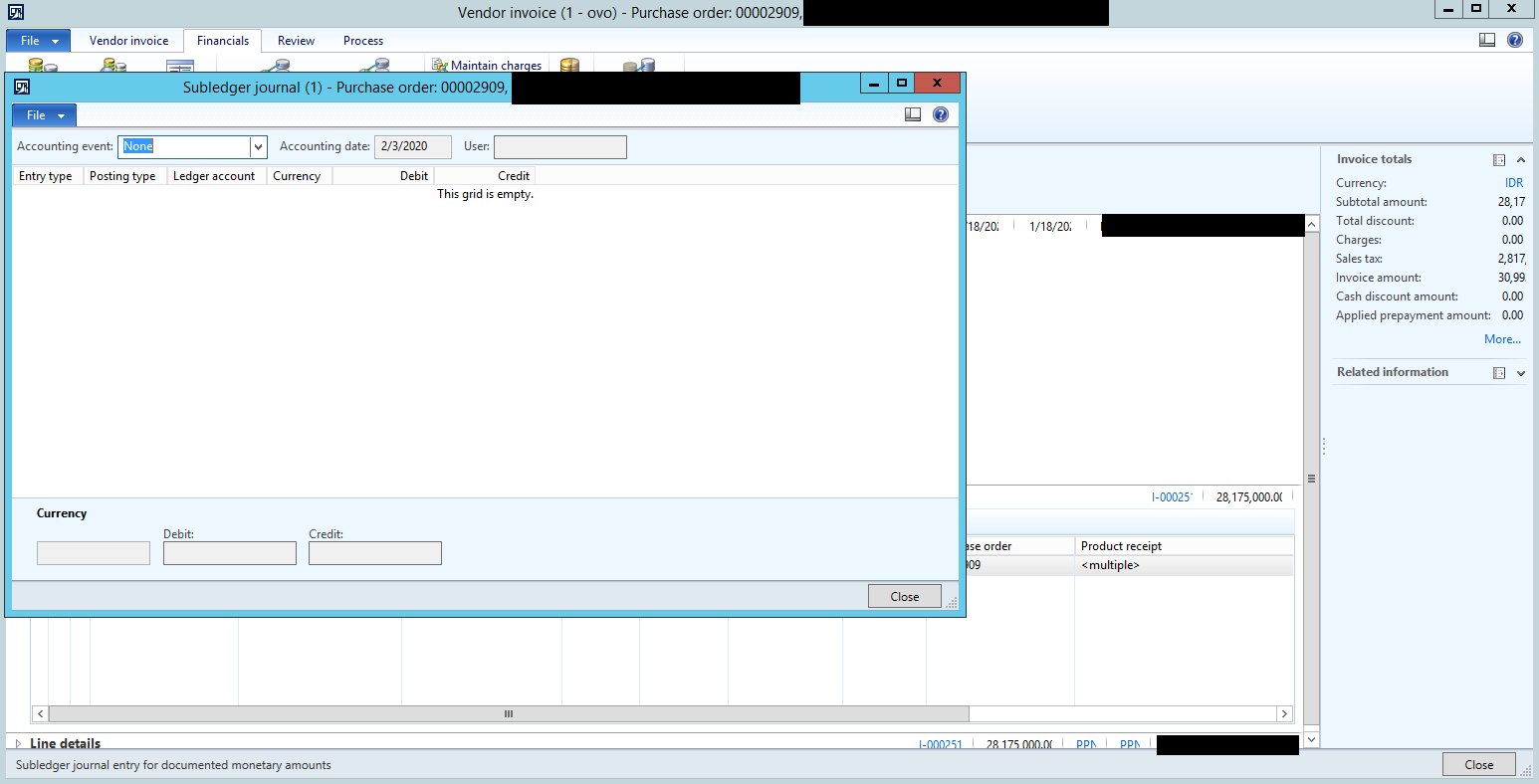
    this is the totals
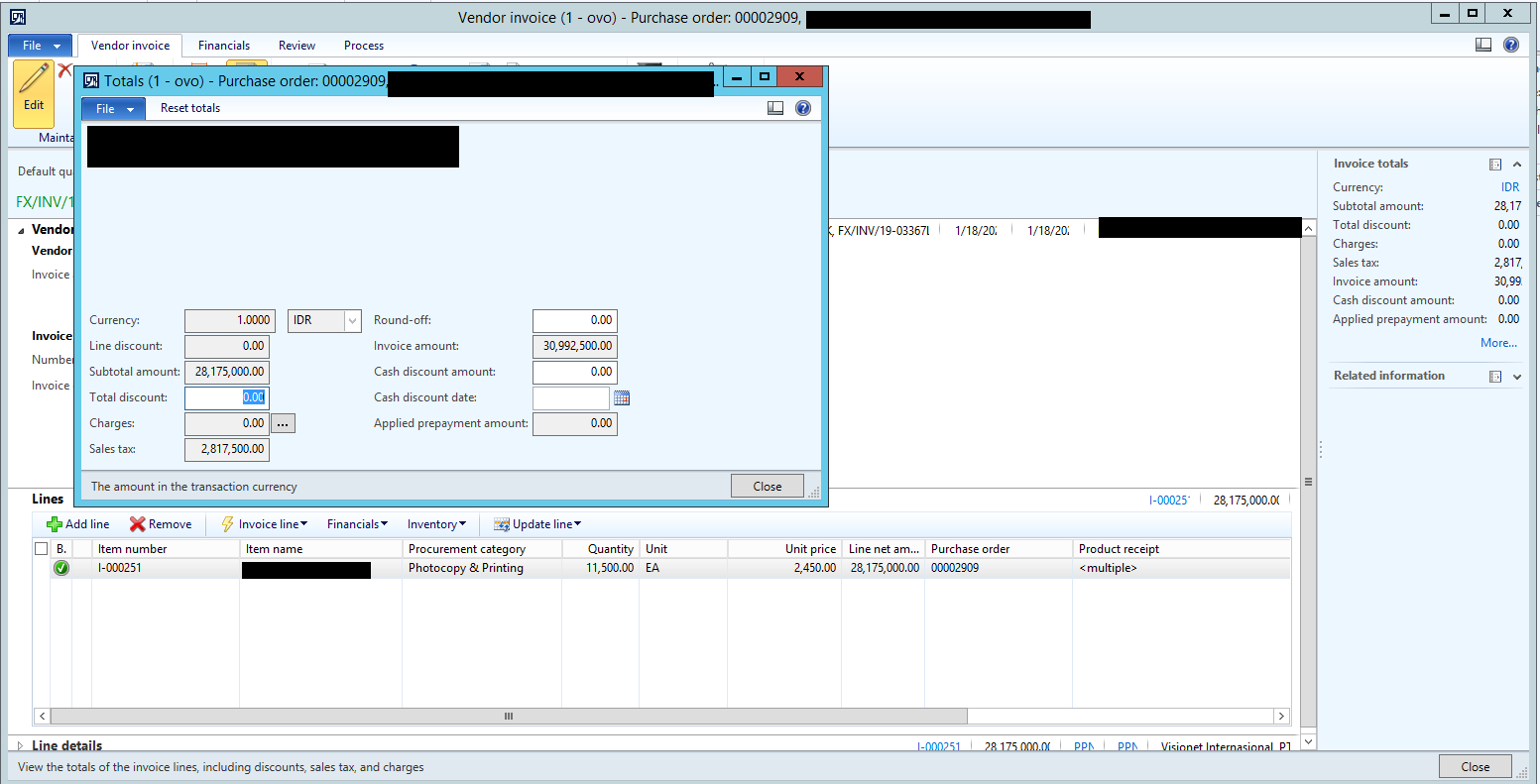
    pastedimage1582081833248v1.png

    this is the subledger journal

    pastedimage1582081972402v2.png

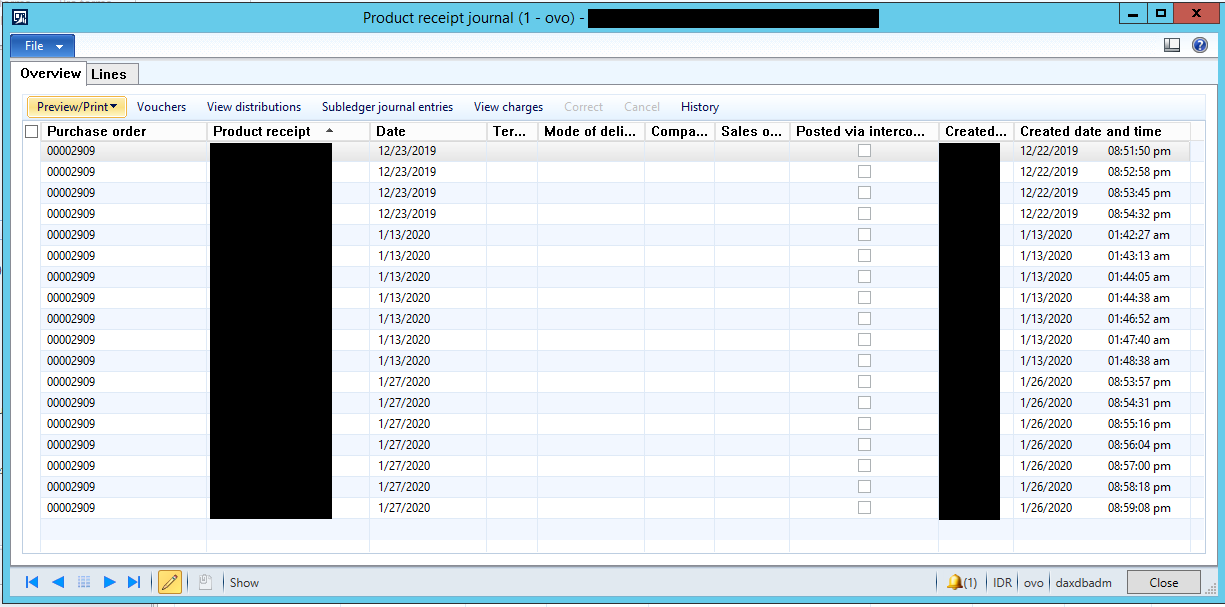
    this is the product receipt

    pastedimage1582082101498v3.png

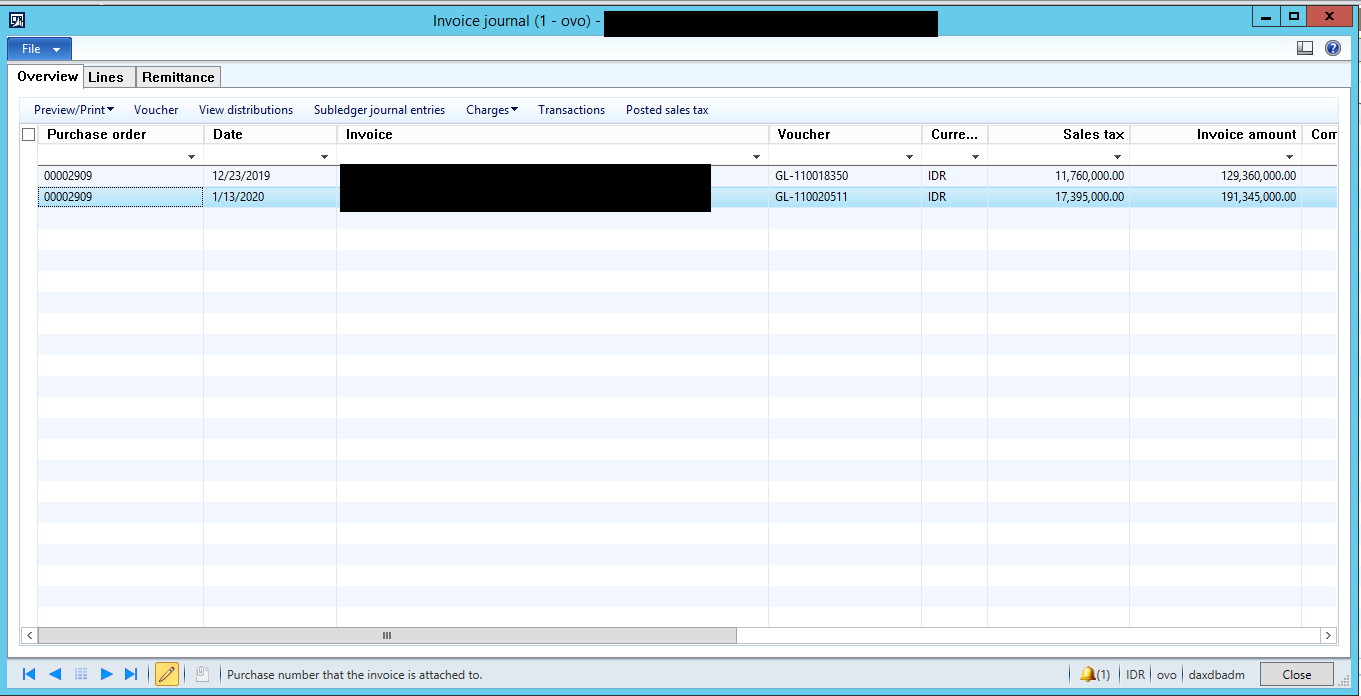
    this is previously posted invoice

    pastedimage1582082400760v4.png

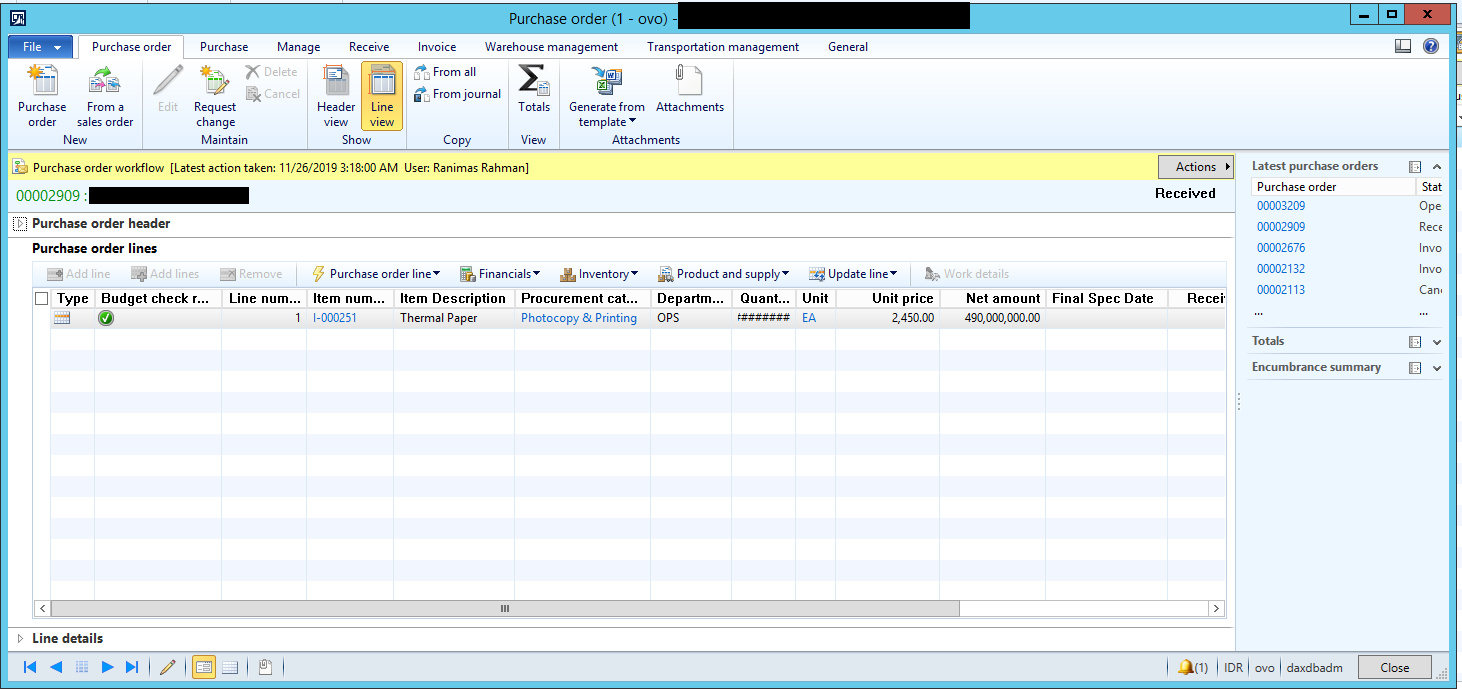
    this is the PO lines

    pastedimage1582082543192v5.png

    if there's anything missing or you want another screenprints just let me know

    thanks

  • Suggested answer
    Ludwig Reinhard Profile Picture
    Microsoft Employee on at
    RE: Invoice amount is 0

    Good Morning Aldo,

    Is it possible that all product receipts have been selected and matched to the first invoice?

    When you create the second invoice do you have some product receipts available that you can match in the matching form?

    Best regards,

    Ludwig

  • Aldo Biondy Profile Picture
    25 on at
    RE: Invoice amount is 0

    Good morning to you too ludwig,

    I already checked the matching form and the one user wants to match is available

    pastedimage1582093238897v2.png

    but the amount in subledger journal is still 0

  • Suggested answer
    Ludwig Reinhard Profile Picture
    Microsoft Employee on at
    RE: Invoice amount is 0

    Hello Aldo,

    Mmhhh. This looks really strange.

    I had a look at LCS and found a hotfix for AX2012 with a similar error message that is, however, related to travel requisitions.

    Can you test the following:

    - delete the pending vendor invoice and try to re-confirm the PO

    - thereafter try to create the invoice again and try to match the receipts as usual.

    This might help resolving the issue.

    If it does not then I would recommend asking a technical expert / developer having a look at this.

    Best regards,

    Ludwig

  • Ludwig Reinhard Profile Picture
    Microsoft Employee on at
    RE: Invoice amount is 0

    Good Morning Aldo,

    Did you make any progress in regards to this issue?

    Best regards,

    Ludwig

  • Aldo Biondy Profile Picture
    25 on at
    RE: Invoice amount is 0

    Hello Ludwig,

    Sorry for the late reply, I already tried deleting and creating it again but it still doesn't work

    and now i'm about to ask technical expert about this problem

    I will update this forum if i found the solution

    Thanks for your help

  • Verified answer
    Aldo Biondy Profile Picture
    25 on at
    RE: Invoice amount is 0

    Hello Ludwig,

    i finally have an update about this problem, so i think there's a problem in the accounting distribution table and when i checked the distribution amount menu in PO lines the amount is not all carried over

    acc-distribution.png

    I think what’s happening is in January I’m doing purchase order year end closing to make the budget and accounting distribution from last year carry over to this year and I don’t know how this happening but the carry over amount is only partial (only amount in pending invoice is carry over) so when user already posted the pending invoice and  they tried to make another new invoice the carry over amount is already used by the pending invoice and that’s making the next accounting distribution amount is 0.

    So to work this around we tried using job to update the accounting distribution amount to full amount, and it surprisingly works

    Thanks for your help Ludwig

Under review

Thank you for your reply! To ensure a great experience for everyone, your content is awaiting approval by our Community Managers. Please check back later.

Helpful resources

Quick Links

Responsible AI policies

As AI tools become more common, we’re introducing a Responsible AI Use…

Neeraj Kumar – Community Spotlight

We are honored to recognize Neeraj Kumar as our Community Spotlight honoree for…

Leaderboard > Finance | Project Operations, Human Resources, AX, GP, SL

#1
Martin Dráb Profile Picture

Martin Dráb 758 Most Valuable Professional

#2
André Arnaud de Calavon Profile Picture

André Arnaud de Cal... 607 Super User 2025 Season 2

#3
Sohaib Cheema Profile Picture

Sohaib Cheema 402 User Group Leader

Last 30 days Overall leaderboard

Product updates

Dynamics 365 release plans