web
You’re offline. This is a read only version of the page.
close
Skip to main content

Notifications

Announcements

No record found.

Community site session details

Community site session details

Session Id :
Microsoft Dynamics 365 | Integration, Dataverse...
Suggested Answer

Creating an approval on the Business Process Flow to move a programme to the next work stage

(0) ShareShare
ReportReport
Posted on by 15

Morning all

Very very new to this.

I have a Business Process Flow in my model driven App.
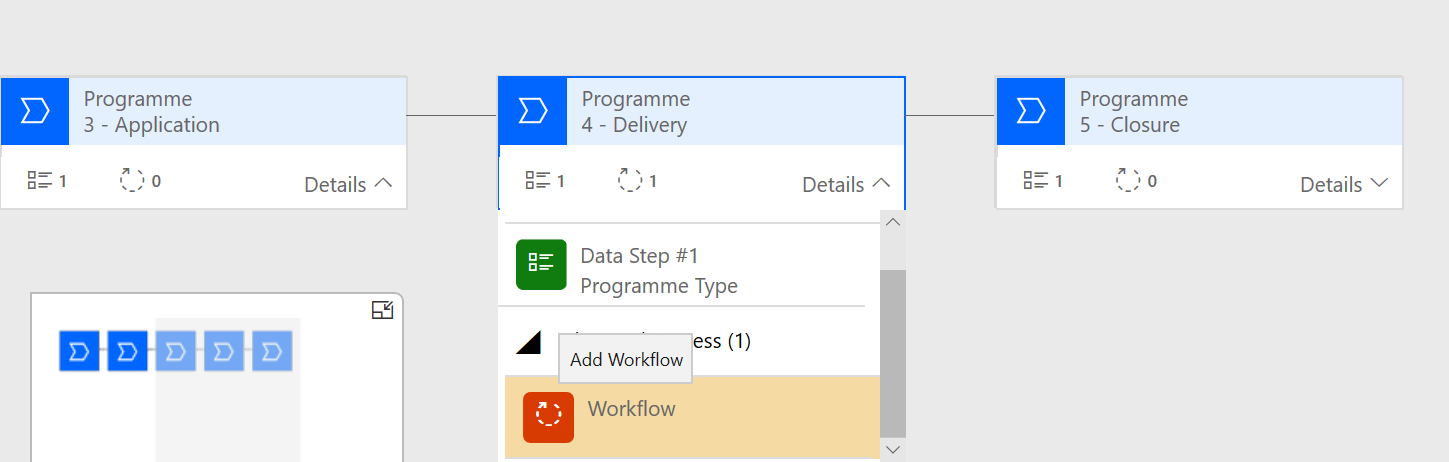
BusinessprocessScreengrab.png

and I want to set up an approval workflow so that when someone clicks next 'Next Stage' that it sends an approval email and won't let the programme move to the next stage until it has been approved.

programmesteps.png


Does anyone have a step by step guide on how to achieve this? All help appreciated. 

I have the same question (0)
  • YGupta Profile Picture
    45 on at

    Hi Sutekh,

    First of all, you have to create an on-demand workflow to use it for BPF where you can define "from", "to" and the email template you want to use.

    Then, you have to create a new field in the form for which you are using BPF which contains flag value of approval, Lets say if mail is approved then field value is 1 else 0.

    Now you have to put a condition in BPF that if field value = 1 then moves to another state.

    Hope this will help you.

    Mark it as answer if you find it helpful.

    Regards,

    Yash Gupta

    Software Developer

  • sutekh Profile Picture
    15 on at

    Thanks @Yash. How would I create a on-demand workflow - sorry very new to this - is it from the workflow that I dragged and dropped into the stage as pictured in my first screen grab and how would I configure it? Thanks

  • YGupta Profile Picture
    45 on at

    No Worries, See the below image, when you create a new workflow there is an option to tick "As an on-demand process" select that and write your logic.


    pastedimage1592379890679v1.png

    Hope this will help you.

    you can also refer this doc to create an on-demand workflow.https://docs.microsoft.com/en-us/dynamics365/customerengagement/on-premises/customize/workflow-processes

    Mark this as an answer if it is helpful.

    Cheers,

    Yash Gupta

  • Linn Zaw Win Profile Picture
    3,407 on at

    In addition to YGupta 's solution, you might want to consider how to lock the "flag value of approval" to make sure that the person with the approval rights updates that flag.

    In one of our projects, we control it by field-level security and only the users added to the profile can approve (change the flag of) the record.

  • sutekh Profile Picture
    15 on at

    Thanks @linnzawzin

    An additional question can you have multiple workflows under one Stage? I need to have a series of approvals for different tasks and on once all these stages are approved does the programme move onto the next stage. What's the best way to achieve this?

  • Linn Zaw Win Profile Picture
    3,407 on at

    sutekh You can add multiple workflow in one stage of the BPF. But I don't think that I a good idea especially when it is a series of approvals (which needs to be trigger one after another one is approved) There is a chance that the user clicks on the wrong workflow and trigger an approval email to the wrong user.

    In my experience, the approval emails are triggered automatically based on the status of the record and the approval user lookup value. Only the approval status is added to the BPF to prevent the record from proceeding to the next stage without proper approval.

  • Suggested answer
    YGupta Profile Picture
    45 on at

    Sukekh, you can add multiple Workflows but u don't need to, it is not a right practice and will cause ambiguity. If you have a series of approval you can do it from a single workflow which multiple Condition steps.

    and if your condition met then stop the workflow right away.

    MS flow now known as Power Automate is also a very simpler way to these actions.

    Regards,

    Yash Gupta

  • sutekh Profile Picture
    15 on at

    Thanks @yash and @Linn Zaw Win  for all your help today. I'm going to start putting this into action tomorrow. One last question, so when I put these conditions in place the user will be unable to move onto the next stage?

  • Linn Zaw Win Profile Picture
    3,407 on at

    As Yash mentioned in the first reply, create a new Two Options flag value of approval in BPF stage and make sure the normal user is not able to modify the flag manually.

    In that way, the user will be unable to move onto the next stage until that flag is set to true (either by the approving user setting the value or the system set the value from the backend)

  • sutekh Profile Picture
    15 on at

    Hi both @linn zaw win and @yash

    I keep trying to create a workflow, but every time I create it I can't find it in the Workflows none of them are there? Also I can't drag a Condition over to my stage? Where am I going wrong? I'm make sure to save the Workflows  and even to activate them? 

     NoWorkFlow.png

Under review

Thank you for your reply! To ensure a great experience for everyone, your content is awaiting approval by our Community Managers. Please check back later.

Helpful resources

Quick Links

Responsible AI policies

As AI tools become more common, we’re introducing a Responsible AI Use…

Neeraj Kumar – Community Spotlight

We are honored to recognize Neeraj Kumar as our Community Spotlight honoree for…

Leaderboard > Microsoft Dynamics 365 | Integration, Dataverse, and general topics

#1
#ManoVerse Profile Picture

#ManoVerse 93

#1
Siv Sagar Profile Picture

Siv Sagar 93 Super User 2025 Season 2

#3
Martin Dráb Profile Picture

Martin Dráb 62 Most Valuable Professional

Last 30 days Overall leaderboard

Product updates

Dynamics 365 release plans



