web
You’re offline. This is a read only version of the page.
close
Skip to main content

Notifications

Announcements

No record found.

Community site session details

Community site session details

Session Id :
Microsoft Dynamics AX (Archived)

No Description in Customer account statement report

(0) ShareShare
ReportReport
Posted on by 135

Dear all,

I am new to AX reports. in customer account statement (AR -> Reports -> External -> Customer Account Statement) when will I get the description field value. I have not done any changes only I need to know when the description field will get the value. please guide me if I want to give any parameter or something.
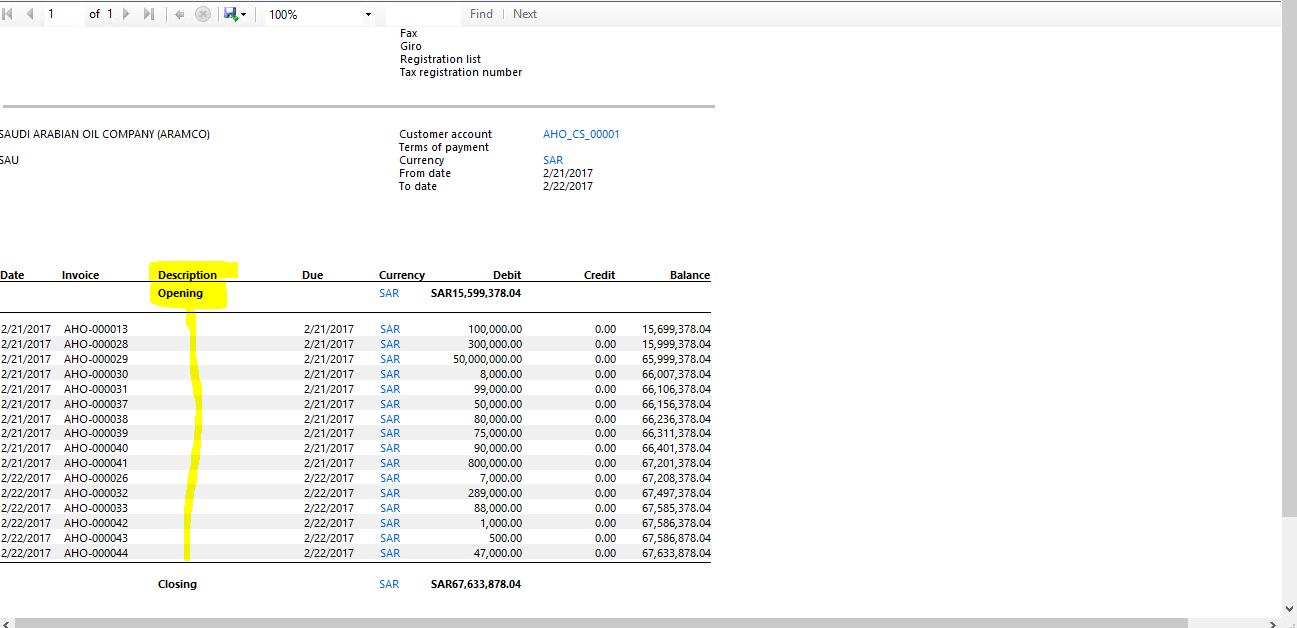
 description-field.PNG

or else tell me which table will have the value for this field.

*This post is locked for comments

I have the same question (2)
  • André Arnaud de Calavon Profile Picture
    300,911 Super User 2025 Season 2 on at

    Hi Surjit,

    It takes the Description field of the customer transaction. Depending on the setup this will be filled or not.

  • Surjit Kumar Profile Picture
    135 on at

    Thanks fo replying,

    can u tell me which setup i want to use whether in parameter or any other. can u explain briefly.

  • Suggested answer
    Chaitanya Golla Profile Picture
    17,225 on at

    Hi,

    Please check the business logic in the method insertCustAccountStatementExtTmp(Line # 134) of class CustAccountStatementExtController.

    Code: custAccountStatementExtTmp.CustTrans_Txt = currentTrans.Txt;

    Its getting copied from Txt field of custtrans table.

    TableName: custAccountStatementExtTmp

    FieldName: CustTrans_Txt

    Thanks,

    Chaitanya Golla

  • Suggested answer
    Ludwig Reinhard Profile Picture
    Microsoft Employee on at

    Hi,

    Please check in the organisation admin module under setup - default descriptions.

    There are a lot of customer-related automatic texts available that can be setup and that will be filled automatically.

    Best regards,

    Ludwig

  • AX 2012 r3 Profile Picture
    2,426 on at

    Hi,

    1.Please redeploy the report once.

    2.Restart SSRS Report Server.

    3.If not coming then please delete report from Reports folder and deploy report again.

    4.Check whether  data is there or not using table browser

    5.Place a breakpoint in DP class and check whether value is coming or not.

    Regards.

  • benjamin84 Profile Picture
    2,075 on at

    Hi Ludwig,

    could you give example at AP ?

    my user has type the description at AP - Invoice - charges - adjustment, but later when I check at voucher transaction , the description is empty.

    could you help give example for setting this information.

    really appreciate if you could give a hand.

    danke.

  • Ludwig Reinhard Profile Picture
    Microsoft Employee on at

    Hi Benjamin,

    You can setup a lot of Auto Texts for different transactions types.

    6153.autotext.png

    I cannot tell you, which text will be used for your charge adjustments.

    It might be one of the purchase order types.

    Yet, please set them up and test in a demo environment to identify which one fits exactly.

    Best regards,

    Ludwig

  • benjamin84 Profile Picture
    2,075 on at

    Hi Ludwig,

    let me test this at demo first once i'm free troubleshooting cases.

    once done, will update the information.

    danke, waarderen

Under review

Thank you for your reply! To ensure a great experience for everyone, your content is awaiting approval by our Community Managers. Please check back later.

Helpful resources

Quick Links

Responsible AI policies

As AI tools become more common, we’re introducing a Responsible AI Use…

Neeraj Kumar – Community Spotlight

We are honored to recognize Neeraj Kumar as our Community Spotlight honoree for…

Leaderboard > 🔒一 Microsoft Dynamics AX (Archived)

#1
Martin Dráb Profile Picture

Martin Dráb 4 Most Valuable Professional

#1
Priya_K Profile Picture

Priya_K 4

#3
MyDynamicsNAV Profile Picture

MyDynamicsNAV 2

Last 30 days Overall leaderboard

Featured topics

Product updates

Dynamics 365 release plans



