web
You’re offline. This is a read only version of the page.
close
Skip to main content

Notifications

Announcements

No record found.

Community site session details

Community site session details

Session Id :
Customer experience | Sales, Customer Insights,...
Answered

Security Role for changing User cannot be set to "User"

(0) ShareShare
ReportReport
Posted on by 56

Hi community,

I guess this is a simple question but I couldn't find any information on that so far:

When creating/editing a security role and willing that users are only able to change their own information I cannot set the write right to "User". Only none or at least Business unit. 

can someone please explain what is the reason and if there is maybe a workaround? If set to Business Unit Users can also change information of other users what is not desired.

For the example I've taken an empty, new security role to check if this might be depending on any other right. But no matter if I create one from scratch or edit an existing, the behavior is the same.
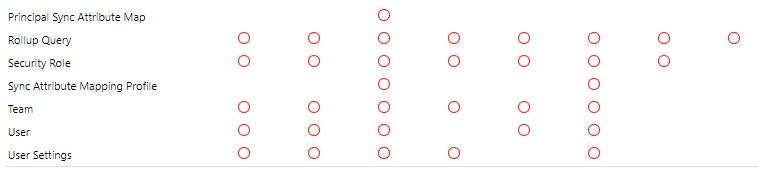
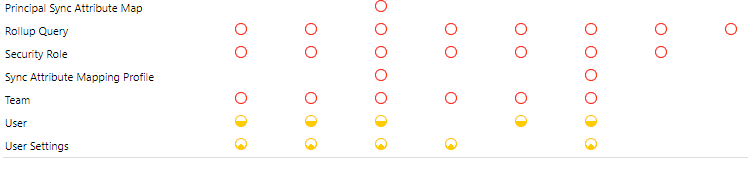
pastedimage1629377255442v1.png

pastedimage1629377290613v2.png

Thank you for your help

I have the same question (0)
  • Ram Prakash Duraisamy Profile Picture
    2,287 on at

    Hello Jay Kay,

    User level --> Logged in user can edit/create/delete only his/her record

    Org level --> Logged in User can edit/create/delete all the records

    BU Level--> Logged in User can edit/create/delete all the records in the Respective BU

    eg --> If User A in BU 1 and User B in BU1 --> If we set Account write to BU, level User A or User B can edit the records

    Parent Child BU --> Logged in User is in TOP BU he can edit or view the records from Chile BU

    eg --> If User A in BU1 (BU2 Is Parent), User B in BU2 then User B Can make changes in USER A Record

  • Jay Kay Profile Picture
    56 on at

    Hello Ramprakash,

    thank you for your reply. Unfortunately that didn't answer my question. I know how security levels behave on certain selections.

    In my case I want to know, why I can't select "User" Level for user rights. Either it's none or already Business Unit. The selection in the yellow buttons skips "User" for User editing and therefore that a user can only edit his personal record.

    Do you have an answer on this?

  • Verified answer
    Community Member Profile Picture
    on at

    Hi Jay,

    I have found following thread, which explains why was it decided to not enable User/Basic depth on System User privileges?

    Privileges depth on System User entity - Microsoft Dynamics CRM Forum Community Forum

    Regards,

    Leah Ju

    Please mark as verified if the answer is helpful. Welcome to join hot discussions in Dynamics 365 Forums.

  • Jay Kay Profile Picture
    56 on at

    Hi Leah,

    thank you. This helps. So if I got this right, for User and User Settings needs at least to be set at business unit. Otherwise one cannot see/ work with most of the data in the system?!

  • Community Member Profile Picture
    on at

    Hi Jay,

    You've got it!

    Regards,

    Leah Ju

Under review

Thank you for your reply! To ensure a great experience for everyone, your content is awaiting approval by our Community Managers. Please check back later.

Helpful resources

Quick Links

Responsible AI policies

As AI tools become more common, we’re introducing a Responsible AI Use…

Neeraj Kumar – Community Spotlight

We are honored to recognize Neeraj Kumar as our Community Spotlight honoree for…

Leaderboard > Customer experience | Sales, Customer Insights, CRM

#1
Tom_Gioielli Profile Picture

Tom_Gioielli 137 Super User 2025 Season 2

#2
#ManoVerse Profile Picture

#ManoVerse 57

#3
Jimmy Passeti Profile Picture

Jimmy Passeti 50 Most Valuable Professional

Last 30 days Overall leaderboard

Product updates

Dynamics 365 release plans
