web
You’re offline. This is a read only version of the page.
close
Skip to main content

Notifications

Announcements

Community site session details

Community site session details

Session Id :
Customer experience | Sales, Customer Insights,...
Answered

Enable security roles option on form does not work after solution import from DEV to PRD

(0) ShareShare
ReportReport
Posted on by

I have created solution with new account form (logistics Form) and new security role([GA]Logistics), new business unit on DEV enviroment.

on DEV the form in visible only for new security role users(logisticsR) and also they dont  see other forms.

I imported this solution managed to PRD,  created again new business unit but the enable security role does not work and all users can see each other forms. 
How can I fix it, please adivse?

scree nattached, user with logistcsR security role can see all forms 
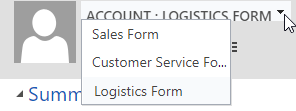
pastedimage1624367568483v1.png

even tho role on form is set the same as on DEV , only to Logistics
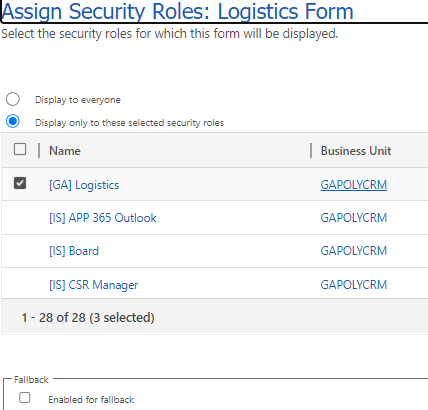
pastedimage1624367585037v2.png

I have the same question (0)
  • Suggested answer
    Charan Raju C R Profile Picture
    7 Moderator on at

    Check if this role is assigned to any of the teams the users who are able to see the forms belongs to in PRD.

  • Community Member Profile Picture
    on at

    Hi Charan,

    The role is assigned only to 1 user which I have created to test it on PRD. This user has only this one role Logistcs.

  • Mauro De Biasio Profile Picture
    on at

    Hi Mark, try to use XrmToolBox "User Security Manager" to confirm what roles and teams are assigned to. Also be aware, as Charan mentioned that Team permission gets applied on the users in an additive way.

    Can you double check:

    • if the forms are present in the App?
    • that the additional forms have permissions restrictions
      • Sales Form and Customer Service Form are not visible for the [GA] Logistic role.
    • In your prod environment Sales Form and Customer Service Form are visible for everyone, allowing the user to see them all.
  • Community Member Profile Picture
    on at

    I have checked in Xrm and the user has only the [GA] Logistics role, and one for outlook, mobile service.
    pastedimage1624519695986v1.png

    the Logistics form is visible only to users with [ga] logistics security role, otehr users with role like salespersone dont see the form

    [GA] logistics role can see all 3 forms even thos the other 2 forms are not enabled to [ga] logistics like Sales Form

    pastedimage1624520412307v2.png

    I dont understand why it works on Test and on Production it does not, the configuration seems to be done right.

    Please advise what else I can do to fix it, thank you.

  • Verified answer
    Mauro De Biasio Profile Picture
    on at

    Sorry to be redundant, but did you confirm that the Team "[GA] Logistics (default)" doesn't have additional security roles assigned to it? T

    I tested the same scenario in this steps and everything worked correctly:

    • User permissions assign to see all the forms (Passed all forms visible)
    • Customize the security roles that are assigned to the forms and save
      • 1 security role for Account
      • 2 for a secondary form (different from the previous one)
      • Disable a third form
    • Check an account and all the forms are still visible.
    • Publish all customization.
    • Only the first form is correctly visible.
    • Add a new security role, the second form is visible too.
    • Remove all the roles and add security roles to the Team for this user, all the forms are visible again.

    (seems to be a bug, all the active forms become visible if a security roles is assigned to the team, removing the security role from the team doesn't fix the situation).

    Please try to:

    • Remove a security roles associated with a team
    • disable the forms that shouldn't be visible
    • Publish
    • Clear the cache (ctrl-f5) and confirm that only one form is not visible
    • Enable the forms again
    • Publish

    I will run additional testing on this scenario.

  • Community Member Profile Picture
    on at

    Hi Mauro,

    Thank you for help.

    1. I have cloned on PRD the security role [GA] Logistics,

    2.  then on Test removed the dependency from  Logistics from, imported on PRD deleted the orginal security role [GA] logistics,

    3. assigned users to the new copied role and it works fine. now they can see only the logistics form.

    I do not know where was the issue but deleting the role helped.

Under review

Thank you for your reply! To ensure a great experience for everyone, your content is awaiting approval by our Community Managers. Please check back later.

Helpful resources

News and Announcements

Season of Giving Solutions is Here!

Quick Links

Responsible AI policies

As AI tools become more common, we’re introducing a Responsible AI Use…

Neeraj Kumar – Community Spotlight

We are honored to recognize Neeraj Kumar as our Community Spotlight honoree for…

Leaderboard > Customer experience | Sales, Customer Insights, CRM

#1
Pallavi Phade Profile Picture

Pallavi Phade 98

#2
Tom_Gioielli Profile Picture

Tom_Gioielli 59 Super User 2025 Season 2

#3
TAHER Mehdi Profile Picture

TAHER Mehdi 37

Last 30 days Overall leaderboard

Product updates

Dynamics 365 release plans



