Hello,
I would like to be able to view events (information, warning and error events) generated by the MPOS in Event Viewer. I am however not able to do this. In the MPOS TypeScript code you can create events like this:
Commerce.Tracer.Information("CartView.keepAliveViewActivated()");
The system.diagnostics part of my DLLHost.exe.config-file looks like this:
<system.diagnostics>
        <sources>
            <source name="RetailNetTracerEventLog" switchValue="Information">
                <listeners>
                    <add name="EventLogTraceListener" />
                </listeners>
            </source>
        </sources>
        <!-- this defines a listener -->
        <sharedListeners>
            <add name="EventLogTraceListener" type="System.Diagnostics.EventLogTraceListener" initializeData="Microsoft Dynamics AX Retail : Retail Client Broker" />
        </sharedListeners>
        <!-- this configures tracing -->
        <trace autoflush="true">
            <listeners>
                <remove name="Default" />
                <add name="EventLogTraceListener" />
            </listeners>
        </trace>
</system.diagnostics>
I have create a custom view in Event Viewer where I have included 'Microsoft Dynamics AX Retail : Retail Client Broker' as a Source.
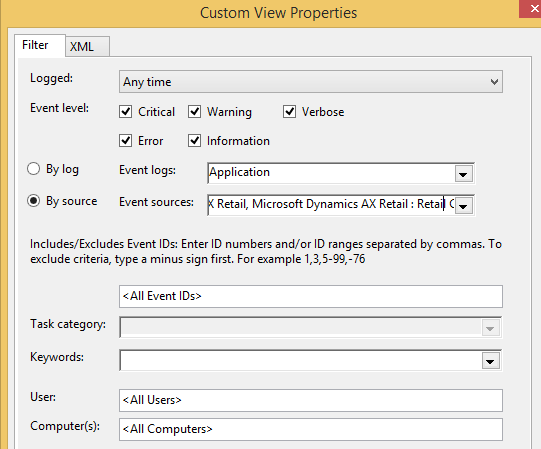
I am however not seeing the events from the MPOS. For debugging purposes I would like to see the events. Do you have any suggestions?
Regards
Morten Løpen
*This post is locked for comments
I have the same question (0)







